





Want to watch your favorite Netflix movies, TV series, shows, and seasons offline on the fly? You may wonder whether there is a way to download them to play back smoothly without internet.
The good news is that there are several ways to download Netflix content for offline viewing, depending on your device and needs. In this guide, we’ll walk you through3 ways to download movies, series, shows, and seasons from Netflix. Here we go!

You May Like:
Can I Download Movies from Netflix?
Yes. Netflix officially provides a Download button on its mobile apps.
According to the latest information on Netflix’s official website, all members with an active subscription can download movies from Netflix on supported devices and for titles that are available for download. However, the download resolution and maximum number of downloads you can have vary depending on your plan, device, and title. Check the details in the chart below.
| Netflix Plan | Download Limit | Download Quality | Supported Devices |
|---|---|---|---|
| Standard with ads | Up to 15 videos per device per calendar month | Up to FHD | 2 devices |
| Standard | Up to 100 videos | Up to FHD | 2 devices |
| Premium | Up to 100 videos | Up to UHD | 6 devices |
Please note that some titles have a limit on downloads in a year. Also, downloads will be removed when your subscription is cancelled. Netflix downloads are stored within the Netflix app for offline viewing rather than as regular video files that you can access freely on your device.
Besides the official Netflix app, this guide covers three other ways to save Netflix content for offline viewing:
- Method 2: Download Netflix videos to MP4/MKV on PC/Mac
- Method 3: Record and Download Netflix movies on mobile devices
Each method works differently and comes with its own requirements and limitations. Choose the one that best fits your device and viewing needs.
Method 1. Download Movies on Netflix App on Mobile Device (Official)
With the latest version of Netflix app installed on a compatible device, you can directly download Netflix movies and shows to watch offline. First off, make sure your device is supported for downloading movies from Netflix:
- iPhone/iPad: iOS/iPadOS 17.0 or later
- Android Phone/Tablet: Android 7.0 or later
- Amazon Fire Tablet: Fire OS 4.0 or later
- Google Chromebook: With Netflix installed via Play Store
👀Learn more:
👉 How to Download Netflix Movies to iPad/iPhone to Watch Offline
👉 How to Download Netflix Movies to Android Phone/Tablet
👉 Download and Watch Netflix Movies on Amazon Fire Tablet
It’s a shame that Netflix no longer offers a download feature for the Netflix Windows app and doesn’t provide a dedicated app for Mac users. If you want to download Netflix videos directly to your computer, check method 2.
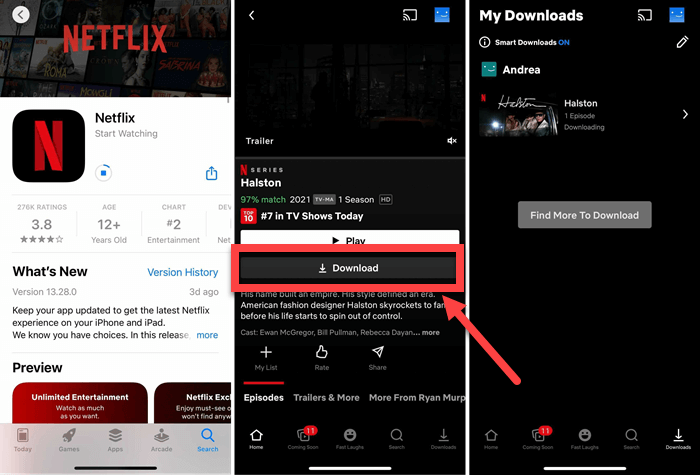
The steps to downloading Netflix movies on compatible devices are identical, and you can just follow the tutorial below to get it all done.
- Download and install the Netflix app on your device. Then, launch the app and sign in to your account with an active plan.
- Search for a preferred movie in the app and tap on it. You should find a Download button if available.
- Tap on the Download button and it’ll start downloading to your device. The resolution will be based on your plan.
How to Choose the Netflix Download Quality
Netflix provides different download quality settings depending on the device, plan, and title. In general, Standard quality uses less storage and downloads faster, while High quality produces a larger file and can provide better picture quality when the content supports it.
You can adjust the setting from the Netflix app’s download settings before starting a download. Keep in mind that choosing a higher quality does not mean every title will be available at that resolution.
Use Smart Downloads to Manage Episodes
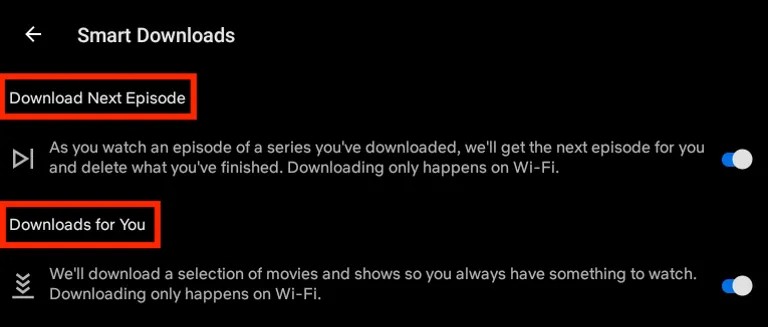
Netflix also provides Smart Downloads features that can make downloading TV series more convenient:
- Download Next Episode: Download the next Netflix episode and delete it when finished.
- Downloads for You: Download movies and shows according to your liking.
These features are useful when you want Netflix to manage downloaded content automatically instead of selecting every episode yourself.
What to Know About Netflix Downloads
Netflix downloads are convenient, but they come with several restrictions:
- App-only playback: Downloads are stored for playback through the Netflix app. You cannot normally open them as MP4 or MKV files in another video player.
- Not every title is downloadable: Download availability depends on Netflix’s licensing and other content restrictions.
- Downloads can expire: Downloaded titles expire after 7 to 30 days, which varies by title. Some titles may expire 48 hours after you first press Play, while others may remain available for longer.
- Some titles have download limits: Certain movies or episodes may have restrictions on how many times they can be downloaded or renewed.
- An active Netflix membership is required: Downloaded content is tied to your Netflix account and app, so you cannot keep using it through the official download feature after your membership access ends.
- Storage space matters: High-quality downloads can take considerably more storage, especially when downloading multiple episodes or movies.
Method 2. Download Netflix Movies to PC/Mac via MovPilot (in MP4/MKV)
Netflix imposes download limits. Additionally, there’s no official way to download movies from Netflix to PC or Mac. To bypass these limits and keep Netflix downloads permanently for offline viewing, MovPilot is necessary.
MovPilot Netflix Video Downloader helps you download movies or shows from Netflix on Windows and Mac. With the leading technology, it enables you to save your favorite titles to MP4/MKV at Full HD 1080P resolution, giving you more flexibility for offline viewing.
- Removes DRM from Netflix movies for playback on any device.
- 5X faster download speed. Grabs multiple Netflix episodes together.
- Removes streaming ads from Netflix videos, ensuring smooth playback.
- Keeps Dolby 5.1 surround sound for a better watching experience.
- Offers hard subtitles, soft subtitles, or separate SRT files.
📢 Check Also: MovPilot Netflix Video Downloader Review: A Real Surprise
MovPilot Netflix Video Downloader is user-friendly and easy to get started. Here is the detailed tutorial for you:
Step 1. Launch MovPilot on Windows/Mac and sign in to your Netflix account.
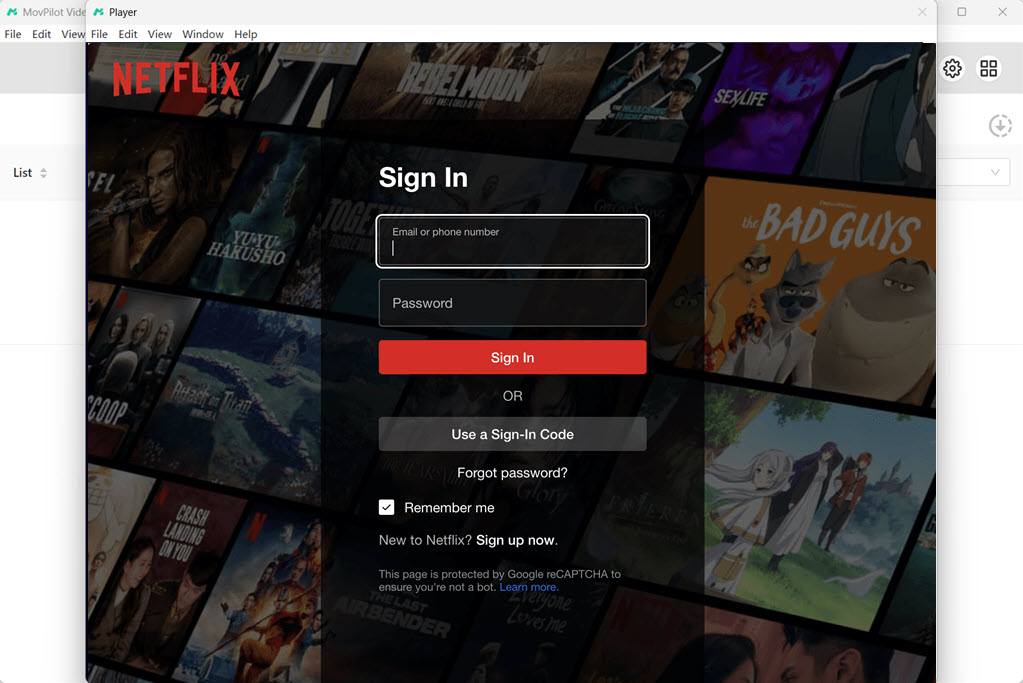
Step 2. Click the “Gear” icon to adjust video format, video codec, and other settings.
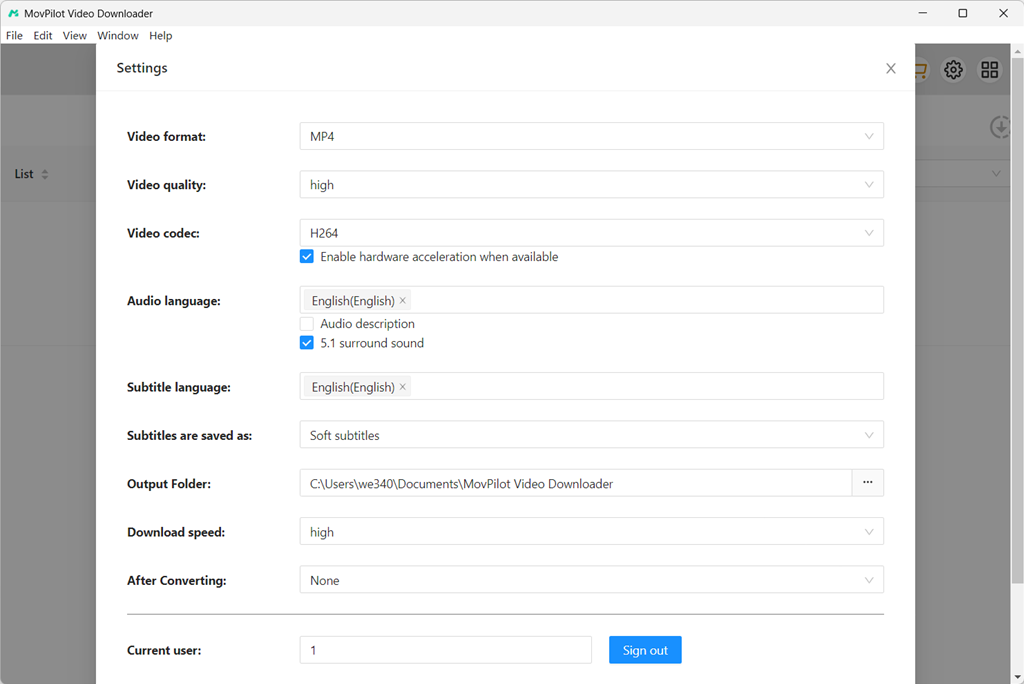
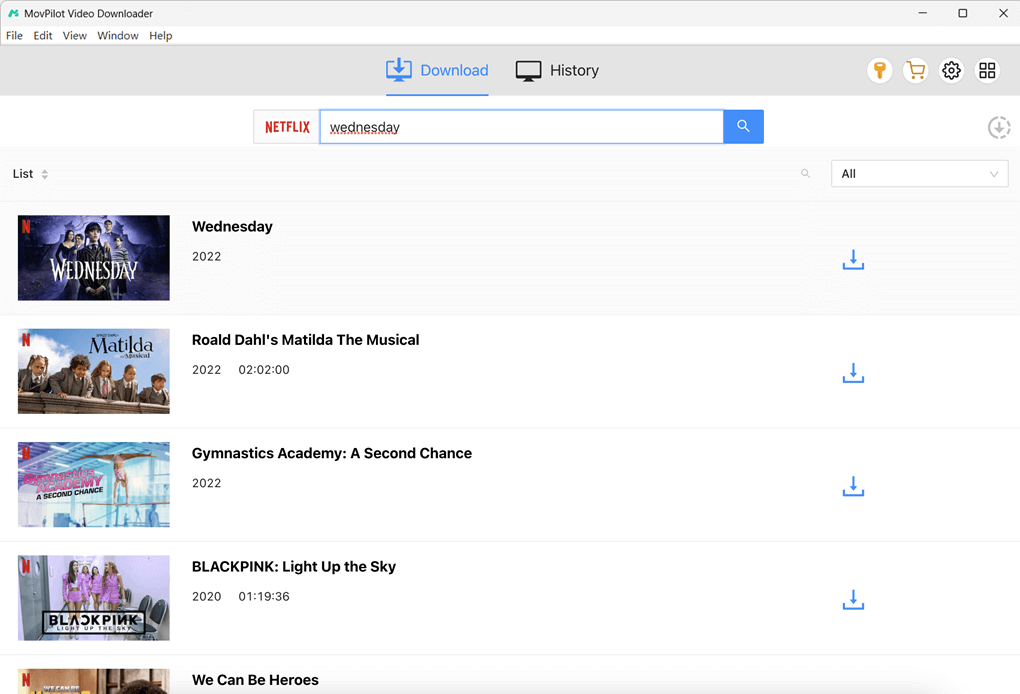
Step 3. Search for the movie you want to download by keywords or URL. Then click the download button.
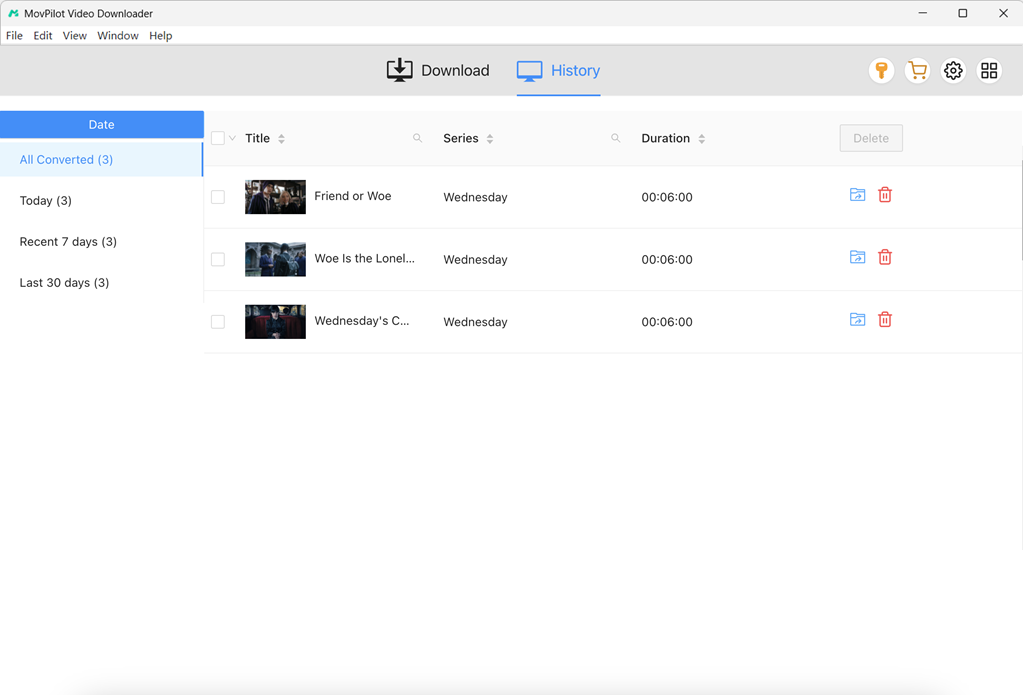
Step 4. Wait for the download process to finish. Check the downloads in History. Click the blue folder icon to locate downloaded Netflix movies on your computer. Then you can play them with any local player or keep them in your local storage.
The official Netflix app is convenient for temporary offline viewing, but its downloads remain inside the Netflix ecosystem. MovPilot is more suitable when your goal is to save supported Netflix content as local video files on a Windows PC or Mac. You can download it and try it for free.
Method 3. Download Movies from Netflix to Android/iOS via Playon
PlayOn Cloud is an app that works a cloud DVR service starting at $4.99/mo for 30 recording credits with 100GB. It can record streaming videos in SD, HD, or Full HD (1080p), including Netflix movies, series, seasons, and shows in the cloud, then save the recordings as MP4 files for you on a virtual cloud PC, and then give you an MP4 you can watch offline or download to Android/iPhone/iPad.
Unlike Netflix’s built-in download feature, PlayOn Cloud records the selected title in real time rather than saving it directly through the Netflix app. Once the recording is complete, the MP4 file is available in your PlayOn Cloud library for download.
This makes PlayOn Cloud useful for users who want to move their recordings between supported devices. You can download them to a phone or tablet, or use the PlayOn Cloud Downloader to save recordings to a Windows or Mac computer.
Tip: PlayOn Cloud records videos in real time, so recording a full-length movie can take about as long as watching it. For longer movies or entire seasons, you can add recordings to the queue and let PlayOn Cloud process them in the cloud.
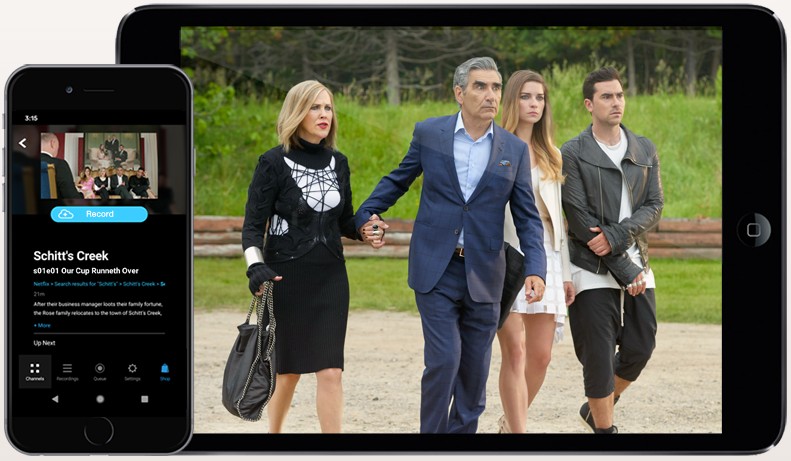
Step 1. Open PlayOn Cloud app after installing it on Android/iOS.
Step 2. Choose “Netflix” in the Channels tab and search for your preferred movie.
Step 3. Hit the “Record” button to start recording the Netflix movie.
Step 4. In the Recording tab, download Netflix movie for offline watching.
Bonus Tip: How to Download Netflix Movies for Free
Besides the methods mentioned above, you might be wondering: Can you download movies on Netflix for free, or without a subscription? The answer is yes. You can get a free Netflix membership through certain methods.
With a free Netflix membership, you can use MovPilot Netflix Video Downloader to download movies or episodes as mentioned in the former part. All downloads will be DRM-free MP4/MKV files. You can watch them anytime, keep them permanently, and they won’t expire.
Comparison Among Netflix Movie Download Methods
After comparing the three methods, the best choice depends on how and where you want to watch your Netflix downloads. To make the differences clearer, we tested the desktop download and cloud recording methods with three movies from the Knives Out series, with runtimes of 130, 139, and 144 minutes, respectively (413 minutes in total), at 1080P resolution.
| Method | Netflix App | MovPilot | PlayOn Cloud |
| Method | Official download | Local download | Cloud recording |
| Approx. Time for 3 Movies | ~90 min | ~83 min | ~413 min |
| Output | Netflix app download | MP4/MKV | MP4 |
| Offline Playback | Yes, in Netflix app | Yes, with a compatible player | Yes |
| Supported Device | iPhone/iPad/Android/Chromebook | Windows/Mac | iPhone/iPad/Android/Chromebook |
| Best For | Simple offline viewing | Fast local downloads | Cross-device recordings |
| Main Limitation | App-only and title/account restrictions | Third-party software | Real-time recording and recording credits |
Test note: Actual download or recording time can vary depending on internet speed, title availability, device performance, and other factors. The times above show the results under our test conditions rather than a guaranteed processing time.
Each method serves a different purpose, so there is no need to use the most advanced option for every situation. Use the table below to quickly find the method that fits your needs:
| Your Situation | Recommended Method | Why |
| You only want to watch Netflix offline on your phone or tablet | Netflix App | It is the simplest option and requires no additional downloader or recording service. |
| You want to download Netflix movies to a Windows PC | MovPilot | It supports local MP4/MKV downloads and is much faster than real-time recording in our test. |
| You want to save Netflix movies to a Mac | MovPilot | It provides a desktop solution for saving supported Netflix titles as local video files. |
| You need MP4/MKV files instead of app-only downloads | MovPilot | The videos are saved as regular local video files for playback with compatible media players. |
| You want to download multiple Netflix episodes at once | MovPilot | Batch downloading makes it more practical for TV series and larger download tasks. |
| You want to record streaming content in the cloud | PlayOn Cloud | It uses cloud DVR technology and turns completed recordings into MP4 files. |
| You want to access recordings across phones, tablets, and computers | PlayOn Cloud | Recordings can be downloaded to supported devices or transferred to a computer. |
| You want the simplest official solution | Netflix App | Everything is handled directly within Netflix without another service. |
| You need to finish a large download task as quickly as possible | MovPilot | Its tested speed of about 5× was significantly faster than PlayOn Cloud’s approximately 1× real-time recording. |
FAQs about Downloading Movies on Netflix
Why can’t I download movies from Netflix?
There are a few reasons that may prevent downloading Netflix movies:
- Your device is not supported, or the operating system is outdated.
- Some Netflix titles are unavailable for download due to copyright or region code.
- The number of your downloads exceeds your subscription’s limitation.
- The Smart Downloads feature cannot work with cellular data.
- Your device storage is not enough.
When downloads fail or the Download button is missing, these issues are worth checking. You can also learn how to fix Netflix download problems for more solutions.
Where are Netflix downloads stored?
If you’re using the Netflix app, go to “My Downloads”. However, if you want to find where the downloaded files are actually stored, the location varies depending on your device and the software you use. For more details, check our guide on where Netflix downloads are stored.
When you use a third-party downloader such as MovPilot or a cloud recording service such as PlayOn Cloud, the files are handled differently. You can go to “Settings” and check the output folder location.
How long can I keep my Netflix downloads?
Typically, you can watch Netflix videos offline in 7-30 days after downloading them. But your downloads will expire 48 hours after being watched. You’ll get to know the amount of time you have left on the Downloads/My Downloads page. When expires, some titles are allowed to be renewed a limited number of times.
If you want to keep your Netflix downloads forever, MovPilot Netflix Video Downloader can remove Netflix DRM and let you enjoy Netflix free downloads anywhere at any time. They will never expire unless you delete them from your device.

Which movies and TV shows can’t be downloaded from Netflix?
Any title for which Netflix hasn’t obtained download rights can’t be downloaded, where there is no download icon. Reasons include exclusive rights held by other companies, cost, popularity/seasonal choices, or licensing constraints.
Can I download Netflix shows without an account?
No. Most methods will need your account to connect with Netflix servers, so that you can download Netflix videos. Luckily, if you want to download Netflix TV shows for free, you can just have a trial account to work with MovPilot.
Can I download Netflix movies free without subscription?
No, if you want to download movies in the Netflix app.
Yes, if you have a trial account, you can download Netflix videos free of charge with MovPilot during the trial.
Where to download movies from Netflix for free?
There’s no legitimate site that gives you Netflix movies for free outside of Netflix. If you want free, legal movies to download, look for public-domain sites like Hoopla and Internet Archive.
Can I download Netflix movies to SD card?
Yes, the Netflix app allows you to choose Download Location and save downloads to an installed SD card on supported Android and Amazon Fire. If you’re using other Methods, you can certainly transfer downloads to the SD card as well.
The Bottom Line
Now that you know how to download Netflix movies and shows in different ways, the best method depends on where you want to watch them and how you want to save them.
- Method 1: The official Netflix app is the simplest choice for offline viewing on supported mobile devices, but downloads remain inside the Netflix app and come with title, device, and expiration restrictions.
- Method 2: MovPilot Netflix Video Downloader is a better fit for users who want to save supported Netflix movies and shows as MP4/MKV files on Windows or Mac. In our test, it downloaded three Knives Out movies at about 5× speed, making it much faster than real-time recording.
- Method 3: PlayOn Cloud is worth considering when you prefer a cloud-based recording solution and want to access MP4 recordings across supported devices. However, its recording speed is about 1×, so it takes roughly as long as the content’s playback time.
MovPilot Netflix Video Downloader
Download Netflix Movies and Shows to Watch Offline Easily!