






Quick Overview:
Amazon Prime protects all its videos with DRM, which prevents you from freely saving or transferring them through the official app. To remove DRM from Amazon video, there are two reliable approaches you can try:
- Use a tool like MovPilot Amazon Prime Video Downloader, which can save Amazon movies and shows as MP4 or MKV files while keeping the 1080P quality, subtitles, and audio tracks.
- Use a recorder, such as FonePaw Screen Recorder, to capture the playback in real time.
Each method has its pros and cons. Read this article to choose the one that best suits you.
As one of the world’s largest streaming platforms, Amazon Prime Video now hosts over 26,000 movies and 2,700+ TV shows across more than 240 countries and regions, offering content up to 1080P and even 4K UHD quality. However, the strict DRM rules make it hard for you to watch their favorite titles offline on non-Amazon devices.
When you purchase or rent videos from Amazon Prime, or subscribe to Prime Video to download them for offline viewing, you’ll notice that these titles are only playable within the Prime Video app. This limitation exists because Amazon encrypts all its content with DRM protection, restricting playback, copying, or transfer to unauthorized devices. Moreover, even downloaded videos expire automatically after 30 days or 48 hours after playback begins, meaning you can’t keep them permanently.
To help you enjoy a more flexible and personal offline viewing experience, this article tests and compares two effective ways to remove DRM from Amazon videos. Read on to discover which method suits your device, video type, and usage scenario best.
Related Reading:
What is Amazon DRM? Why You Should Remove It?
DRM refers to Digital Rights Management, which is a technology used to protect streaming media such as videos and music from being used without regulations. By adding such a protection method to Amazon Prime videos, they can’t be downloaded or extracted to play outside the Prime Video platforms. You also have to follow the rules set by Amazon to access these video downloads, even if you have subscribed to an Amazon Prime membership and are granted the right to download them for offline playback.
Therefore, if you want to remove all these limitations and download Amazon Prime videos to keep offline forever without expiration, removing DRM should be the first step. Once you get the DRM-free Amazon Prime video downloads, you are able to play them on all media players without being limited to the Prime Video app. In addition, the downloads won’t expire and can be kept as long as you like.
See Also:
Method 1: Remove DRM from Amazon Video via Downloader
To conclude, if you want to save Amazon videos offline to play without limitations, or just keep offline without worrying about expiration someday, you need to remove DRM from Amazon videos on Mac/Windows first. For this purpose, a professional desktop tool can surely bring you the best help.
MovPilot Amazon Prime Video Downloader is what you need. It provides a powerful unlocking ability to bypass DRM protection, and help you effortlessly get DRM-free Amazon video downloads by downloading and converting Amazon movies to MP4 or MKV format. You can import the videos to any media player or device to enjoy playback without installing the Prime Video app.
What’s more, this powerful downloader runs at 5X or an even faster speed to bring you a more efficient experience in downloading Amazon videos. It will also extract ID3 information together with the downloads, making sure that you can manage them conveniently. It will keep the best HD definitions, with original audio tracks as well as subtitles with the video downloads, ensuring an original playback experience.
Key Features of MovPilot Amazon Prime Video Downloader:
- Embed built-in web browser to access all Amazon Prime video resources by easily searching.
- Remove DRM and download Amazon videos in unlimited MP4/MKV format with only one click.
- Process Amazon videos download in batches at 5X faster speed.
- Keep original quality while processing Amazon Prime video downloads within the software.
- Save metadata and full ID3 tags while processing video downloads for you automatically.
Detailed Guide to Bypass Amazon Video DRM via MovPilot
MovPilot Amazon Prime Video Downloader is also designed with quite an easy-to-use function to make Amazon Prime video download an easy job to complete. Now, also check and follow the steps below to easily remove DRM from Amazon videos to keep them offline forever for playback at any time you want.
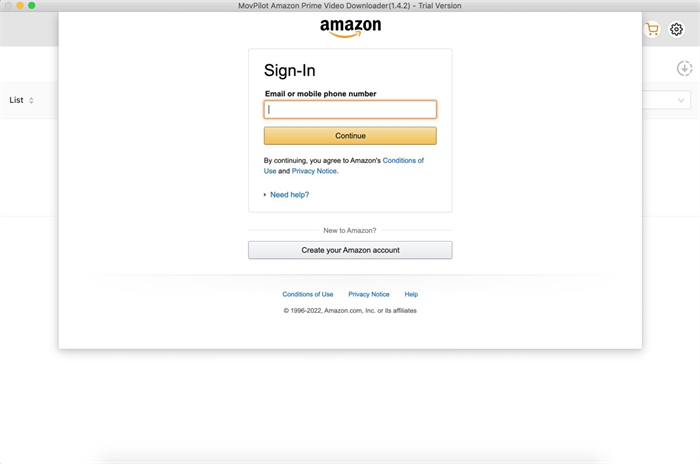
Step 1. Log into Amazon Prime Browser
Firstly, when you have installed MovPilot Amazon Prime Video Downloader on your computer, open the software and then use your Prime Video account to log in to the built-in web browser.
Step 2. Adjust Video Settings Before Downloading
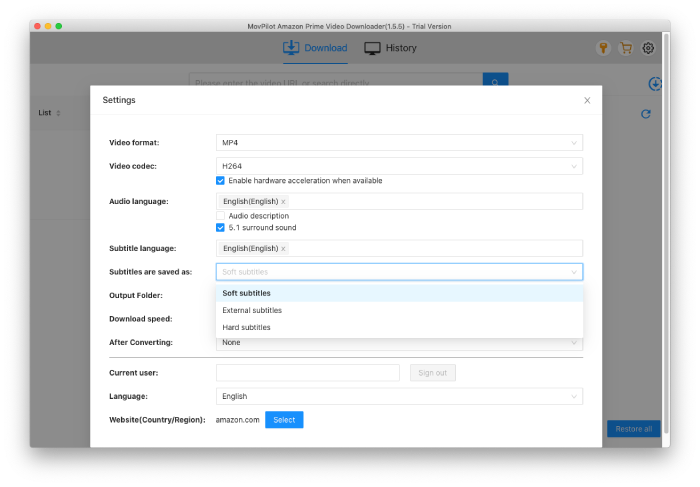
Before starting the video download process, click the gear icon on the top-right of the downloader to customize the output format, audio, subtitle language, or subtitle type to keep the Prime video downloads as you want.
Step 3. Search Amazon Prime Videos
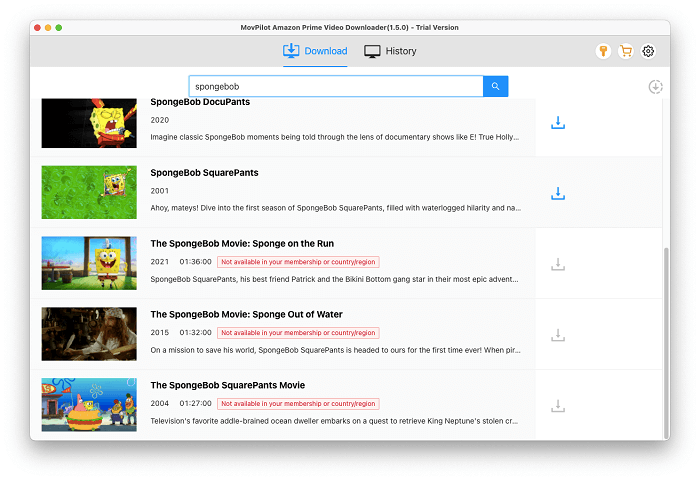
Once accessing the downloader interface, directly paste the video URL to search for it exactly, or type in keywords to browse the results and select any videos you like.
Step 4. Download Amazon Videos Without DRM
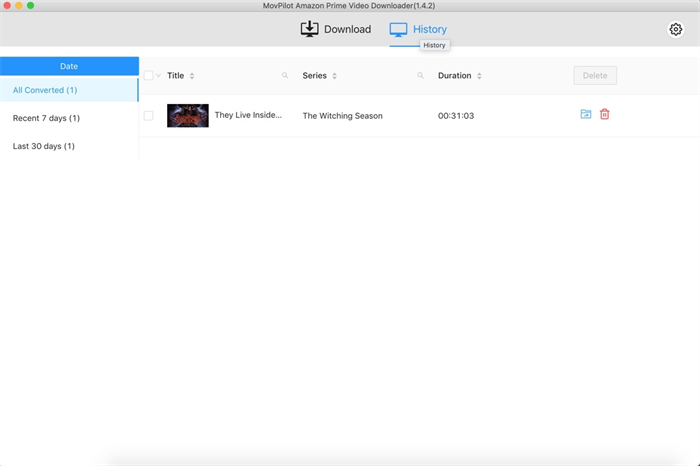
Now, simply click the download buttons provided after the videos you want to remove DRM and save offline, and then they will be added to the downloading list right away. Once the video downloads are completed, you can check the download records under “History” to access them for playback smoothly with any media player offline.
Method 2: Remove DRM from Amazon Video via Recorder
If you’re looking for another way to remove Amazon video DRM, FonePaw Screen Recorder is a good choice. Instead of decrypting the DRM directly, this tool captures Amazon Prime playback in real time, saving it as a DRM-free MP4 file. This method works even for the latest Amazon Prime DRM protection versions, as it records what’s displayed on your screen without quality loss.
FonePaw allows you to record Amazon videos in up to 1080P resolution with synchronized sound and customizable recording areas. It also supports scheduled recording, so you can automatically capture entire TV series or movies while you’re away. Unlike traditional DRM removal tools, FonePaw is compatible with Windows and macOS, ensuring flexible and stable Amazon video DRM removal for any device.
How to Remove DRM from Amazon Prime Video with FonePaw
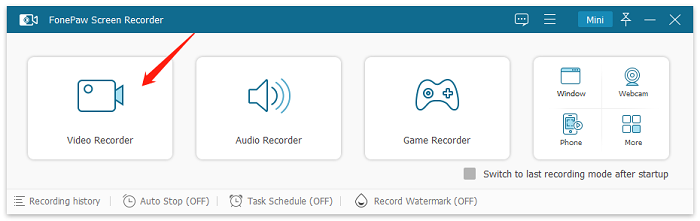
Step 1: Launch FonePaw and select “Video Recorder.”
Step 2: In the main interface, select “Full Screen” to record Amazon Prime video without cropping. Under “Preferences”, you can customize settings like output format, frame rate, and save path according to your needs.
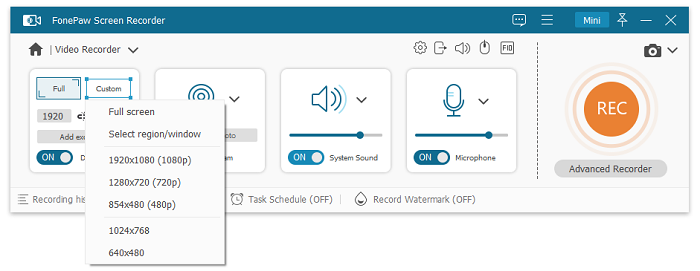
Step 3: Open Amazon Prime Video in your browser and play the movie or show you want to record. Click “REC” to start recording the Amazon Prime video in real time.

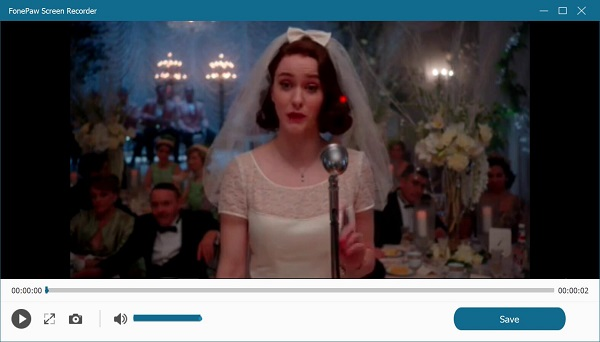
Step 4: When the playback ends, click “Stop” and save the recording. You’ll now have a DRM-free Amazon video file that can be watched anytime, anywhere.
FAQs About Removing Amazon Video
Is it Legal to Remove DRM from Amazon Videos?
Some of you wonder if it is legal to remove Amazon video DRM by yourself. The answer to this question is yes, but only if you use video downloads for personal needs. For example, if you only download Amazon videos for yourself to have a smoother offline playback experience, it is completely legal.
However, if you use the downloads for earning profits, or causing actual loss to the uploaders, artists, or companies, you are breaking the copyright laws, which can be illegal.
What Other Types of Content on Amazon Are Protected by DRM?
In addition to Amazon Prime Video, Amazon applies DRM protection to several other types of digital content across its ecosystem. These include:
- Kindle eBooks: Almost all Kindle books are encrypted with Amazon Kindle DRM, which prevents you from copying, sharing, or converting the files to other formats, like PDF or EPUB, without authorization. The DRM also ties each book to a specific Amazon account or Kindle device.
- Amazon Music: Songs and albums purchased or streamed through Amazon Music Unlimited or Prime Music are protected by audio DRM encryption. They can only be played through the official Amazon Music app or web player, not freely transferred to other players or devices.
- Amazon Appstore Apps & Games: Many apps downloaded from the Amazon Appstore include license verification DRM, ensuring that only users who purchase or download the app through official channels can access it.
- Audiobooks on Audible: Amazon’s Audible platform also uses DRM to secure audiobook files in proprietary .aa or .aax formats, which can only be played through the Audible app or authorized devices.
Overall, DRM is used by Amazon to protect copyrights and control content access, but it also limits how you can back up, share, or use their legally purchased digital products across platforms.
Conclusion
Although Amazon’s DRM limits how you can access or save Prime videos, tools like MovPilot Amazon Prime Video Downloader and FonePaw Screen Recorder make Amazon video DRM removal simple. MovPilot lets you download Amazon movies and shows in 1080P MP4/MKV with original audio and subtitles, while FonePaw records playback in real time for videos that can’t be downloaded. Choose the method that fits you best and enjoy DRM-free Amazon videos offline anytime.