






“Venom: The Last Dance” marks the explosive finale of Sony’s Venom trilogy, featuring Tom Hardy in his most emotionally charged performance yet. As the stakes rise and secrets unravel, fans are rushing to secure their own copy of the film for offline viewing. But with so many options online, how do you safely and legally download Venom: The Last Dance in high quality?
In this guide, we’ll walk you through 3 reliable ways to get high-quality Venom: The Last Dance download, whether you prefer streaming services like Amazon Prime and Netflix, or powerful third-party tools that remove video DRM and give you full offline control. Read on to discover the method that fits your needs best.

You May Also Like:
How to Download Rented Amazon Prime Movies? [2 Ways]
2 Ways to Download Amazon Movie Purchases to Computer/Mobile
Where to Watch Venom: The Last Dance Online
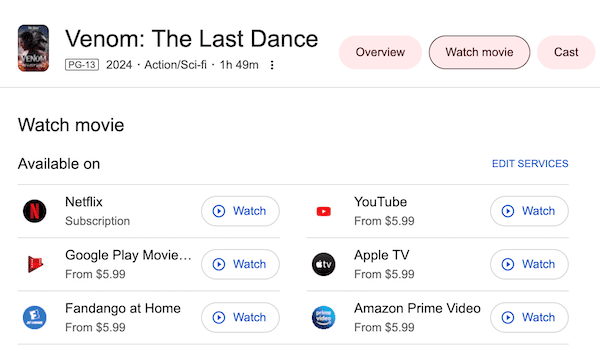
Venom: The Last Dance is now widely available across multiple streaming platforms, giving fans plenty of options to watch it online or download it for offline viewing. Whether you prefer subscription-based services or pay-per-view rentals, the movie is just a few clicks away.
Here are the top platforms where you can stream or purchase the movie:
- Netflix – Watch with an active subscription.
- Amazon Prime Video – Rent or buy from $5.99.
- YouTube Movies – Available to rent starting at $5.99.
- Google Play Movies & TV – Rent from $5.99.
- Apple TV – Rent or purchase for $5.99 and up.
- Fandango at Home – Rent from $5.99.
Each platform provides HD-quality streaming, and some allow limited offline downloads within their official apps. If you’re looking for more flexible and permanent download options, the next sections will walk you through how to download the movie using the best method for your needs.
Method 1. Rent and Get Venom: The Last Dance Downloaded
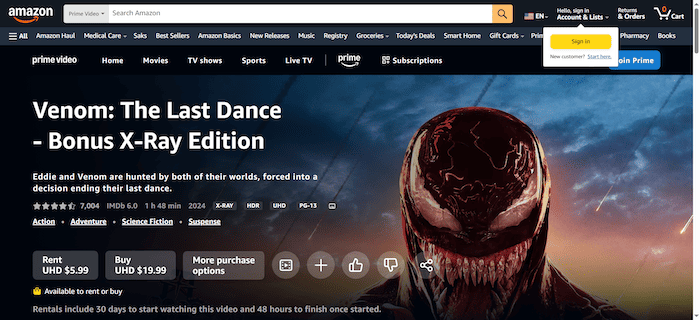
If you prefer an official and secure method to get the Venom: The Last Dance download, renting or purchasing it from Amazon Prime Video is one of the most accessible choices. With just a few clicks, you can enjoy HD-quality playback and download the film to your mobile device for offline viewing. Whether you want to watch it once or keep it forever, Amazon offers flexible options starting from $5.99.
That said, there are limitations you should be aware of. Amazon only allows downloads through its mobile app, meaning you won’t be able to store the video file directly on your laptop or transfer it freely across devices. Additionally, if you choose the rental option, your access will expire 30 days after purchase or 48 hours after you start watching, whichever comes first.
To download the movie for offline viewing through Amazon Prime Video, follow these detailed steps:
Step 1. Install and open the Amazon Prime Video app on your mobile phone, tablet, or Fire TV device. Make sure you’re logged into your Amazon account.
Step 2. In the app’s search bar, type “Venom: The Last Dance” and tap on the official movie result.
Step 3. On the movie page, select either “Rent” (starting at $5.99) or “Buy”, depending on your preference and availability in your region.
Step 4. After successful payment, go to “My Stuff” > “Purchases & Rentals”, tap on the movie, and press the “Download” button.
Step 5. Once downloaded, go to the “Downloads” section within the app to find and play the movie offline anytime.
Read Also:
How to Download Smile 2 Movie (3 Ways)
3 Best Ways to Download Alien: Romulus [Complete Guide]
Method 2. Get Venom: The Last Dance Download from Netflix Subscription
If you’re already a Netflix subscriber, downloading Venom: The Last Dance is fast, easy, and doesn’t require any additional cost beyond your monthly plan. Netflix supports offline viewing through its official app, allowing you to download movies directly to your device and watch them without an internet connection. This is an ideal option for viewers who prefer streaming subscriptions and want to enjoy the movie offline on smartphones or tablets.
However, there are some limitations to keep in mind. The access depends on maintaining an active subscription, which can be expensive if you’re only watching a few titles. The downloads are not permanent – they expire after a certain period or if the title leaves the platform.
Additionally, you can only download content on select devices (such as mobile phones and tablets) and not on desktops or smart TVs.
To download the film using your Netflix subscription, follow these steps:
Step 1. Open the Netflix app on your Android or iOS device. Make sure you’re signed in to your active Netflix account.
Step 2. In the search bar, type “Venom: The Last Dance” and select the correct title.
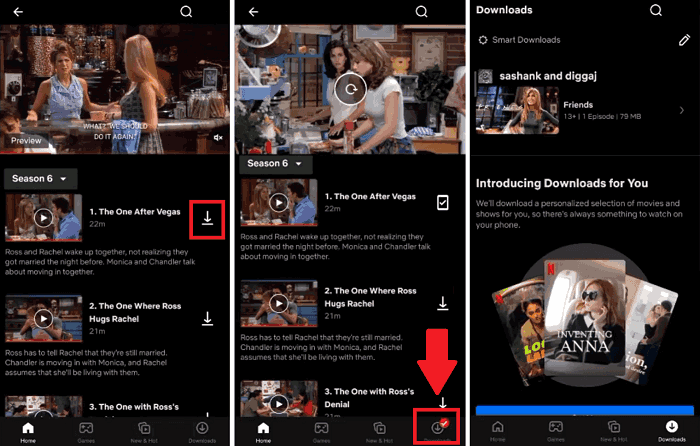
Step 3. On the movie’s page, look for the “Download” icon (a downward arrow) and tap it.
Step 4. Wait for the download to finish. Once completed, the movie will be available under the “Downloads” section in the app.
Step 5. Tap the downloaded file to start watching offline anytime, anywhere.
Method 3. Download Venom: The Last Dance with Downloader [Recommended]
For viewers who want long-term offline access, full control over video files, and playback across all devices, using a third-party video downloader is the most flexible and powerful option. Among the available tools, MovPilot All-in-One Video Downloader stands out for its ease of use, high quality, and broad platform compatibility.
MovPilot All-in-One Video Downloader is a powerful tool that lets you download movies and shows from popular streaming platforms like Amazon Prime Video, Netflix, Disney+, Hulu, and HBO, all in one app. Unlike official app downloads that expire or restrict usage, MovPilot allows you to save videos permanently in MP4 or MKV format with up to 1080p HD resolution and Dolby 5.1 audio.
It’s ideal for users who want full offline access without viewing limits, ads, or device restrictions. With intuitive operation, fast download speed, and multi-language subtitle support, MovPilot is the best choice for long-term movie collectors and frequent travelers alike.
Key Features of MovPilot All-in-One Video Downloader:
- Downloads from Netflix, Amazon Prime, Disney+, HBO, Hulu, and more via built-in web browser.
- Supports MP4/MKV format up to 1080p; optional H.265 encoding for higher compression and quality.
- Preserves Dolby 5.1 surround sound with high-fidelity audio for immersive playback.
- Saves audio and subtitles in various languages and offers soft, hard, or external subtitle files.
- Utilizes hardware acceleration for up to 5× faster downloading speed with batch downloads
To use MovPilot, you’ll first need to subscribe to a streaming platform (like Netflix) or rent/purchase the movie (on Prime Video). Once you’ve confirmed access, follow these steps to download the movie permanently to your computer:
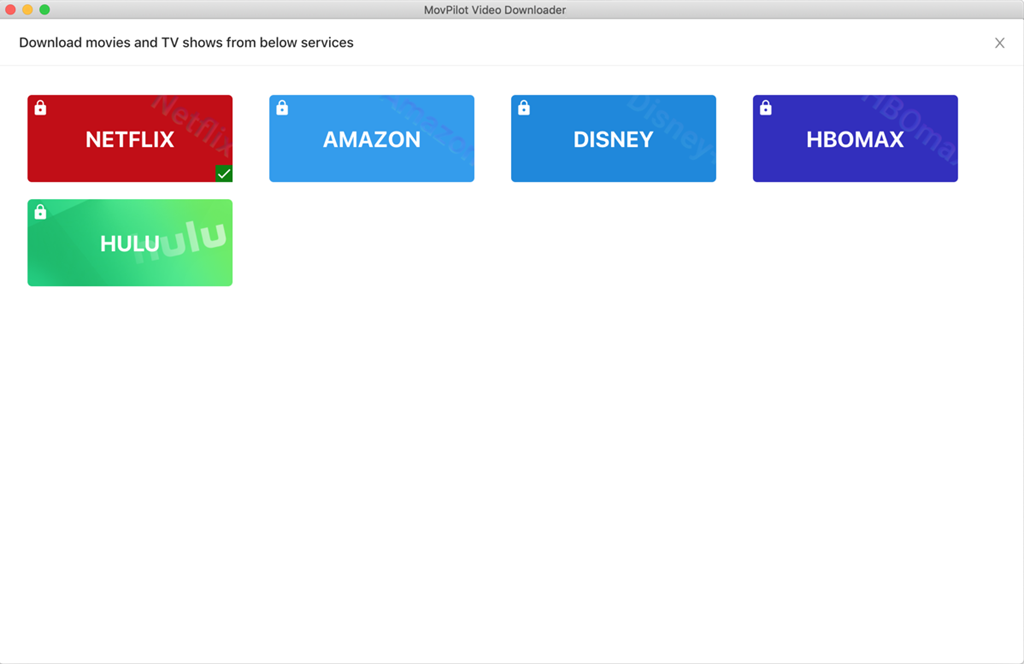
Step 1. Launch the Program and Choose Platform
Open MovPilot on your Windows or macOS computer. From the home screen, choose the platform where you’ve rented, purchased or subscribed to.
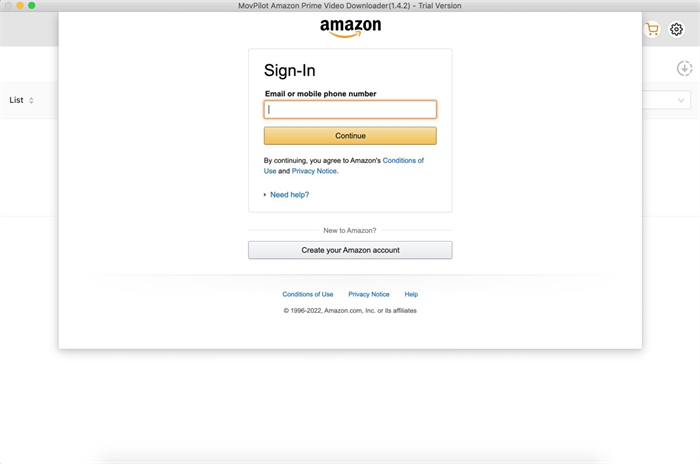
Step 2. Log into Your Account
Use the built-in browser window to securely sign in to your streaming account. This ensures access to your movie library just like in the official app.
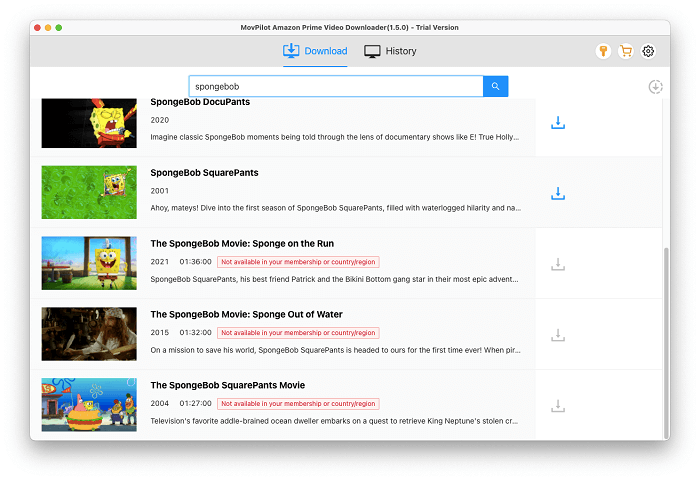
Step 3. Search or Paste Movie URL
In the search bar, enter “Venom: The Last Dance” or paste the movie’s URL from the streaming site. The program will display the available video results.
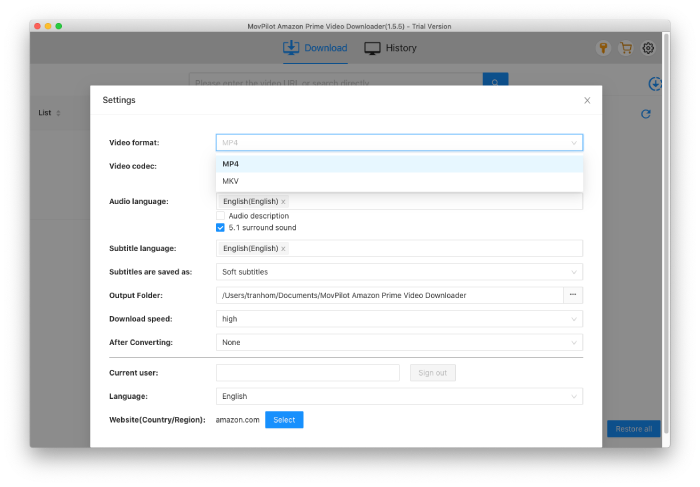
Step 4. Customize Download Settings
Select your preferred video resolution (up to 1080p), output format (MP4 or MKV), subtitle style (soft, hard, or external), and audio language.
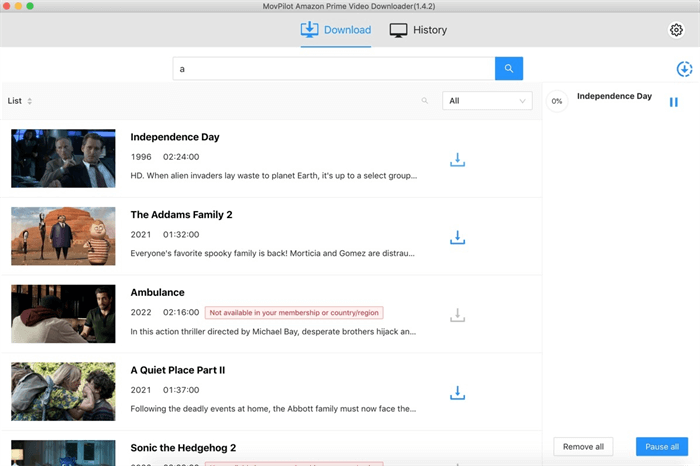
Step 5. Start the Download
Click the “Download” button to begin. The movie will be saved to your designated folder for permanent offline viewing. You can monitor progress and manage multiple downloads within the interface.
FAQs
Can I download the movie for free?
While there may be free websites or torrent sources claiming to offer Venom: The Last Dance for download, these methods are not legal or safe. They often carry copyright risks, poor video quality, and potential malware. For a secure and high-quality experience, it’s strongly recommended to use official platforms or authorized tools like MovPilot.
What’s the best way to watch the downloaded movie on a TV?
If you downloaded the movie using Netflix or Prime Video, the best way is to cast it from your phone or tablet to your smart TV using Chromecast or AirPlay. If you used a downloader like MovPilot, you can transfer the MP4/MKV file to a USB drive and then connect it directly to your TV. This method gives you the most flexibility and doesn’t require an internet connection.
If I download the movie, will it include the post-credits scenes?
Yes. Whether you download Venom: The Last Dance via Netflix, Amazon Prime Video, or a tool like MovPilot, the full movie file typically includes all content shown in theaters, including the mid-credits and post-credits scenes. Just make sure you download the complete version and watch until the end.
Conclusion
In this guide, we explored 3 effective ways to get your own copy of Venom: The Last Dance for offline viewing. Whether you choose to rent it from Amazon Prime Video, download it via a Netflix subscription, or use a dedicated downloader like MovPilot for permanent, device-free access, there’s a method that fits every viewer’s needs.
For those who value high video quality, long-term storage, and the freedom to watch anytime on any device, MovPilot All-in-One Video Downloader stands out as the most versatile and user-friendly option. Ready to experience the final chapter of Venom’s story without limitations? Download it now and enjoy the symbiote’s last dance!