






Can you download HBO Max movies on a laptop? No, unfortunately. HBO Max doesn’t offer a desktop app on Windows or Mac computers. Also, the official download feature only works on mobile devices like iPhone or Android phones, meaning you can’t watch HBO Max offline on laptop directly.
But don’t worry, there is still a simple way to download HBO Max shows and movies on Windows PC in 1080P to watch offline! In this guide, we will show you the best tool to enjoy your favorite HBO Max originals on a bigger screen without the internet. Just read on to explore!

Best Way to Download HBO Max Movies on Laptop: MovPilot Max Video Downloader
When it comes to downloading HBO Max videos on laptop, the best solution is to use a third-party tool. MovPilot Max Video Downloader is a reliable option that provides HBO Max download services for any HBO subscribers. Even if you are on an ad-supported plan, you can download HBO Max movies to MP4/MKV on laptop running Windows 11/10/8/7 with this amazing program.
Besides, all the movies, shows, and originals from HBO Max/HBO Go can be downloaded in their original quality and permanently saved on your laptop. They will be saved as common video files and will never expire. So, if you prefer a big-screen viewing, MovPilot is definitely worth considering.
✨ Why Choose MovPilot Max Video Downloader?
- High-Quality Video Output – Save HBO Max downloads at 1080P quality, offering a theater-like viewing experience.
- Efficient Batch Conversion – One click to download multiple HBO Max movies and shows on laptop at 5X faster speed.
- Original Audio Tracks and Subtitles – Preserve the original multilingual audio tracks and subtitles for diverse viewing needs.
- Forever Available – Permanently save HBO Max movies on your laptop without expiration.
- Unrestricted Playback – Remove HBO ads and DRM protection from the videos.
- Budget-Friendly – One-time payment lets you watch ad-free HBO Max videos offline forever right on your laptop.
🔎 Comparison: MovPilot vs. Other Max Downloaders vs. Official Max App
While there are many tools available on the market that claim to be able to download HBO Max videos on laptops, their stability, quality, and performance are often less ideal. To help you see the differences clearly, the table below compares the main features between MovPilot Max Video Downloader, other third-party downloaders, and the official HBO Max app side by side.
| Features | MovPilot Max Video Downloader | Other Max Downloaders | Official Max App |
|---|---|---|---|
| Supported Devices | Windows PC and Mac | Usually Windows only | Limit to iOS, Android, and Amazon Fire tablet |
| Supported HBO Max Plans | All HBO subscription plans | Usually Ad-free plans | Ad-free plans only |
| Video Quality | Up to 1080P Full HD | 720P | Up to 4K |
| Output Format | MP4, MKV | MP4 | Encrypted proprietary format |
| Dolby Atmos Audio | ✔ | ❌ | ✔ |
| DRM Removal | ✔ | ✔ | ❌ |
| Permanent Save | ✔ | ✔ | ❌ |
| Batch Conversion | ✔ | ❌ | ❌ |
How to Download Max Videos to MP4/MKV on Laptop: Step-by-Step Guide
If this is your first time using a tool like this, MovPilot Max Video Downloader offers a seamless and effortless process that everyone can easily get started. Next, let’s see the detailed steps on how to download movies on HBO Max on a laptop by using it.
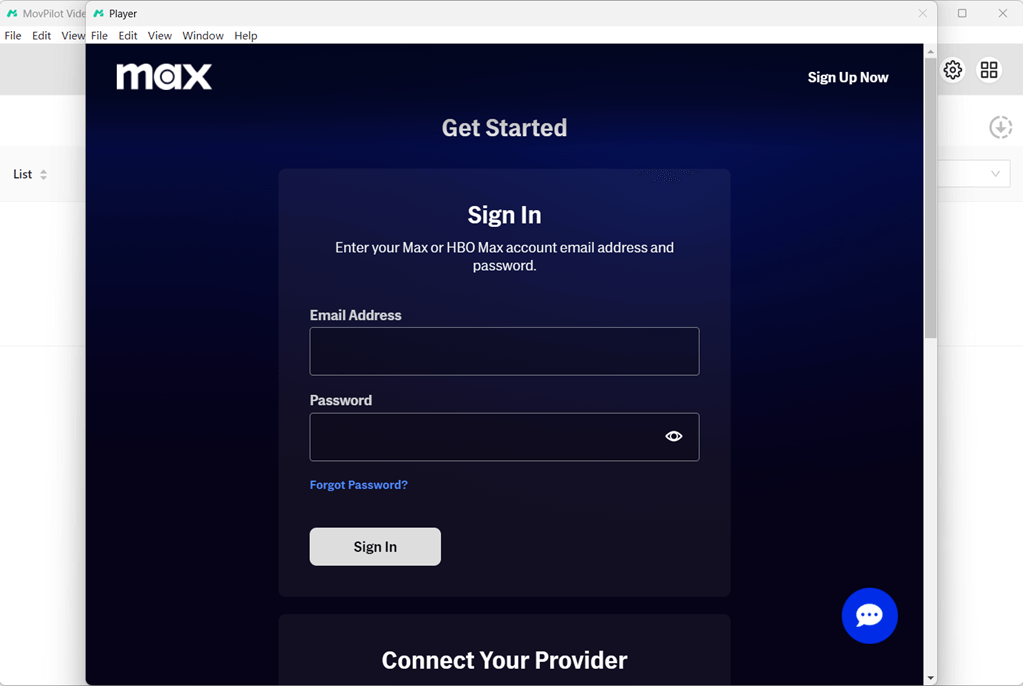
Step 1. Sign in to Your HBO Account in MovPilot
Install MovPilot Max(HBO) Video Downloader on your Windows laptop, launch it, and sign in with your HBO account.
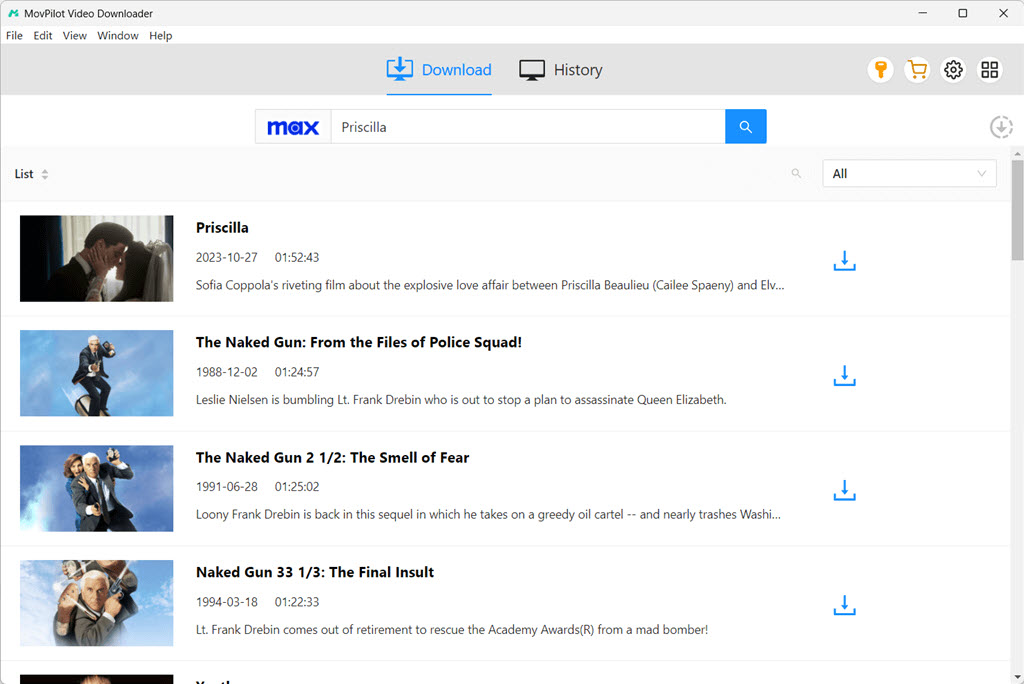
Step 2. Search and Add HBO Max Movies or Shows to Batch Download
Type the keywords like Game of Thrones into the search bar or paste the direct video URL from the HBO Max website. For TV shows with multiple episodes, click the download icon and select the exact videos you want to download from Max to your laptop.
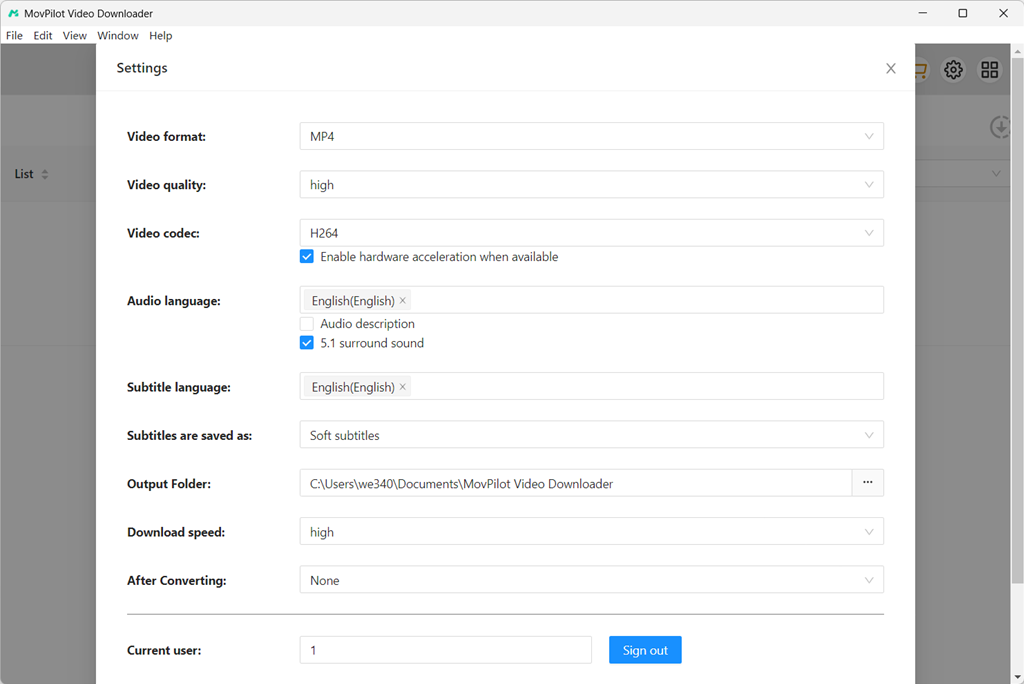
Step 3. Adjust Output Settings
Click the settings icon on the top-right corner of the interface, then you can adjust the output format (MP4/MKV), choose 1080P quality, and select the audio track and subtitle settings before starting to download HBO Max on PC.
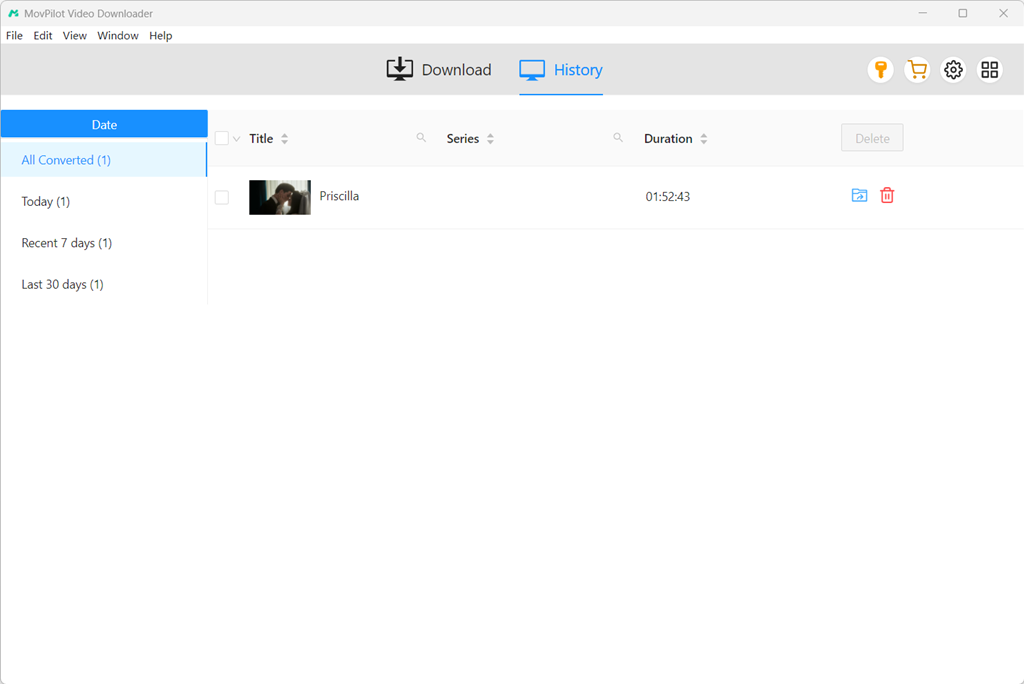
Step 4. Download HBO Max Movies on Laptop
Click the download button. MovPilot will start downloading your selected HBO Max movies or episodes on your laptop immediately. You can check the downloading process on the right side. When it finishes, you can flexibly watch the downloaded HBO videos offline on your laptop at any time. Also, downloaded videos can be transferred to TV or other devices for larger-screen viewing with ease.
FAQs About Downloading HBO Max Videos on Laptop
Q1. Is it legal and safe to use a third-party Max video downloader?
Generally, downloading purely for personal use is usually acceptable, as it is redistribution and commercial use that truly violates copyright laws and Max’s terms of service. Therefore, please ensure your use of the downloader is for personal purposes, and be sure to check your local regulations before use.
Moreover, to avoid potential security risks such as malware and intrusive ads, it is recommended to use a professional and reliable option, such as MovPilot Max Video Downloader.
Q2. Will the HBO Max Downloads on Laptop Expire?
No. This is the biggest advantage of using a professional tool like MovPilot compared to the official download feature. It can bypass DRM protection with ease and save any HBO Max movie or show as a common MP4 or MKV file, which will be stored on your laptop permanently without expiration.
Q3. Can I transfer Max downloads to USB or other devices?
Yes. Since MovPilot helps you save Max videos as common files on PC, these files are no longer restricted by DRM. This means you can freely transfer these downloaded Max video files to USB drives, external hard drives, and smart TVs for offline playback.
Further Readings:
Q4. Can I download Max movies and shows on phones?
Yes, but with limitations. As mentioned above, the HBO Max mobile app allows offline viewing for ad-free subscribers. However, there are HBO Max download limitations you should note, such as:
- You can only download a maximum of 100 videos across all mobile devices, even with Premium plans.
- Unwatched downloaded Max videos only last for 30 days, while played ones can expire after 48 hours.
- HBO Max downloads are encrypted and cannot be transferred or exported to other players.
If you want to permanently save your favorite Max movies and shows on your phone, you can choose to download them on your computer using MovPilot first, and then transfer the MP4/MKV files to your phone for playback.
Conclusion
Now, you have learned the best way to download HBO Max videos on a laptop. While DRM protection and subscription requirements can make the process a bit challenging, MovPilot Max(HBO) Video Downloader offers a powerful and reliable solution. It enables you to directly download HBO Max movies and shows to your Windows PC as MP4 or MKV files, even with an ad-supported plan. If you are looking for the best HBO Max downloader for Windows/Mac, download MovPilot and give it a try!