






Soon after the release of A Minecraft Movie, the production team revealed that a sequel was already in the works, and the official release date was later confirmed on October 9, 2025. While the sequel is still a way off, many fans are rewatching the first film, and newcomers are looking to catch up.
If you are searching for how to download A Minecraft Movie to watch offline during a flight or your daily commute, this guide has you covered. We will explain which platforms support downloads, the official ways to download the movie, including how to save purchased or rented copies offline, and whether it is possible to save the film as an MP4 for more flexible playback across different devices.
Where Can You Watch A Minecraft Movie at Home?
Can you download A Minecraft Movie for offline watching? The short answer is yes. Following its premiere on April 4, 2025, A Minecraft Movie can now be accessed through various channels. The table below summarizes where to stream, rent, or buy A Minecraft Movie, and which platforms support offline downloads.
| Platform | Streaming Subscription | Digital Rental | Digital Purchase | In-App Download Support |
|---|---|---|---|---|
| HBO Max | ✔️ (Exclusive base home) | – | – | ✔️ (Standard & Premium plans.) |
| Hulu, YouTube, Sling TV | ✔️ (Via Max Add-on channel) | – | – | ✔️ |
| Amazon Prime Video | ✔️ (Via Max Add-on channel) | ✔️ | ✔️ | ✔️ |
| Netflix (Only several countries) | ✔️ | – | – | ✔️ |
| The Roku Channel | ✔️ | – | – | – |
| Apple TV, Google Play Movies & TV, Fandango at Home | – | ✔️ | ✔️ | – |
Note: Regional restrictions may apply. Check your local platform catalog to confirm if the title is available in your country.
How to Download A Minecraft Movie from Streaming Services
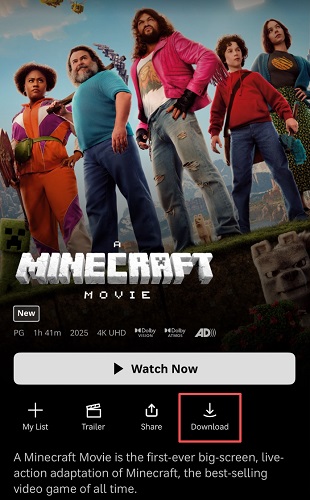
If you have subscribed to a supported streaming service, downloading the movie inside the official app is usually the simplest way to watch A Minecraft Movie offline. We will use Max as an example, as it is still the primary streaming home for the film in most regions. (The exact interface may differ slightly between devices, but the overall download process is similar across most streaming platforms.)
Step 1. Open the Max app on your mobile device (iOS/Android) or supported tablet. Ensure you are logged into an active account (Standard or Premium plans).
Step 2. Search for “A Minecraft Movie”.
Step 3. On the movie details page, look for the download icon and tap it. Wait for the download to finish.
Step 4. Once finished, navigate to your “Downloads” tab in the bottom menu to watch A Minecraft Movie download offline even when traveling or in areas with an unstable network.
Important Note:
Although official downloads are convenient, they also come with several limitations:
- Regional restrictions may apply. Check your local platform catalog to confirm if the title is available in your country.
- Unwatched downloads expire after 30 days. Once you press play, you usually have 48 hours to finish viewing.
- Some services restrict how many devices can store downloads simultaneously.
- The downloaded A Minecraft Movie expires if your subscription ends.
- The file is encrypted and playable only within the Max app. You cannot transfer it to another device or play it on other video players.
How to Rent or Buy A Minecraft Movie and Download It
If you don’t have a streaming subscription that includes A Minecraft Movie, another common option is to rent or purchase the movie from a digital store. Below, we use Amazon Prime Video as the walkthrough example.
Important: Renting or purchasing a movie does not necessarily mean you receive a standalone video file. In most cases, the download remains available only inside the platform’s official app and is subject to the provider’s licensing rules and Terms of Use.
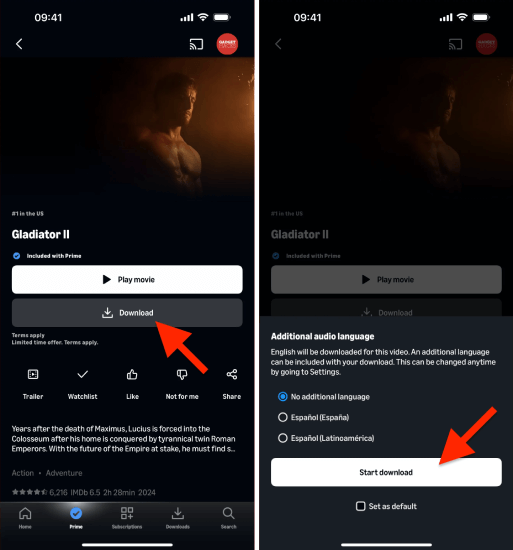
Step 1. Open the Prime Video website or app. Then, search for A Minecraft Movie.
Step 2. Select “Rent UHD” or “Buy UHD” to move on and complete the payment process.
Step 3. Tap the download icon under the movie title. The title saves to your “Downloads” section for offline viewing.
Digital Purchase vs. Rental: Which Is Better for A Minecraft Movie Full Movie Downloads?
| Factor | Rental | Purchase |
|---|---|---|
| Cost | $3.99 | $14.99 |
| Download availability | Yes | Yes |
| Expiration | 30 days to start; 48 hours once playback begins | No expiration (Depend on copyright license) |
| Best for | One-time viewing | Repeated viewing, collectors |
Can You Download A Minecraft Full Movie as MP4? How?
Instead of watching A Minecraft Movie offline inside the official streaming app, many users may prefer a local video file, such as an MP4 file that can be stored and played on various devices and media players. However, these downloads are often protected and cannot be directly output as MP4. To make this happen, you will need a reliable third-party tool to remove platform restrictions from the video.
Disclaimer: The movie should come from a subscription, rental, purchase, or other authorized viewing source. Also, using third-party tools to download content may violate platform Terms of Service and laws in your region. Always check your local copyright laws and platform terms before using any downloader tool.
Among the tools we tested, MovPilot All-in-One Video Downloader stands out as one of the most reliable options for both Windows and Mac. This tool integrates with multiple streaming platforms, including HBO Max and Amazon Prime Video, eliminating the need to install separate downloaders for each platform. This allows you to search for A Minecraft Movie directly within the software and save it as a high-quality MP4 file.
In our tests using an HBO Max Standard account over a 500 Mbps connection, we downloaded A Minecraft Movie in Full HD 1080p resolution in just about 25 minutes. The exported MP4 played in VLC Media Player, without the need for the Max app for offline playback.
What Makes MovPilot Different Based on Testing Results?
- Offer an all-in-one solution for searching and downloading A Minecraft Movie to MP4/MKV.
- Save A Minecraft Movie downloads in up to 1080P with Dolby Atmos 5.1 surround sound.
- Keep audio tracks and subtitles (Soft, Hard, External) in multiple languages.
- Support hardware acceleration, speed up 5X.
- Remove ads and offline playback restrictions.
This tool’s user-friendly interface is also impressive. Even beginners can quickly get started. Here is a step-by-step guide on how to get A Minecraft Movie full length in MP4 using MovPilot.
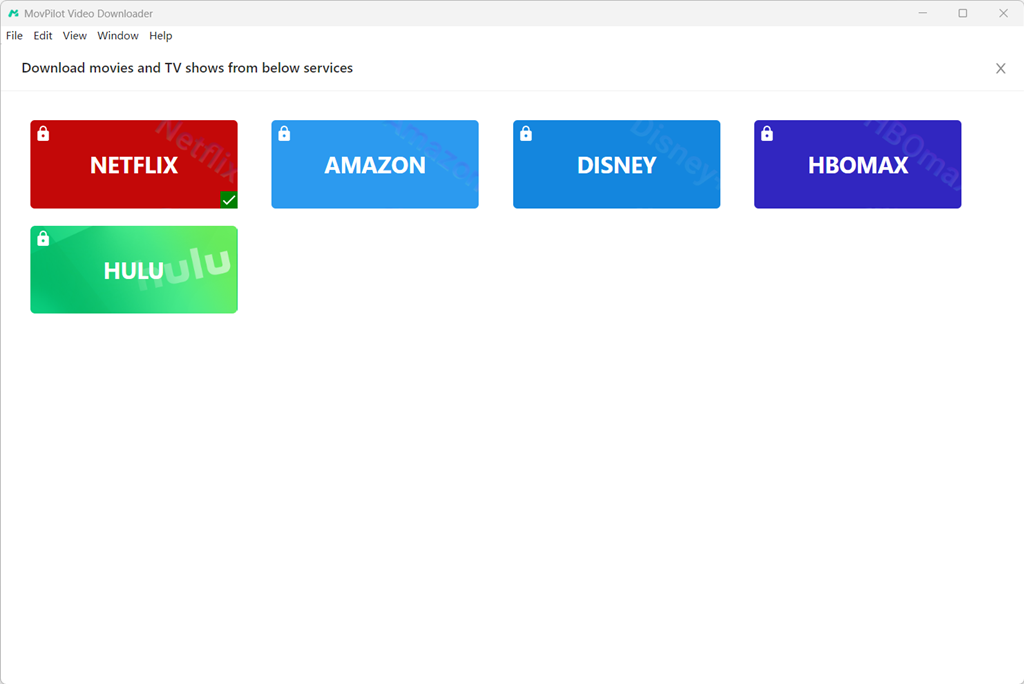
Step 1. Set Up MovPilot All-in-One Video Downloader
Install and launch the software. Select HBO Max on the interface and log in to your account to authorize access to the library.
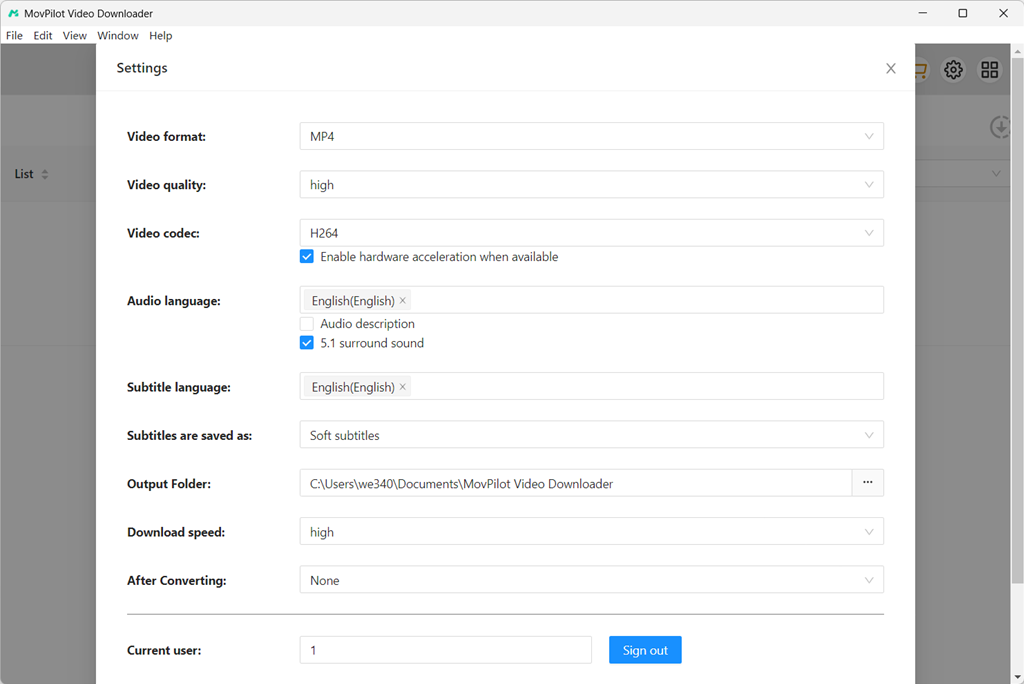
Step 2. Choose MP4 Output Settings
Click the Settings (gear) icon in the upper-right corner. Set MP4 as your preferred output format, choose your target video resolution (up to 1080p), and select the desired audio and subtitle languages.
Step 3. Add A Minecraft Movie
Search for “A Minecraft Movie” or paste the direct HBO Max video URL. MovPilot will quickly fetch and display the matching movie in the search results.
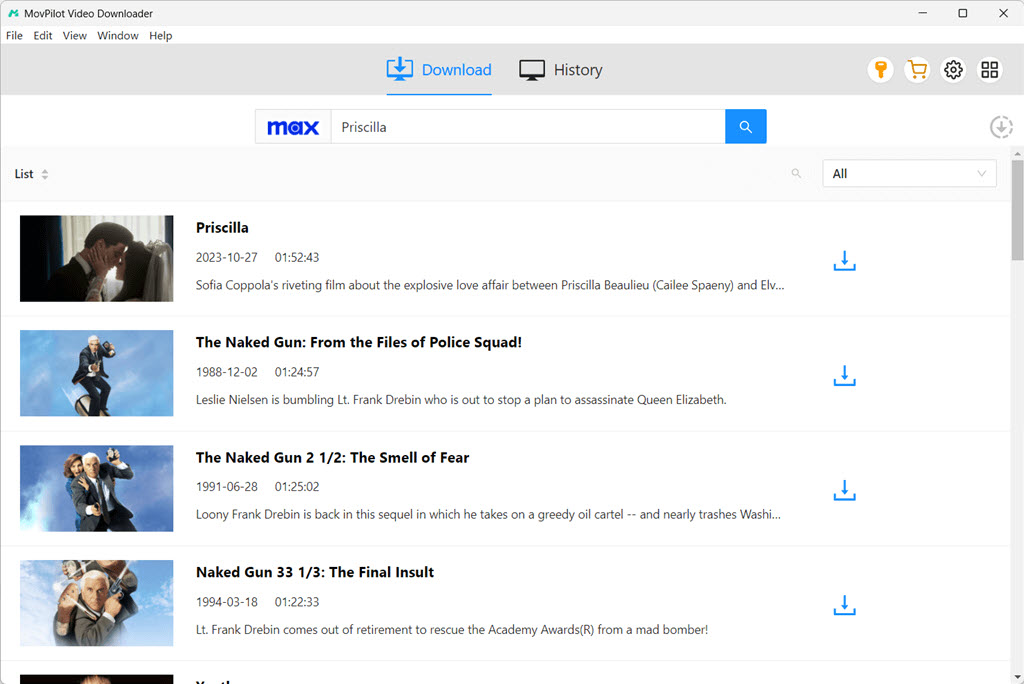
Step 4. Download A Minecraft Movie to MP4
Click the Download button next to A Minecraft Movie. MovPilot will process and download the full movie to your local computer seamlessly.
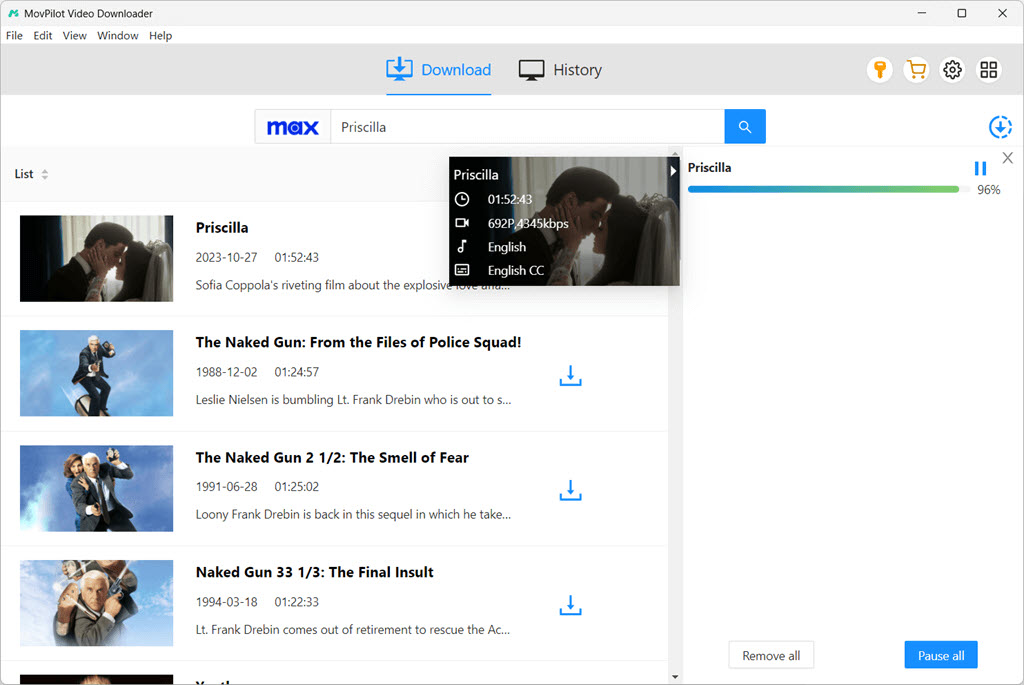
Step 5. Play A Minecraft Movie Offline
Once the process finishes, navigate to the History tab to see your completed download. Click the Folder icon to open the output folder, where you can now watch A Minecraft Movie offline on any media player or transfer it to other devices like a USB drive.
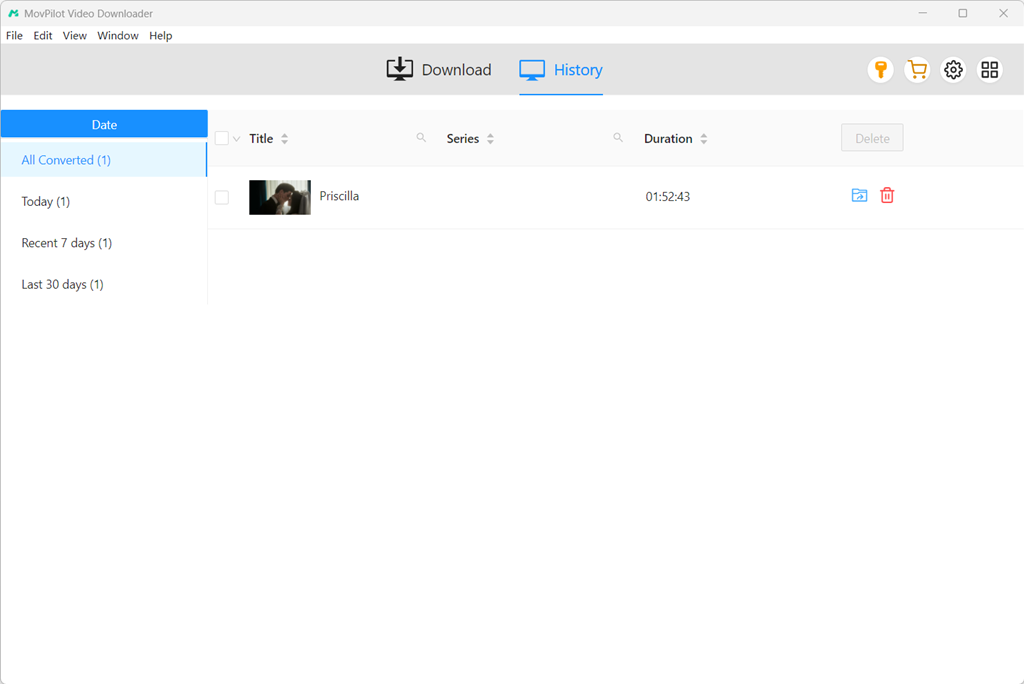
Read Also:
Official Downloads vs MP4 Downloads: Which Option Fits You?
| Scenario | Official App Download | Third-Party MP4 Export |
|---|---|---|
| You have a Max subscription | Best first choice | Only if you need a local file |
| You bought the film on Prime Video | Convenient, good quality | For offline archive |
| You need to play on a non-smart TV | Requires compatible app | MP4 works on most USB players |
| You want 4K HDR | ✅ Official apps support this | Usually limited to 1080p |
| Long-term ownership | Can be taken down due to the change of the copyright license. | Local MP4 downloads are permanently accessible. |
What is Minecraft Movie 2 About? Any Updates?
If you are catching up on the first movie now, here is what we know so far about the upcoming sequel:
- The sequel is titled A Minecraft Movie Squared.
- The film is scheduled to hit theaters on July 23, 2027.
- Jared Hess returns to direct, co-writing the screenplay alongside Chris Galletta.
- Core stars, including Jack Black (Steve) and Jason Momoa, are returning to lead the adventure once again.
- While detailed plotlines remain under wraps, the sequel is set to expand beyond the Overworld into other iconic biomes and dimensions, exploring deep lore, nether structures, and advanced redstone mechanics.
- Teasers and production updates hint at the introduction of iconic game elements previously untouched, including new biomes (such as Frozen Tundra), fresh crafting mechanics, and key game characters like Alex.
FAQs About Minecraft Movie Downloads
Can I download A Minecraft Movie from Netflix?
Yes, you can watch and download A Minecraft Movie from Netflix if you are in the supported regions. This includes Australia, Andorra, Bulgaria, Cyprus, Denmark, Finland, Hungary, the Netherlands, Poland, Romania, Serbia, and Slovenia. Still, for a local MP4 file, you will need a reliable streaming downloader for help.
Is A Minecraft Movie available for free?
No, A Minecraft Movie is not available completely free on streaming platforms. While some websites claim to offer free access, they may expose users to unauthorized copies, misleading download buttons, excessive ads, and even potential security threats.
Where can I watch A Minecraft Movie dubbed in Hindi?
Dubbed versions are typically available on the same platforms where the movie is offered. You can check the audio/language settings within each platform’s player to see if Hindi (or other languages) are available. It is important to note that availability varies by country.
Final Words
This article has walked you through several ways to download A Minecraft Movie. If you simply want to watch the film for one time during a flight, commute, or trip, the official download feature from a subscribed streaming service is usually the easiest solution. If you prefer a longer-term option, purchasing the movie before downloading can provide more convenient access for repeated viewing.
For a more flexible offline playback experience, third-party tools like MovPilot All-in-One Video Downloader may fit your needs. With it, you can easily get A Minecraft Movie download in MP4 or MKV and enjoy the movie offline anywhere, anytime.