






Downloading movies in MKV format isn’t always straightforward. Some sources provide MKV files directly, while others only allow online playback or limited offline viewing. The available methods can vary a lot depending on where the movie is hosted, the type of platform, and the restrictions applied to the video stream. As a result, you may run into issues such as unavailable download options, format limitations, or unstable video quality.
This guide focuses on the practical side of MKV movie downloads. It breaks down the main ways people try to download movies in MKV format, explains what works and what doesn’t, and highlights the differences between streaming platforms and free websites. By the end, you will have a clearer idea of which approach fits your needs and expectations best.
You May Also Like:
Part 1. Can You Download MKV Movies in HD? What Actually Works
Before moving on to specific methods, it’s worth clarifying what downloading MKV movies in HD really involves, and what usually limits the results.
- MKV is a container, not a quality guarantee.
The MKV format itself does not determine resolution or clarity. Whether you can get 1080p or 4K MKV movies depends on the original video source and how it is encoded.
- HD MKV downloads are source-dependent.
Some platforms and websites provide MKV files directly, while others only allow online streaming or restrict downloadable formats and resolutions.
- Copyright restrictions still apply.
Movies are generally protected by copyright. Downloading MKV movies for redistribution or commercial use may violate local laws, depending on your region.
- Free MKV download sites can carry risks.
Many unverified sites bundle malware, adware, or misleading download buttons, which can compromise your device or data security.
Part 2. [Best Method] Download HD MKV Movies from Streaming Sites
MovPilot All-in-One Video Downloader is a remarkable downloader that enables you to download HD MKV movies from Netflix, Amazon Prime, Disney+, HBO Max, and Hulu. As a rule, these popular streaming sites always have the most and the latest movie library. Better yet, MovPilot can remove DRM and keep the best sound quality for you. That means you can do whatever you want with the MKV downloads.
Key Features to Streamline Your MKV Movie Downloading Experience
- Support multiple streaming platforms – Netflix, Amazon Prime, Disney+, HBO Max, and Hulu
- Download MKV/MP4 movies up to 1080P resolution
- Retain 5.1 Dolby Atmos Sound with bitrates up to 640kbps
- Preserve all the original multilingual audio tracks and subtitles
- Batch download movies at 5X faster speed
- Embed the web player for seamless search and download
Check out how to easily download MKV movies from your favorite streaming platform with MovPilot.
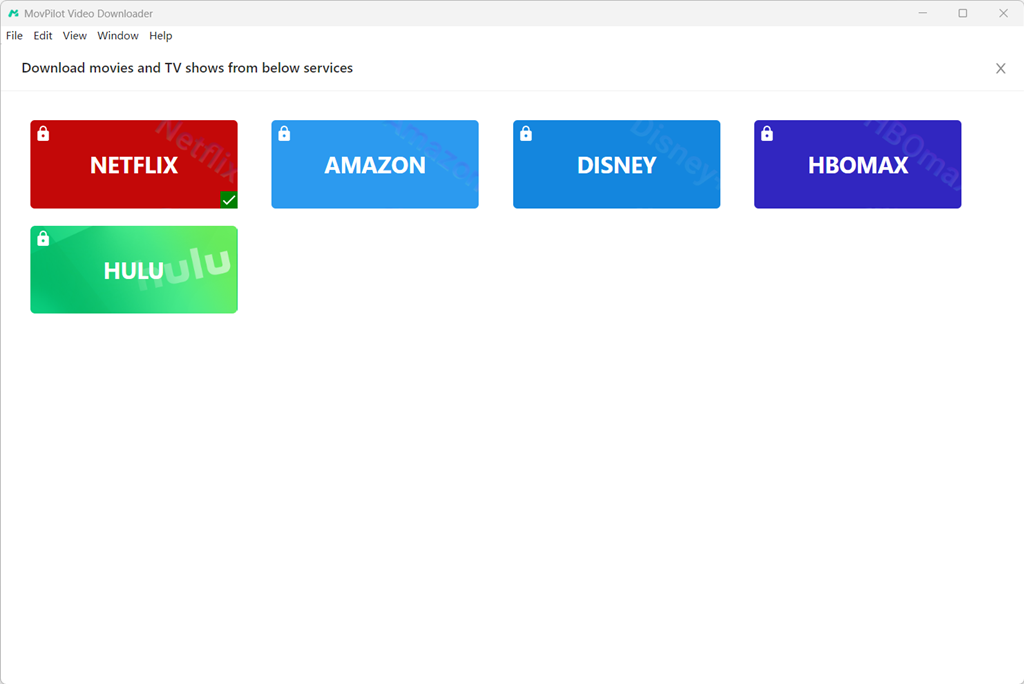
Step 1. Download, install, and launch MovPilot on your device. Select the platform on which you want to download videos. Then, log into it with your account.
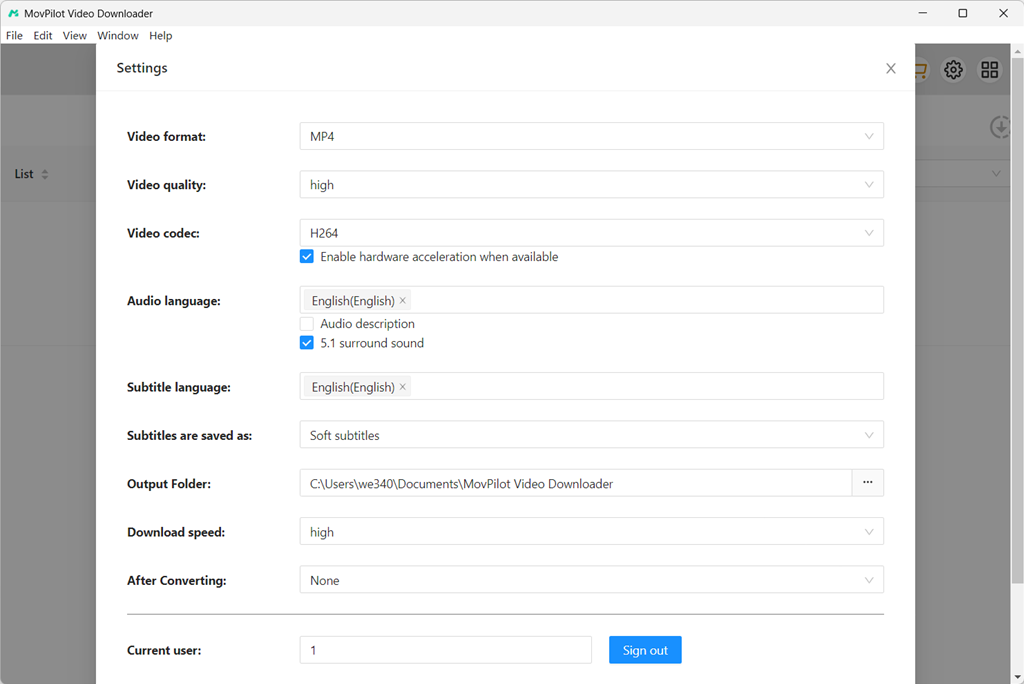
Step 2. Click the gear icon on the top right and choose “MKV” as the video format. You can also customize other output parameters including video quality, codec, language for audio and subtitles, and more.
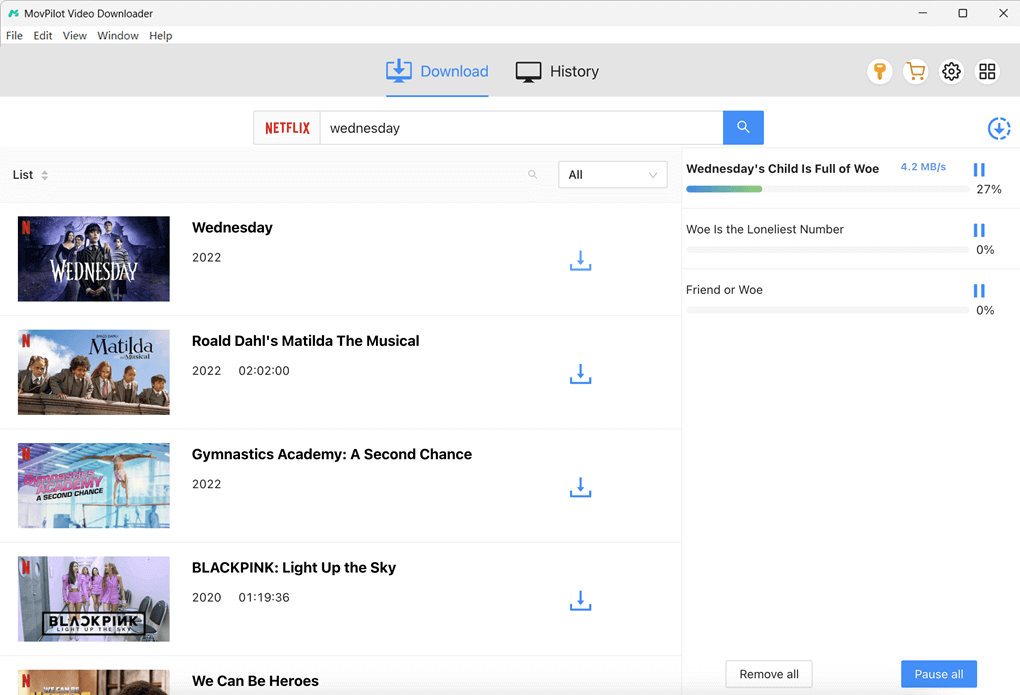
Step 3. After setting it up, you can go back to the homepage and input the keywords of the video title you want to download on the search bar. You can also copy & paste the video URL for an accurate match.
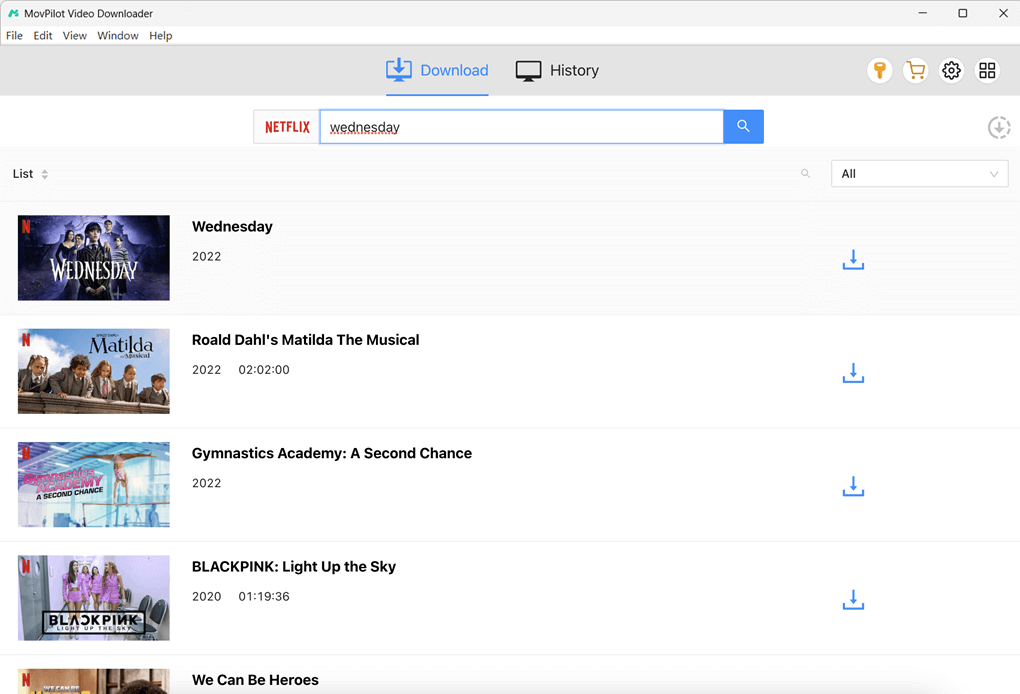
Step 4. Click on the arrow-down button next to the video you want to download and you will have it on your device soon. During the downloading, you can view the process or remove/pause the downloads on the right panel. All MKV movie downloads can be found on the “History” tab.
Part 3. Top 15 Best Free HD MKV Movies Download Sites
While professional downloaders provide a convenient method for getting MKV movies, they are not the only solution. Free MKV movie download sites offer a direct way, enabling anyone to access Hollywood blockbusters, Bollywood hits, and even 3D movies that are unavailable on streaming platforms through a web browser. This can be especially useful for those who prefer not to install software.
Keep in mind that these websites may not always output the best video quality, and there are potential security concerns to be aware of. Therefore, it is a good idea to have your firewall and antivirus protection active when using these platforms. If you decide to give them a try, here are some of the most popular MKV movie download websites currently available.
- Mkvhub: Easily access 720P HD movies, 1080P HD movies, BluRay movies, Dual audio, and TV Shows. You can easily find the type of movie you want.
- MyDownloadTube: Allow users to watch and grab the latest HD movies from Hollywood and Disney. The site also gives brief introductions and ratings for each title.
- Khatrimaza: This is a site where you can download MKV Hollywood and Bollywood movies in Hindi. You can effortlessly explore and get dual audio movies in 720P.
- WorldFree4u: This site can download HD MKV movies, especially Bollywood movies, with the smallest size. It even offers a “300MB Movies” category on the navigation bar! If you want to download dual audio movies up to HD 1080P, it is a should-not-miss choice.
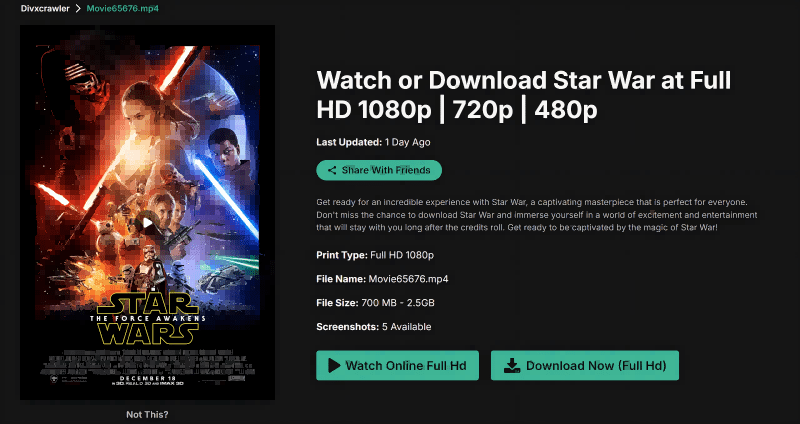
- Divxcrawler: Newly released movies and classified films are accessible on this site. You can download HD movies in MKV, and even get full HD 1080P Blu-ray films.
- Mkvking: Your perfect destination to get MKV movie downloads. It is designed just like a common video streaming platform and offer several download options.
- Mkvmoviespoint: It is one of the best HD MKV movie download sites that offers options for downloading MKV movies with dual audio in Hindi and English. You can easily save them in 720P, 480P, and 1080P with just one click.
- MKVCinemas: It offers an online platform enabling you to get free HD MKV movie downloads related to Hollywood, Bollywood, Tollywood, and more. With its powerful search engine, you can easily find the movie you need.
- MovieCounter: This site is not limited to Hollywood or Bollywood movies, including the latest movies and TV shows around the world for free download.
- 3donlinefilms: It is the best website to enjoy 3D movies without going to a cinema. Once you have VR headsets and glasses, you can enjoy the same immersive experience on TV at home.
- MP4Moviiez: MP4Moviiez is a folk-run movie download hub that lists Bollywood, South-Indian, and Hollywood releases in different sizes and qualities. It enables watchers to download movies in MKV and MP4 packs as well.
- Hoopla Digital: Hoopla is a legal library streaming service where you borrow movies with your library card and can download titles for offline viewing inside the official app.
- YTS.MX: YTS sites focus on small, high-quality movie torrent releases in 720p/1080p and most torrents are packaged in MKV containers, so you can download movies in MKVwhen you download via a torrent client.
- FlashMovies: FlashMovies is mainly a free streaming aggregator that links to external hosts for playback. It emphasizes online watching, and any downloadable files in MKV or MP4 depend on the third-party host rather than the site itself.
- FlixHQ: FlixHQ lists movies and TV shows and points users to third-party hosts for streaming or downloads. Please note that the site itself doesn’t offer standardized MKV movie downloads. You may pick a host to download MKV movies on your own.
Part 4. MKV vs MP4: Which Format Fits Your Playback Needs?
If you’re still wondering MKV and MP4, which is better for downloading movies for offline watching, here’s a concise table for you to go through the differences and grasp the idea.
| MKV | MP4 | |
|---|---|---|
| DRM Free | Yes | Yes |
| Video Quality | Excellent | Very Good |
| Compression Quality | Minimal | Lossy |
| File Size | Larger | Smaller |
| Audio Tracks | Support Multiple Audio Tracks | Support Multiple Audio Tracks |
| Subtitle Support | Support Multiple Subtitle Formats | Support Subtitles but Fewer Format Types |
| Compatibility | Less Compatible on TV/Mobile | Widely Compatible with Any Device |
| Streaming Support | Not Ideal for Online Streaming | Optimized for Web and Streaming |
| Editing and Archiving | Great for Editing and Storage | Better for Sharing and Uploading |
| Metadata Support | Very Detailed and Customizable | Basic Metadata Support |
| Best for | Edit, Save, and Burn | Stream, Share, and Upload |
Read Also
Download Despicable Me 4 | Deadpool and Wolverine | Kung Fu Pandora 4
FAQs About Downloading MKV Movies
Q1. Is it safe to download MKV movies?
It depends on the method you used to get MKV files. Generally, it is safe when using a professional video downloader like MovPilot All-in-One Video Downloader. Some teams stand behind these tools. They offer regular security updates and you will get technical support whenever needed.
However, downloading MKV movies from websites can be risky. Some may contain phishing links, attempt to collect personal information, or redirect you to potentially harmful pages. Therefore, you’d better turn on your firewall and anti-virus software and be cautious about providing any personal information when downloading from movie sites.
Q2. How to play MKV videos on my computer?
Devices and software are essential for playing MKV videos. Most modern computers (Windows, Mac, or Linux) with a dual-core processor can handle MKV playback. You can simply save MKV files to your computer and open them with the built-in media player.
However, some default players may struggle with the MKV format. In such cases, you can try a third-party player like VLC Media Player for better compatibility and additional features.
Q3. How to download MKV as MP4?
Normally, you cannot download MKV as MP4, but you can convert MKV to MP4 using HandBrake, VLC media player, or online video converters. Moreover, MovPilot All-in-One Video Downloader supports downloading streaming movies in MP4 as well, with no conversion.
Q4. What are the disadvantages of MKV?
Since MKV has the minimum compression, that means it usually has a larger size. Meanwhile, it’s less compatible, especially for mobile devices and TVs, or for uploading videos over the cloud.
Q5. Can MKV files get corrupted?
Yes. Like any digital file, MKVs can become corrupted due to incomplete downloads, bad storage sectors, or file transfer errors. You’ll need repair software to recover it if corrupted.
Q6. Why do some MKV movies look low quality even in 1080p?
The resolution label alone doesn’t determine actual video quality. Even if a movie is marked as 1080p, several factors can make it look blurry, compressed, or visually flat.
- Low bitrate encoding: A 1080p MKV with an aggressive bitrate reduction will lose detail.
- Poor source quality: If the original video source is low quality, re-encoding it into MKV won’t improve how it looks.
- Heavy compression or re-encoding: Movies that have been transcoded multiple times often suffer from visible artifacts, color banding, and reduced sharpness.
- Outdated or inefficient codecs: Some MKV files use older codecs or suboptimal settings that don’t preserve detail as well as modern encoders.
- Playback or device limitations: Media players, hardware decoders, or incorrect scaling settings can also affect perceived quality.
In short, MKV describes how video and audio are packaged, not how well they are encoded. True HD quality depends on the source, bitrate, codec, and playback environment working together.
Conclusion
In this guide, we have walked you through how to download MKV movies in high quality. For those seeking convenience, free MKV movie download sites offer a quick and easy way to access a wide range of the latest HD movies. However, be aware that these websites can be unreliable and may be shut down at any time.
For a more secure and reliable solution, MovPilot All-in-One Video Downloader is the recommended choice. It can ensure streaming movie downloads in MKV/MP4 format with lossless video and audio quality, which helps build a personal collection of your favorite films. Ready for unlimited, smooth, and effortless MKV movie downloads? Try MovPilot now!