






If you’re a fan of blood-chilling horror, Terrifier 3 is likely on your must-watch list. Terrifier 3 brings back the sadistic and terrifying Art the Clown in a chilling new chapter that pushes the boundaries of horror even further. With its intense gore, shocking plot twists, and cult-favorite appeal, this film has quickly become one of the most talked-about horror releases of the year.
If you’re trying to figure out the best way to watch or download Terrifier 3 full movie, you’re in the right place. Whether you want to stream it legally, save it for offline viewing, or explore other download options, this guide will walk you through all the methods, so you can enjoy the film how and where you prefer.

You May Also Like:
How to Watch Terrifier 3 Online
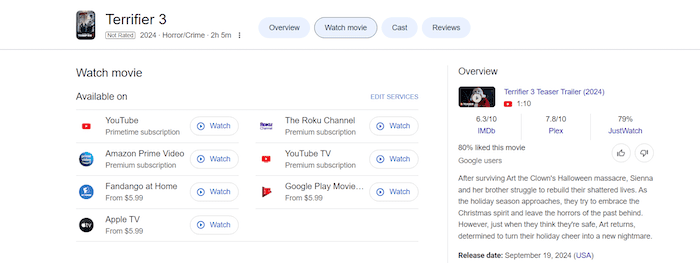
Terrifier 3 is currently available on multiple popular platforms, giving viewers several convenient ways to stream the movie. If you already have a premium subscription, you can watch it at no extra cost on Amazon Prime Video, YouTube (Primetime subscription), YouTube TV, or The Roku Channel. Simply search for the movie within the platform, and you’ll be able to stream it instantly in HD.
If you don’t have a subscription, you can still access Terrifier 3 through pay-per-view options. The movie is available to rent or buy starting from $5.99 on Apple TV, Google Play Movies, and Fandango at Home.
However, subscriptions can be expensive, and rentals often expire within 48 hours. If you want to keep Terrifier 3 saved permanently for offline viewing, the next section covers the best legal and practical methods to do so.
If you’re looking to download Terrifier 3 and store it locally for flexible offline viewing, there are a few reliable options to consider. Whether you prefer official apps, trusted download tools, or other methods, this section breaks down the pros and cons of each.
Read Also:
How to Get Bad Boys: Ride or Die Movie Download [Updated]
How to Download Dune Part Two Full Movie (3 Methods)
Method 1. Get Terrifier 3 Full Movie Download on Official Apps
One of the easiest and most reliable ways to download Terrifier 3 is by using official streaming apps. The movie is available across several platforms, such as Amazon Prime Video, YouTube Primetime, and Google Play Movies, many of which allow users to stream with a subscription or rent/buy and download for offline viewing.
If you have a subscription to one of these services, or you’re willing to purchase the film, you can easily save it for offline playback.
Let’s take Amazon Prime Video as an example of walking through the process:
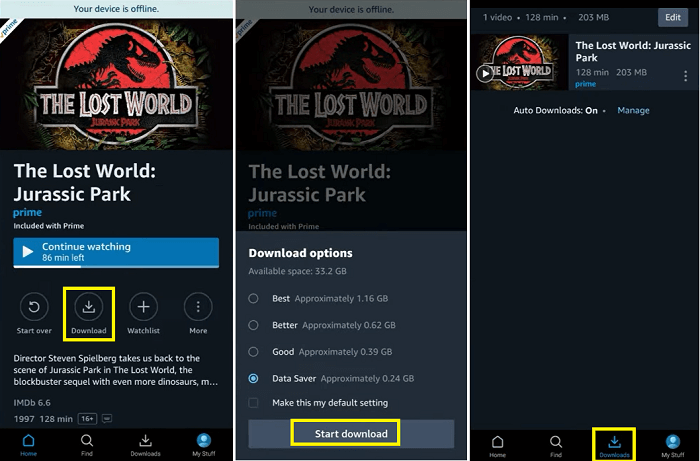
Step 1. Make sure you have an active Amazon Prime subscription.
Step 2. Open the Amazon Prime Video app on your mobile device and sign in.
Step 3. Search for Terrifier 3. If it’s included with Prime, it will be available to watch instantly.
Step 4. Tap the “Download” icon next to the movie title to save it to your device for offline viewing.
That said, this method does come with some limitations. Downloads through official apps are encrypted and locked within the app, meaning you can’t transfer the video file to other devices, play it with third-party media players, or back it up externally. Additionally, offline access may be restricted by time limits or region-specific licensing, and you’ll lose access if your subscription ends.
Method 2. Get Terrifier 3 Full Movie Download with Reliable Downloaders
If you prefer more flexibility and control over your downloads, such as saving the movie as an MP4 file to play on any device, using a reliable third-party downloader is a great option. These tools are especially useful if you want to keep a permanent local copy of Terrifier 3 without being tied to a specific app or streaming subscription.
MovPilot All-in-One Video Downloader is a versatile tool that lets you permanently download movies from platforms such as Amazon Prime Video, Netflix, Disney+, Hulu, and HBO. Compatible with Windows and macOS, it supports HD downloads up to 1080p in MP4 or MKV format, retains Dolby 5.1 audio, and offers H.265 encoding for smaller, high-quality files.
You can choose multiple audio languages, download soft, hard or external subtitles, and enjoy fast downloads. With no ads, no viewing limits, and full offline access, MovPilot is an ideal solution for users who want flexibility, quality, and long-term ownership of their favorite video content.
Key Features of MovPilot All-in-One Video Downloader:
- Compatible with Amazon Prime, Netflix, Disney+, Hulu, HBO, and more.
- Exports videos in MP4 or MKV formats with up to 1080p resolution.
- Retains surround sound quality with up to 640kbps audio bitrate.
- Hardware acceleration offers speeds over 5x faster than typical apps.
- Supports multiple audio and subtitle types, including hard, soft, or external subtitle files.
Using MovPilot All-in-One Video Downloader to save Terrifier 3 is simple and beginner-friendly. Just follow these steps:
Step 1. Launch the Program and Log in
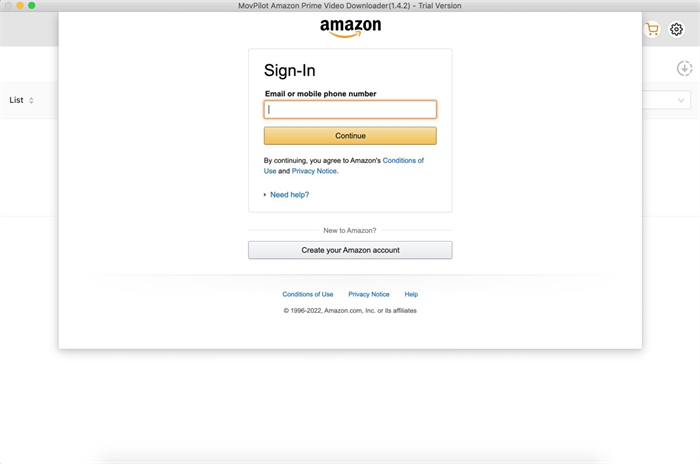
Open the software and select Amazon Prime Video as your streaming platform from the home interface. Within the built-in browser, sign in to your Amazon Prime Video account securely. This allows MovPilot to access your library and streamable content.
Step 2. Search or Paste the Movie URL
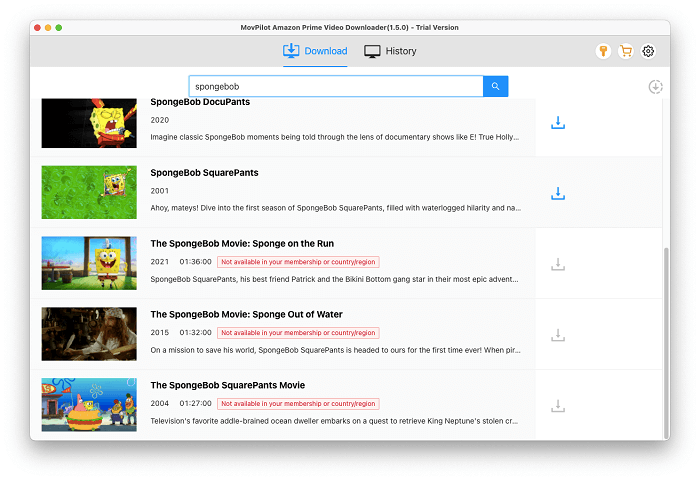
Use the search bar to type in “Terrifier 3” or paste the direct URL of the movie from Prime Video. Press Enter to load the movie details.
Step 3. Customize Download Settings
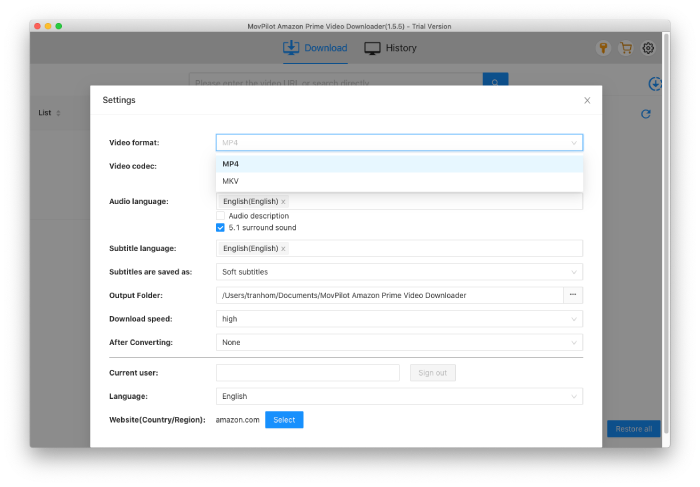
Before downloading, choose your desired video resolution (up to 1080p), audio language, subtitle type (hard, soft, or external), and output format (MP4 or MKV). You can also enable H.265 encoding for better compression without quality loss.
Step 4. Start Downloading
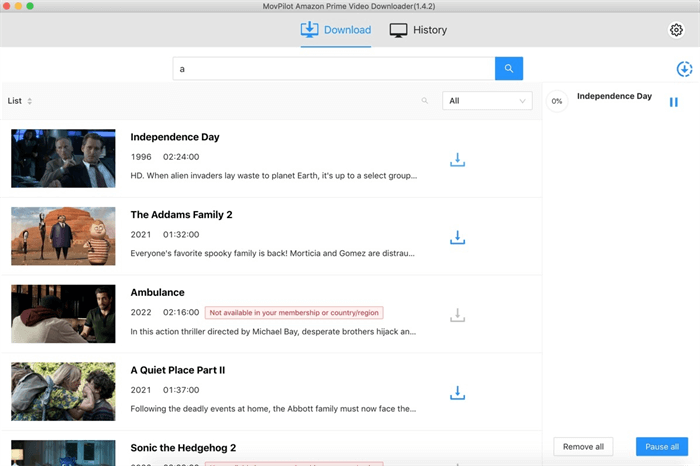
Click the “Download” button. The movie will begin downloading to your local folder. Once finished, you’ll find the movie saved on your computer in your selected format and can be played offline on any device without restriction.
Method 3. Get Terrifier 3 Full Movie Download from Online Websites
Another common way people search for Terrifier 3 full movie download is through online websites that claim to offer direct download links, often for free. A quick Google search may lead you to dozens of such sites promising access without subscriptions or payment.
While this may sound convenient, these online websites often come with serious drawbacks, including low video quality, misleading ads, and potential exposure to malware or viruses. Most of these platforms operate without legal authorization, making downloads risky both in terms of cybersecurity and copyright violation.
Here’s how to download Terrifier 3 using online websites:
Step 1. Search for a third-party movie download site or forum and look for Terrifier 3 full movie download.
Step 2. Choose a link that appears trustworthy and matches the correct title and release year.
Step 3. On the download page, check the available video formats (e.g., MP4), resolution, and file size.
Step 4. Click the “Download” button. The file will begin downloading automatically, or you’ll be redirected to a cloud drive link.
Method 4. Get Terrifier 3 Full Movie Download Using Torrents
Another widely used method to get Terrifier 3 is by using torrent downloads. Through torrenting, users can access the movie in high quality (e.g., 720p, 1080p, even 4K), select preferred file formats, and store the video permanently for offline viewing. Torrent sites like 1337x, YTS, and The Pirate Bay often list multiple versions of the film, giving users more flexibility than streaming platforms.
However, this method also has notable downsides. Torrents are often unregulated, and files may contain malware, misleading content, or be poorly encoded. More importantly, downloading copyrighted content via torrents may be illegal in your country, and could result in legal consequences if detected. Using a VPN is strongly recommended to protect your identity and data.
Here’s how to download Terrifier 3 using a torrent:
Step 1. Download and install a torrent client on your computer, such as uTorrent.
Step 2. Visit a reliable torrent website, and search for “Terrifier 3 full movie torrent”.
Step 3. Choose a torrent file with a high number of seeders, then download the “.torrent” file or copy the magnet link.
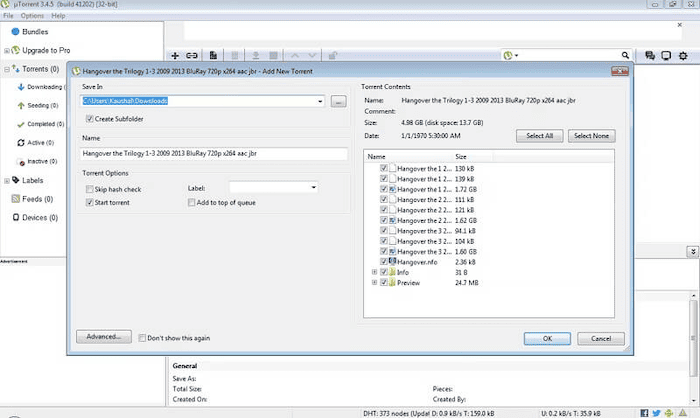
Step 4. Open the torrent file in your torrent client. Set the download folder and confirm the file selection.
Step 5. Wait for the download to complete. Once finished, open the video file using a media player like VLC.
Will I lose video quality when downloading?
It depends on the method. Official apps and tools like MovPilot typically offer high-quality downloads up to 1080p, with MovPilot also supporting H.265 encoding for better compression. Torrent files can range from poor to excellent quality, but the results are inconsistent. Online websites often provide low-resolution, re-encoded videos with noticeable quality loss. For the most reliable results, stick to official platforms or trusted downloaders.
Conclusion
In this guide, we explored four main ways to get the Terrifier 3 full movie download—official streaming apps, reliable third-party downloaders like MovPilot, online websites, and torrent platforms. Each method has its own pros and cons: while official apps offer legal and secure access, they limit file control; torrenting and free sites may promise flexibility but come with legal and safety risks.
For the best balance of quality, flexibility, and safety, we recommend using MovPilot All-in-One Video Downloader. It allows you to download Terrifier 3 in high resolution, save it permanently in MP4 or MKV format, and watch it anytime, anywhere, without platform restrictions or playback limits. Whether you’re a horror enthusiast or just catching up on the buzz, now you can enjoy Terrifier 3 the way that works best for you.