






Paramount Plus as one of the most popular video streaming platforms provides lots of trending movies as well as TV shows in high resolutions for users to enjoy online. However, to avoid streaming errors caused by unstable network connections, or bypass regional limitations to play videos overseas, you probably want to save videos to watch Paramount Plus offline without any restriction. Hence, this guide will mainly focus on how to download Paramount Plus videos on laptops. If you also need help, just keep on reading!
Related Readings:
Can I Directly Download Paramount Plus Videos on PC?
Unfortunately, Paramount Plus doesn’t offer a built-in download feature for laptops. This is mainly because Paramount Plus applies stricter DRM protection on PC and Mac systems, where downloaded files are easier to access, copy, or redistribute. To reduce copyright risks, offline downloads are officially limited to mobile devices only.
Currently, the download feature is available only to Paramount Plus SHOWTIME plan subscribers using the mobile app on supported devices, including:
- iPhone and iPad running iOS 15 or later
- Android phones and tablets with Android 5.0 or above
Even on mobile, official downloads come with clear limitations. Downloaded videos can only be played inside the Paramount Plus app, are subject to expiration, and cannot be transferred to other devices or external storage. There is also no option to download videos in common formats like MP4.
Therefore, if you want to download Paramount Plus videos on a laptop for flexible offline viewing, a third-party Paramount Plus downloader is required. In the next part, we’ll introduce a reliable solution to help you do exactly that.
How to Download Paramount Plus Videos on Laptops for Offline Playback Forever
As Paramount Plus also adopts DRM (Digital Rights Management) to encrypt the streaming media, in order to protect them from illegal pirating and use, to download Paramount Plus videos on laptop, you will need to get rid of DRM first. Hence, to help with this, MovPilot Paramount Plus Video Downloader is recommended.
MovPilot Paramount Plus Video Downloader has embedded the powerful DRM removal function to detect and strip protection from Paramount Plus streaming videos, in order to help you download your favorite movies as well as TV episodes offline, even without the Paramount Plus plans subscriptions required. It will output video downloads in mainstream formats such as MP4, with uncompressed resolutions and original subtitles as well as audio tracks preserved.
After grasping the Paramount Plus videos saved locally, you are able to transfer and keep them across devices and enjoy the streaming offline, without worrying about any streaming error or content expiration!
Highlights of MovPilot Paramount Plus Video Downloader
- Embedded web browser to search for your favorite Paramount Plus movies and TV series to download offline directly;
- Mainstream formats and customized video resolutions (best at HD 1080p) to output video downloads as you desire flexibly;
- Maintain original Dolby 5.1 surround sound effects to deliver you the theatre-like movie playback experience at home theaters;
- Full preservation of audio tracks and subtitles in multi-languages for global audiences to enjoy the same streaming experience offline;
- Acceleration technologies are applied to resolve batch Paramount Plus videos download at 5X faster speed to boost higher efficiency.
With an intuitive interface design, MovPilot Paramount Plus Video Downloader also ensures the most simplified operations to help download Paramount Plus videos on laptops only by taps. In the following, also grasp the brief guide to see how the software works to help:
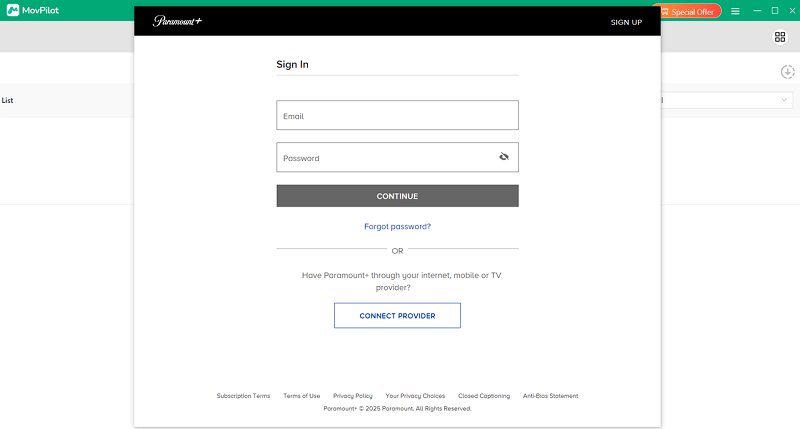
STEP 1. After installing the software, launch MovPilot Paramount Plus Video Downloader on your laptop. Select the Paramount Plus platform from the main interface and follow the guidance to log in to the platform via your account.
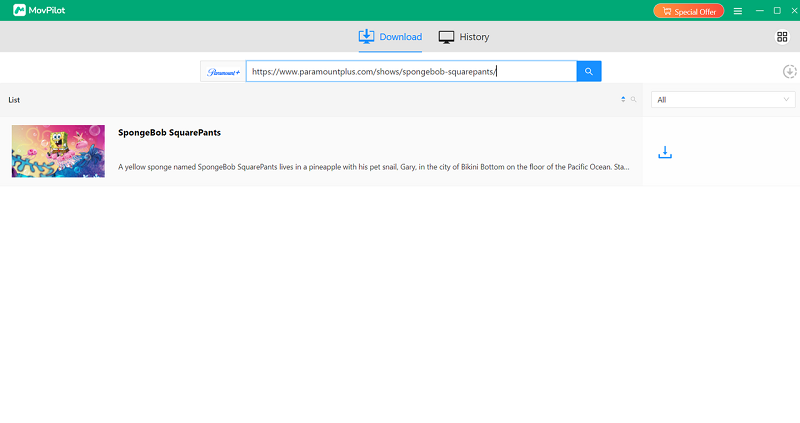
STEP 2. Once access the downloader, directly type in keywords or enter URLs to access the movies or TV series you want to download.
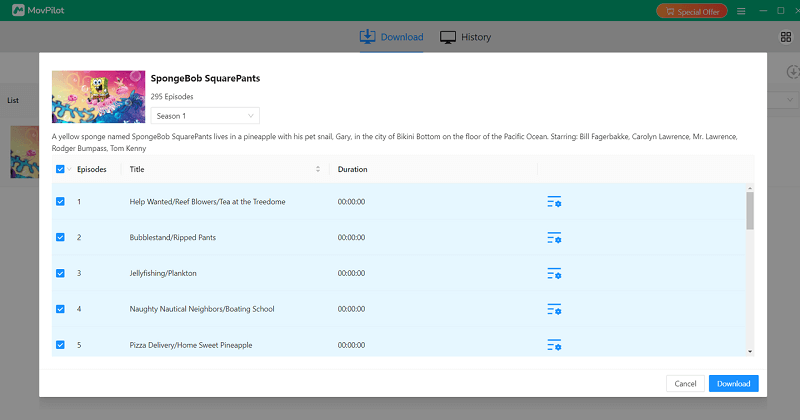
STEP 3. From the video results, find the movie or TV series you need to save offline. To download the TV show, by clicking the download icon and a window will pop up to let you select the exact episodes you’d like to save in your requirements.
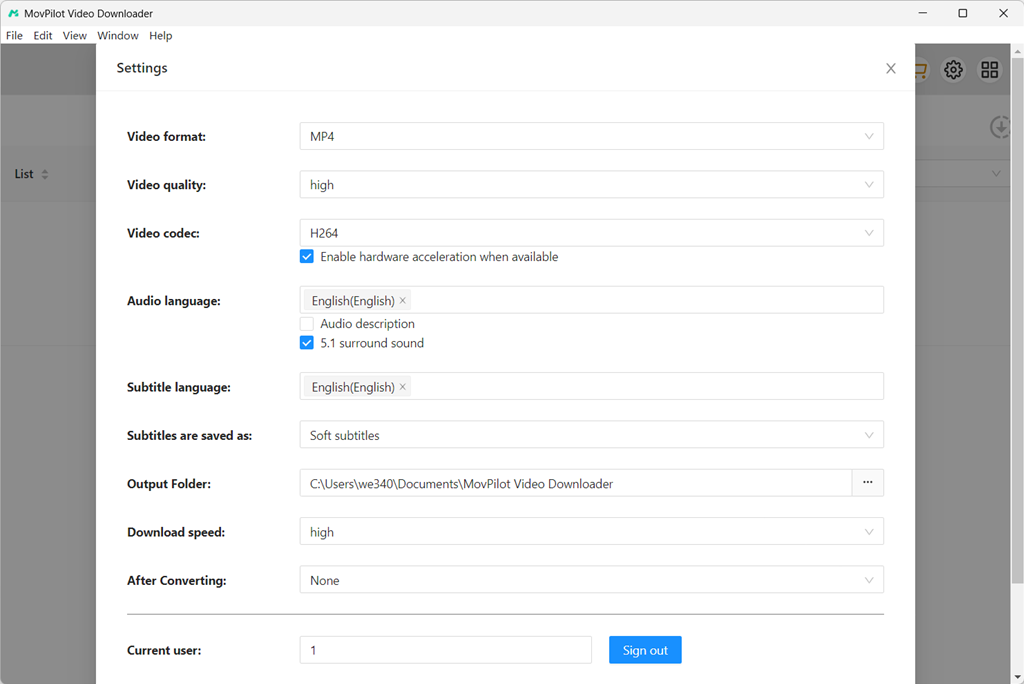
(Optional) STEP 4. If you need to customize the downloading settings, simply tap the “Settings” icon in the upper-right corner to open the setting window. Here, you are able to adjust the video format, codec, and languages as you desire flexibly.
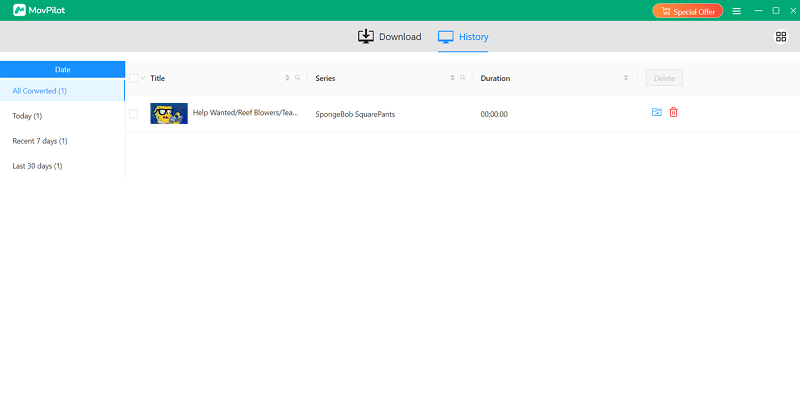
STEP 5. Finally, simply tap the “Download” icon and MovPilot Paramount Plus Video Downloader will download Paramount Plus videos on laptops right away. Wait for a short moment and you will be able to access the video downloads and enjoy the streaming offline smoothly!
Extra Tip: Record Paramount Plus Videos to Save Offline on Laptop
Despite using a video downloader to download Paramount Plus videos on laptop, you can also try using a recorder to extract your favorite parts of Paramount Plus movies or TV episodes to keep as personal collections offline. For such a purpose, FonePaw Screen Recorder can deliver you reliable help.
FonePaw Screen Recorder offers a powerful screen recording function, which can also avoid black screen errors and lets you successfully capture Paramount Plus videos to output as local files offline. The software delivers smart recording features like the lock-screen recording mode, scheduled recording function, and more to save your effort in processing the screen recording. To record Paramount Plus videos on laptop, you only need to go through the following easy steps:
STEP 1. Launch FonePaw Screen Recorder on laptop and select “Video Recorder”.
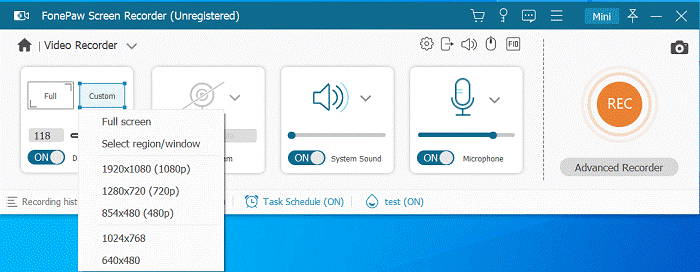
STEP 2. Customize the recording settings like the recording area and system sound volume. Turn off the microphone to avoid capturing noise.
STEP 3. Now, play the Paramount Plus video and also tap REC to start capturing it right away.
STEP 4. Once the recording is over, tap “Stop” and you can immediately save the recorded Paramount Plus video offline!
NOTE:
However, recording long Paramount Plus videos can take time, and the recording quality is still compressed compared to using a downloader. Hence, if you want to get Paramount Plus videos saved offline without quality loss and more efficiently, you are still recommended to try MovPilot Paramount Plus Video Downloader instead.
FAQs About Paramount Plus Download on PC
Is it legal to download Paramount Plus videos?
Downloading Paramount Plus videos through the official app is legal, as long as it’s for personal, offline viewing and follows the platform’s terms of use. However, these downloads are encrypted, limited to the app, and cannot be shared or kept permanently.
Using third-party downloaders falls into a legal gray area. In most regions, downloading content you have access to for personal use is generally tolerated, but redistributing, selling, or sharing downloaded Paramount Plus videos is illegal and violates copyright laws.
What browser does Paramount Plus work best on?
Paramount Plus works best on modern, up-to-date browsers that fully support HTML5 playback and DRM. In general:
- Google Chrome offers the most stable performance and widest compatibility on both Windows and macOS.
- Microsoft Edge (Chromium-based) performs similarly to Chrome and works well on Windows.
- Safari is the best option for macOS users, as it’s optimized for Apple’s system and DRM handling.
Outdated browsers or those with disabled DRM components may cause playback issues, login errors, or missing features. For the best experience, always keep your browser updated to the latest version.
Conclusion
Although Paramount Plus doesn’t deliver the direct downloading function for desktop users, you can still download Paramount Plus videos on laptops to enjoy the streaming smoothly offline. MovPilot Paramount Plus Video Downloader offers high-quality outputs, and stable as well as speedy performance to help you save videos from the platform, allowing you to enjoy the playback offline everywhere. Now, install the software and start with its free trial to download Paramount Plus videos on laptops right away!