






Key Takeaways:
- The official Paramount+ app allows Premium subscribers to enjoy offline viewing on mobile phones, but comes with restrictions.
- A third-party solution, MovPilot Paramount Plus Video Downloader, can bypass all download limitations, enabling you to download shows and movies on Paramount Plus to MP4/MKV in 1080P PC/Mac.
Do you often stream videos while traveling or commuting, but worry about mobile data limits? Streaming HD videos, in particular, can quickly eat up your data. If so, choosing to download Paramount Plus videos in advance is a perfect solution.
Not sure how to do it? Keep reading! This article will guide you on how to download shows and movies on Paramount Plus in Full HD 1080P, covering both the official app and a powerful third-party tool for PC and Mac users. Scroll down to start exploring for HD offline viewing!

Can You Download Videos from Paramount Plus for Offline Viewing?
Absolutely, yes! Paramount Plus does support offline viewing, but only for eligible subscribers. If you want to download shows or movies on Paramount Plus using the official app, you must subscribe to the Paramount+ Premium plan (formerly Paramount+ with Showtime). Users with the Essential plan do not have access to offline downloads.
Additionally, many users mistakenly think that subscribing automatically means unlimited downloads, but that is not true. Even with a qualified plan, there are still several download limitations to keep in mind:
- Each account can only store up to 25 downloaded titles at a time.
- Unwatched downloads are valid for up to 30 days. Once playback starts, they will expire within 48 hours.
- Downloads can only be played within the official app on Android devices (Android 7) or iPhone/iPad (iOS 16+).
- Some titles may disappear due to licensing expiration, even if you have already downloaded them earlier.
- Regional restrictions may still apply to previously downloaded titles.
- You cannot directly save Paramount Plus videos offline in common formats such as MP4 or MKV.
These limitations mean you cannot keep Paramount+ videos forever, nor watch them freely on laptops, TVs, or other large-screen devices.
If you want to download Paramount Plus videos to PC or Mac, keep them permanently, and watch them offline without expiration, proceed to Part 3. We will introduce a reliable third-party tool, MovPilot Paramount Plus Video Downloader, to save Paramount Plus episodes in 1080P MP4 format for unlimited offline viewing.
How to Download Shows on Paramount Plus on Android/iPhone (The Official Way)
The most straightforward solution to watching Paramount Plus offline is by subscribing to the Paramount+ Premium plan. This enables you to download your favorite Paramount+ shows and movies directly onto your mobile devices for seamless offline access anywhere.
Curious about how to get started? Continue reading for a step-by-step guide on how to download Paramount Plus videos to your Android/iOS mobile device.
Step 1. Open the Paramount+ app on your Android/iOS device and sign in to your valid subscribed account.
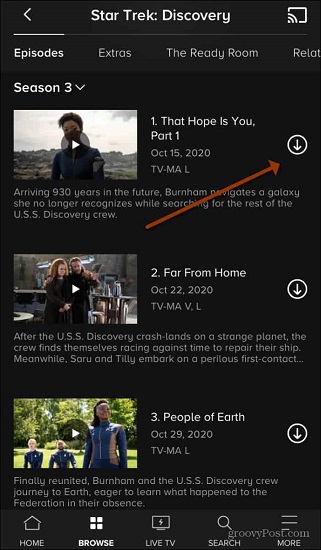
Step 2. Locate the movie or show you want to download, and check if there is a downward arrow icon next to the title. If it is, this means this video is available for download.
Step 3. Tap the download icon to start the download on Paramount Plus.
Step 4. When the download is complete, a checkmark will appear next to the title. You can now access the video via the “Downloads” tab and watch Paramount Plus offline effortlessly.
How to Download Shows on Paramount Plus to PC/Mac (Works With Any Plans)
For those who want to download Paramount Plus videos to a computer, the official method can be frustrating. So, can you download Paramount Plus movies on laptops? Yes, but not through the official app. Instead, you will need a professional third-party download tool.
MovPilot Paramount Plus Video Downloader stands out as a top choice as it can effectively unlock all Paramount Plus download restrictions, offering unlimited downloads. With this feature-rich tool, you can download originals, TV shows, movies, or live sports from Paramount Plus to MP4 or MKV for HD offline viewing. Even better, you can keep them forever and transfer your Paramount+ videos to a TV, laptop, or other devices for unrestricted playback anytime, anywhere.
Why Choose MovPilot Paramount Plus Video Downloader:
- Download videos on Paramount Plus as MP4 or MKV files with no DRM protection.
- Output Full HD 1080P Paramount Plus videos with Dolby Digital 5.1 audio quality on PC.
- Handle Paramount Plus downloads in batches with one click.
- Offer multilingual audio tracks and subtitles for your preference.
- Remove ads automatically, even if you subscribe to an ad-supported tier.
- Deliver a user-friendly download experience with a built-in browser and 5X faster speed.
Plus, MovPilot Paramount Plus Video Downloader is very easy to get started. Now, let’s move on and explore how to download Paramount Plus videos by using it.
Step 1. Get Paramount Plus Video Downloader Ready
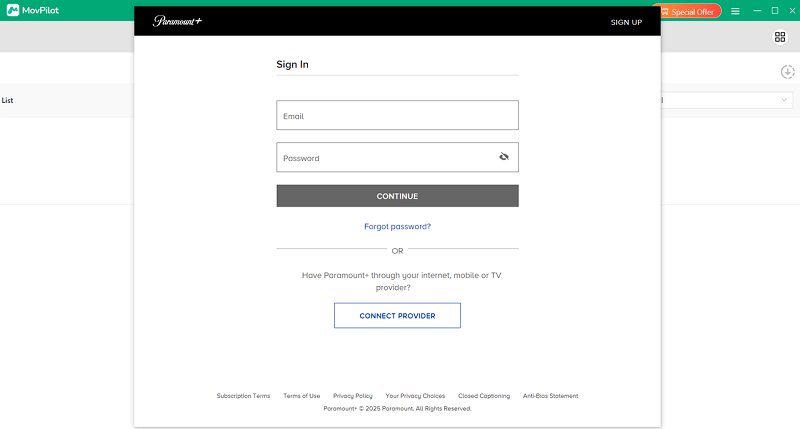
To start with, install and launch MovPilot Paramount Plus Video Downloader on your Windows or Mac computer. Then, select the “Paramount+” service in the main interface to log into your Paramount Plus account.
Tip. Both Paramount+ Premium and Essential plans work here.
Step 2. Preset Output Options
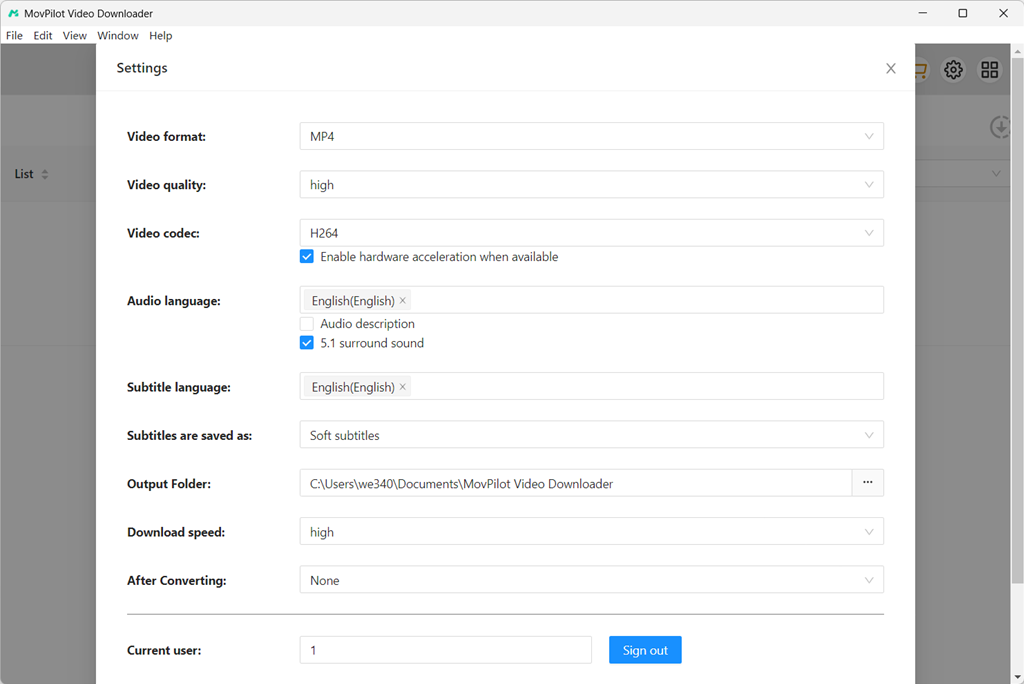
Click on the gear icon in the upper right corner to access “Settings”. Here you can customize the output settings for Paramount Plus downloads based on your needs, including Video format (MP4 or MKV), Video quality (up to 1080P), Video codec, Audio language, subtitle language, and so on.
Step 3. Add Movies or Shows on Paramount Plus to Download
You will have two methods to find your target Paramount Plus video.
- Enter the title keyword into the built-in browser, and all related results will appear in no time.
- Directly paste the video URL into the search bar to find the specific Paramount+ show.
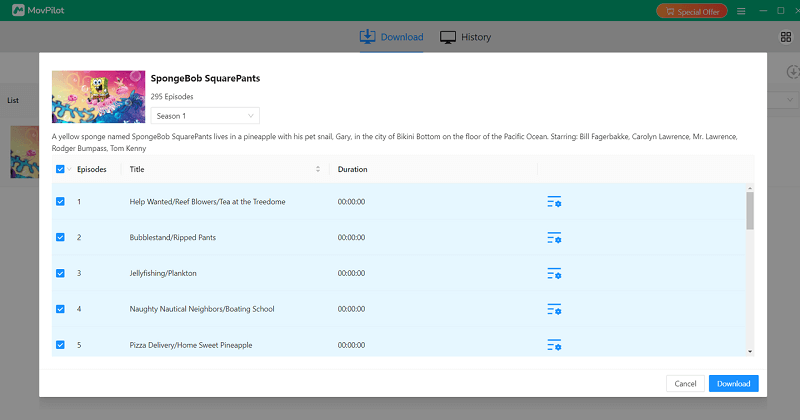
Once you hit the download icon, a window will pop up if there are multiple seasons/episodes. Choose specific seasons or episodes of the Paramount+ show you want.
Step 4. Download Paramount Plus Videos
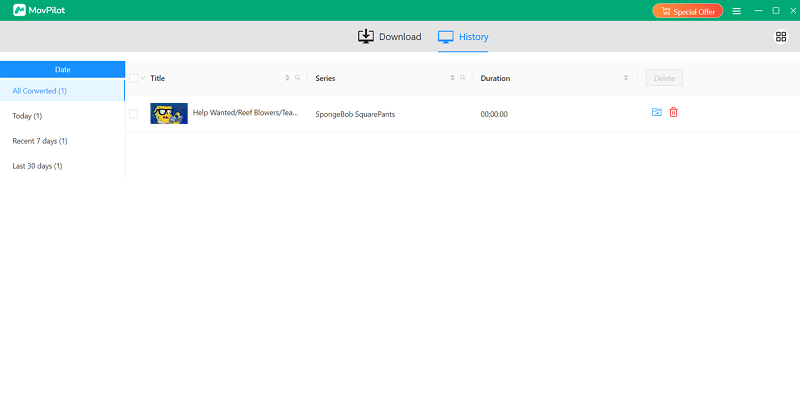
Hit the “Download” button to download Paramount Plus episodes in batches. After a short while, you can move to the “History” tab and click the folder icon to locate all your successful DRM-free Paramount Plus video downloads on your computer for unrestricted offline playback.
FAQs on Paramount Plus Download
Q1. Which Paramount plan allows downloads?
Generally, only the Paramount+ Premium plan supports downloading shows and movies for offline viewing. For Essential plan subscribers, you will need to upgrade your account.
However, if you want to download Paramount Plus videos without plan restrictions, third-party tools like MovPilot Paramount Plus Video Downloader are highly recommended, which work for both Essential and Premium accounts.
Q2. Can you download shows on Paramount Plus on Fire Tablet?
No. Although the Fire Tablet supports the official Paramount+ app, it is not on the official list of devices that support video downloading.
If you want to watch offline on your Fire Tablet, a reliable method is to use a professional Paramount Plus movie downloader to save your favorite shows in 1080P MP4 or MKV format, and then manually transfer the video files to your Fire Tablet.
Q3. Can you download on Paramount Plus free trial?
Yes, as long as your free trial is for the Paramount+ Premium plan. During the trial, you can download Paramount Plus videos for free. However, if you want to retain the downloads after canceling your subscription, then it is best to use a third-party tool like MovPilot to download Paramount+ to MP4/MKV beforehand.
Q4. Why won’t Paramount Plus let me download? How to fix it?
If you can not download Paramount Plus videos, there are several possible reasons:
- Unstable network: Switch to a stable and fast Wi-Fi connection to avoid download interruptions.
- Account or subscription issues: Ensure you are using an account with an active Paramount+ Premium plan.
- Reached the 25-title limit: Please delete old downloaded Paramount Plus shows/movies first.
- Insufficient device storage: Clear redundant files like unused apps, app cache to free up storage space.
- Outdated app/device version: Update the Paramount+ app or your device system to the latest version and try downloading again after restarting.
If previous fixes do not work, you can also check: Full Guide to Fix Paramount Plus Downloads Not Working on PC & Mobile.
Q5. What can you download on Paramount Plus?
With the Paramount+ Premium plan, you can easily download most video content from the official video library, including exclusive originals, blockbuster movies, live sports highlights, TV shows, documentaries, and more. Here are some popular titles on Paramount Plus:
- South Park
- Tulsa King
- Landman
- Mayor of Kingstown
- Yellowstone
- SpongeBob SquarePants
Keep in mind, though, these videos can be removed at any time due to licensing expiration. Therefore, if you want to save Paramount Plus episodes offline for long-term collection, it is recommended to download and back them up in advance.
Q6. Can I watch Paramount Plus on an airplane?
Yes, sure. If you are a SkyMiles Member, you will be eligible to stream Paramount+ original series, blockbuster movies, live sports, and more for up to 24 hours through Delta Sync Wi-Fi. Keep in mind that some Paramount+ titles have regional restrictions, leading to being inaccessible when traveling to another country.
Alternatively, you can also download your favorite Paramount Plus videos on your device in advance and watch them offline on the plane, regardless of your internet connection or geo restrictions.
Conclusion
This article has walked you through how to download Paramount Plus videos on Windows, Mac, Android, and iPhone/iPad. If you plan to continue the Paramount+ Premium plan, its official app offers a perfect option for mobile devices.
However, if you prefer to enjoy Paramount Plus downloads on your computer, MovPilot Paramount Plus Video Downloader can have you covered. With it, you can easily save shows and movies from Paramount Plus as MP4 or MKV files in 1080P, so you can freely play them on any device. Say goodbye to Paramount+ download restrictions and give MovPilot a try!