





The Marvel series movies have been a legend in the movie industry for years, and they are still gaining more audiences and fans around the globe with their amazing story plots. When streaming platforms also deliver mind-blowing and high-quality experiences to stream movies online, it can be much easier to access and watch Marvel movies in your home theatre!
Today’s guide will mainly concentrate on offering you the best way to download Marvel movies, in order to keep your favorites as collections for playback at any time when you want to review the storiesthat happened in the Marvel Universe. Now, let’s dive into reading and master how.
You May Interest In
Where to Watch Marvel Movies?
Currently, the vast majority of Marvel movies and TV series are available on Disney Plus. Whether you use the web browser or the Disney+ app, you can stream the Marvel Cinematic Universe (MCU) with stunning high definition and immersive sound effects. For eligible subscribers, the platform also offers a built-in offline mode, allowing you to download Marvel movies and bypass sudden network drops or annoying video buffering.
However, before we dive into the exact methods of how to download these blockbuster hits to your devices , including how to keep them permanently as MP4/MKV files, you might be wondering where to start your movie marathon. With such a massive timeline, let’s look at the must-have titles for your offline collection.
Best Marvel Movies to Download (MCU Watch Order)
The Marvel Cinematic Universe (MCU) is vast. If you are planning a weekend movie marathon, downloading them in order is highly recommended. Whether you want to witness the origin of the Avengers or explore the multiverse, keeping these blockbuster hits in 1080P or 4K on your local drive guarantees a cinematic experience without buffering. Here are some must-download Marvel movies to kickstart your offline collection:
- Iron Man (2008): The movie that started it all. A perfect test for your home theater’s surround sound.
- The Avengers (2012): The epic team-up featuring Captain America, Thor, and Hulk.
- Guardians of the Galaxy (2014): Download this for its incredible visual effects and iconic soundtrack.
- Spider-Man: No Way Home (2021): A visually stunning multiverse adventure that you’ll want to rewatch multiple times.
How to Download Marvel Movies for Offline Viewing
Overall, there are two solutions to downloading Marvel movies to watch offline. One is by using the official download function, while the other can be turned into a reliable third-party downloader to help. Let’s go for the official solution below.
Method 1: Download Marvel Movies on Phone via the Official Disney+ App (With Limits)
To use the official download function, you will need to be a subscriber to Disney+ Premium, Disney Bundle Duo Premium, Disney Bundle Trio Premium, or Legacy Disney Bundle in advance. Once you complete the billing and activate your premium account, please walk through the procedures below to download Marvel movies and enjoy the streaming offline:
Step 1. Run the Disney+ application on your mobile device.
Step 2. Search for the Marvel movie you’d like to download, and open its video information page.
Step 3. There will be a Download button available. Simply tap it and the Marvel movie will be saved to your library and get ready for local streaming!
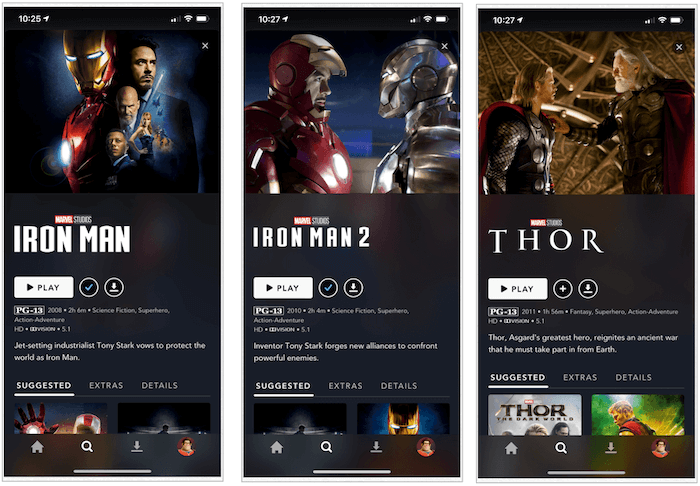
Please note that the downloaded Marvel movies will only be kept on your device when it is connected to the Internet every 30 days with an active Disney+ subscription plan. If you want to download movies on computers or keep them offline permanently even after canceling the Disney+ subscription, the following solution will help. Let’s keep on reading.
Method 2: Download Marvel Movies to MP4 on PC/Mac Permanently
While the official Disney+ app is convenient for mobile viewing, it restricts your downloads to encrypted cache files that expire and cannot be transferred. If you want to build a permanent local MCU collection on your computer or play these blockbuster hits on a bigger screen, you will need a dedicated tool to save them in universally compatible formats.
This is where MovPilot All-in-One Video Downloader comes in. Designed with a built-in web browser, it allows you to log directly into your streaming account and access the entire Marvel library seamlessly. Instead of saving temporary caches, MovPilot downloads Marvel movies as standard MP4 or MKV files straight to your PC or Mac. More importantly, it utilizes advanced decoding technology to preserve the ultimate cinematic experience, ensuring you get full HD 1080P video quality alongside the original multi-lingual audio tracks and subtitles.
Furthermore, with advanced hardware acceleration techniques integrated, MovPilot All-in-One Video Downloader can also deliver you an efficient process to resolve hour-long high-quality Marvel movie downloads swiftly at 5X faster speed. Plus, with the batch download function, you can save even more time and get your favorite Marvel movies downloaded offline at once.
Sparkling Features of MovPilot All-in-One Video Downloader
- Download movies from the official Disney Plus web browser in the program.
- Export Marvel movie downloads in popular video formats and lossless HD definitions.
- Retain original sound effects and multi-lingual audio as well as subtitles options to download Marvel movies.
- Guarantee an accelerated performance to batch download movies at 5X faster speed.
- Also compatible with other streaming platforms like Amazon Prime, Netflix, HBO Max, Hulu, and so forth.
In the following, please walk through the guidance and manipulate Marvel movie download with the help of MovPilot All-in-One Video Downloader in several easy procedures:
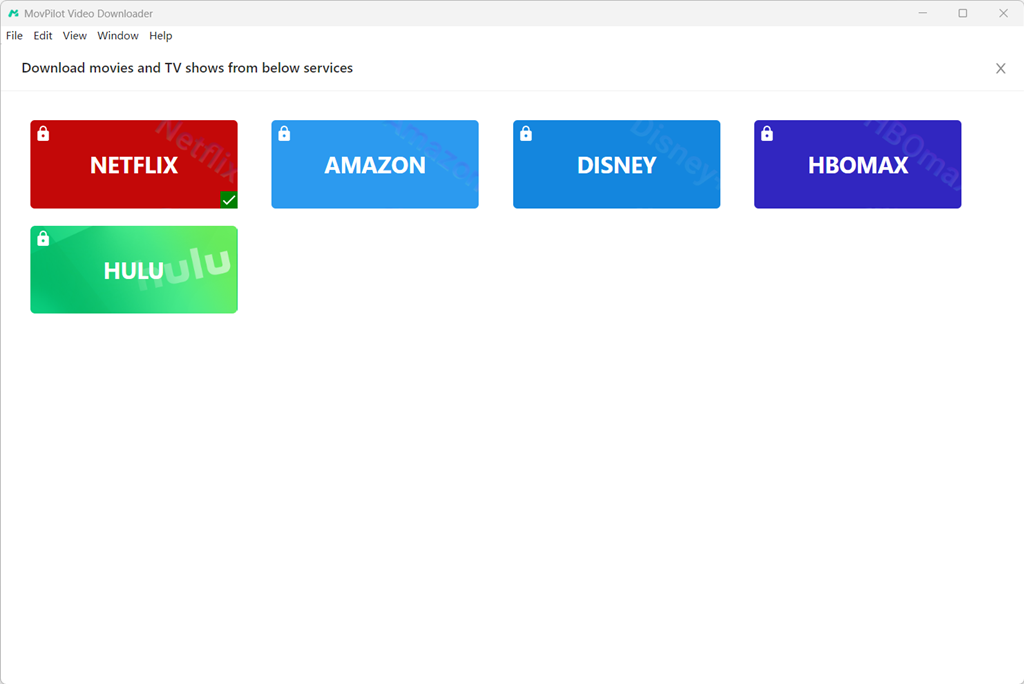
Step 1. Log in to Disney+ in MovPilot
Please run MovPilot All-in-One Video Downloader on your computer. After going to the main feed of the program, select Disney+ and complete the account login.
Step 2. Search for Marvel Movies
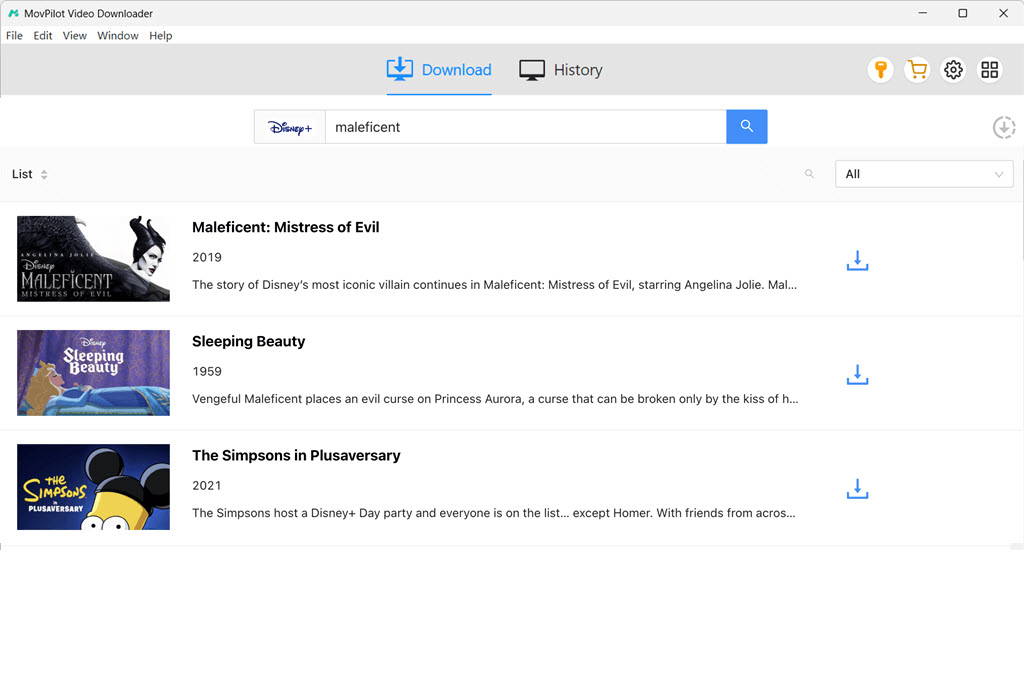
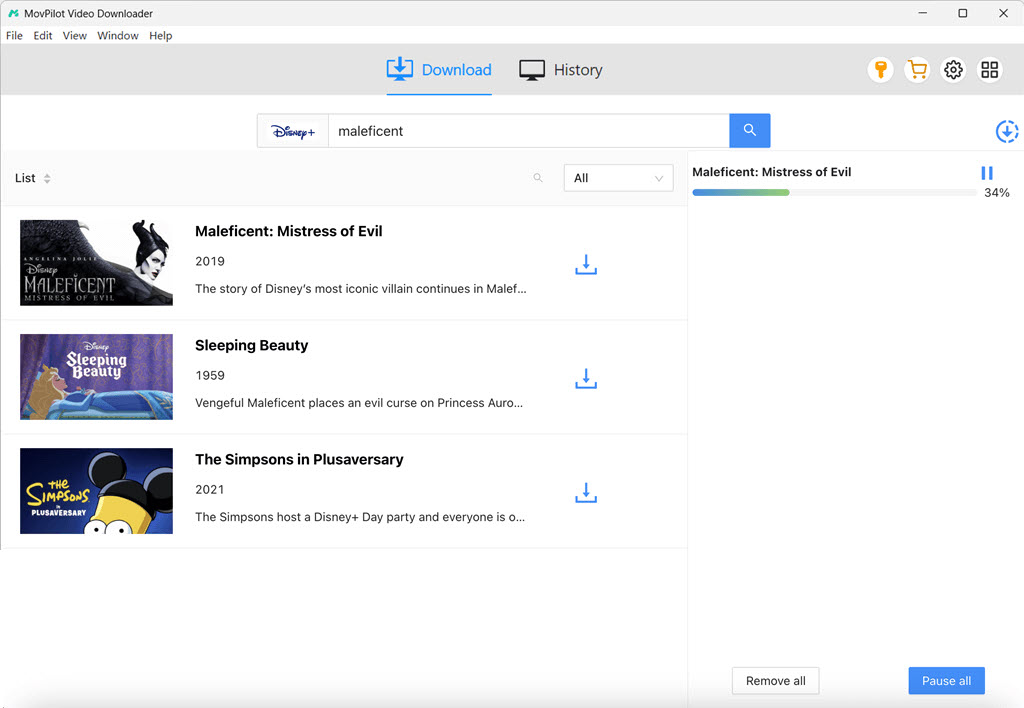
When you land on the interface of the downloader, please enter Marvel movie-related keywords to search for the results you need. They will be the same as the ones on the official platform.
Step 3. Configure Video Parameters
Before proceeding with the video download, you can click on the Setting button to further personalize output parameters in advance. Please choose the Format, Video Codec, Audio as well as Subtitle Languages in your preferences.
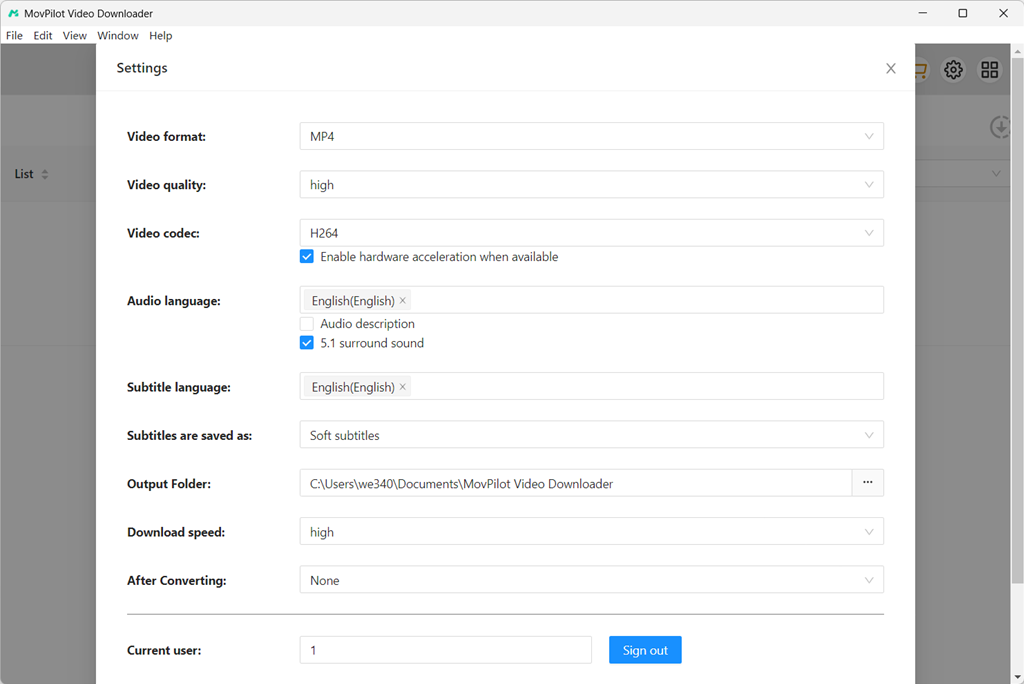
Step 4. Download Marvel Movies on Computers
Eventually, please return back to the video results and tap the Download button behind the Marvel movie you’d like to download. Once complete, you can access it offline and enjoy streaming with any installed media player on your device without restrictions!
Which Method Should You Choose?
To help you make a quick decision, here is a simple comparison between the official Disney+ download feature and MovPilot All-in-One Video Downloader:
| Feature | Official Disney+ App | MovPilot All-in-One Downloader |
|---|---|---|
| Output Format | Encrypted cache files | MP4/MKV/MOV |
| Supported Devices | iOS, Android, Fire tablet | Windows PC, Mac, Laptops |
| Video Quality | Up to 1080P (depends on device) | Full HD 1080P |
| Expiration | Expires if offline for 30 days | Permanent offline playback |
| Transferable | No | Yes (Transfer to USB, TV, any player) |
FAQs About Downloading Marvel Movies
Q1: Can I download Marvel movies to MP4?
A: The official Disney+ app does not allow you to download movies as MP4 files; it only saves them as encrypted cache files within the app. To download movies to plain MP4 or MKV formats, you will need a professional tool like MovPilot All-in-One Video Downloader, which lets you play the movies on any device.
Q2: Are all Marvel movies available on Disney Plus?
A: Most of the MCU movies are available on Disney+. However, due to licensing agreements, some titles, like certain Spider-Man movies or The Incredible Hulk, might be scattered across other streaming platforms like Amazon Prime or Starz. Fortunately, an all-in-one tool like MovPilot supports multiple platforms, making it easy to grab whatever you need.
Q3: Is it legal to download Marvel movies for offline viewing?
A: It is completely legal to use the official Disney+ app to download movies for offline viewing as part of your subscription. Using third-party tools like MovPilot is generally considered acceptable as long as the downloads are strictly for personal, non-commercial use. You should not share, distribute, or profit from downloaded copyrighted materials.
Final Words
To sum up, with the help of the Disney+ official application and the third-party MovPilot All-in-One Video Downloader, you can easily access and download Marvel movies offline by simply tapping your fingers! Now, based on the devices you are using, select the convenient method to save your favorite Marvel movies to enjoy the playback offline with your friends!
MovPilot All-in-One Video Downloader
Download videos from streaming services to be played on any device without limits.