





Quick Answer
You can watch Marvel movies primarily through Disney+, with some titles also available to rent or buy digitally through platforms such as Amazon Prime Video, Apple TV, and Google TV, depending on your region.
For offline viewing, the easiest option is to use the platform’s official download feature where available. If you need to save a playable MP4 file instead, a third-party video downloader may be an alternative, provided you have the right to access and download the content. Availability and download options vary by title and region.
Marvel movies continue to attract fans worldwide, and the recent release of Spider-Man: Brand New Day has brought renewed attention to the MCU. If you’re looking for ways to watch or download Marvel movies, this guide covers the main viewing platforms and practical offline options, including official downloads and third-party tools.
You May Interest In
Where to Watch Marvel Movies?
Currently, the vast majority of Marvel movies and TV series are available on Disney Plus, making it one of the main platforms for streaming the Marvel Cinematic Universe (MCU). You can watch them through a web browser or the Disney+ app, with eligible titles also available for offline viewing through the built-in download feature.
If you don’t have a Disney+ subscription, some Marvel movies can also be rented or purchased digitally through platforms such as Amazon Prime Video, Apple TV, or Google TV, depending on the title and your region. These options can be useful if you only want to watch or keep access to a specific movie without subscribing to another streaming service.
Best Marvel Movies to Download (MCU Watch Order)
The Marvel Cinematic Universe (MCU) is vast. If you are planning a weekend movie marathon, downloading them in order is highly recommended. Whether you want to witness the origin of the Avengers or explore the multiverse, keeping these blockbuster hits in 1080P or 4K on your local drive guarantees a cinematic experience without buffering. Here are some must-download Marvel movies to kickstart your offline collection:
- Iron Man (2008): The movie that started it all. A perfect test for your home theater’s surround sound.
- The Avengers (2012): The epic team-up featuring Captain America, Thor, and Hulk.
- Guardians of the Galaxy (2014): Download this for its incredible visual effects and iconic soundtrack.
- Spider-Man: No Way Home (2021): A visually stunning multiverse adventure that you’ll want to rewatch multiple times.
Can I Download Marvel Movies for Free?
It depends on what you mean by “free download”. If you already have access to Marvel movies through a service such as Disney+, you may be able to download eligible titles for offline viewing at no additional charge. However, these downloads are usually stored within the platform’s app and aren’t provided as standalone movie files.
If you mean downloading a Marvel movie as a free MP4 or MKV file, there is generally no official option to do so. Some websites may claim to offer free Marvel movie downloads, but they can involve unauthorized content, intrusive ads, or other security risks. For a safer option, stick to licensed streaming or digital purchase platforms, and only use third-party download tools with content you are legally allowed to access and download.
How to Download Marvel Movies for Offline Viewing
Overall, there are two solutions to downloading Marvel movies to watch offline. One is by using the official download function, while the other can be turned into a reliable third-party downloader to help. Let’s go for the official solution below.
Method 1: Download Marvel Movies via the Official Disney+ App (With Limits)
To use the official download function, you will need to be a subscriber to Disney+ Premium, Disney Bundle Duo Premium, Disney Bundle Trio Premium, or Legacy Disney Bundle in advance. Once you complete the billing and activate your premium account, please walk through the procedures below to download movies and enjoy the streaming offline:
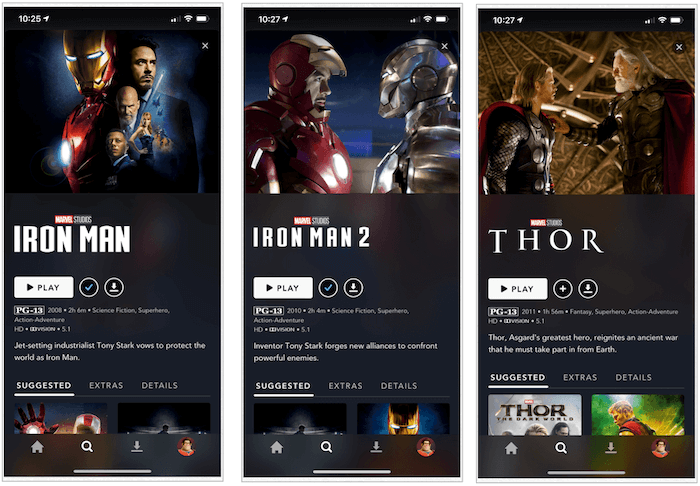
Step 1. Run the Disney+ application on your mobile device.
Step 2. Search for the Marvel movie you’d like to download, and open its video information page.
Step 3. There will be a Download button available. Simply tap it and the Marvel movie will be saved to your library and get ready for local streaming!
Can I download Marvel movies to MP4?
The downloaded Marvel movies will only be kept on your device when it is connected to the Internet every 30 days with an active Disney+ subscription plan. To download movies to plain MP4 or MKV formats, you will need a professional desktop video download tool, which will be introduced in the following text.
Method 2: Download Marvel Movies to MP4 with a Desktop Video Downloader
While the official Disney+ app is convenient for mobile viewing, it restricts your downloads to encrypted cache files that expire and cannot be transferred. If you want to build a permanent local MCU collection on your computer or play these blockbuster hits on a bigger screen, you will need a dedicated tool to save them in universally compatible formats.
This is where MovPilot All-in-One Video Downloader comes in. Designed with a built-in web browser, it allows you to log directly into your streaming account and access the entire Marvel library seamlessly. Instead of saving temporary caches, MovPilot downloads Marvel movies as standard MP4 or MKV files straight to your PC or Mac. More importantly, it utilizes advanced decoding technology to preserve the ultimate cinematic experience, ensuring you get high video quality which can be up to 1080p HD alongside the original multi-lingual audio tracks and subtitles.
Furthermore, with advanced hardware acceleration techniques integrated, MovPilot All-in-One Video Downloader can also deliver you an efficient process to resolve hour-long high-quality Marvel movie downloads swiftly at up to 5X faster speed. Plus, with the batch download function, you can save even more time and get your favorite Marvel movies downloaded offline at once.
Sparkling Features of MovPilot All-in-One Video Downloader
- Download movies from the official Disney Plus web browser in the program.
- Export Marvel movie downloads in popular video formats and lossless HD definitions if the source permits.
- Retain sound effects and multi-lingual audio as well as subtitles options to download Marvel movies.
- Guarantee an accelerated performance to batch download movies at up to 5X faster speed.
- Also compatible with other streaming platforms like Amazon Prime, Netflix, HBO Max, Hulu, and so forth.
In the following, please walk through the guidance and manipulate Marvel movie download with the help of MovPilot All-in-One Video Downloader in several easy procedures:
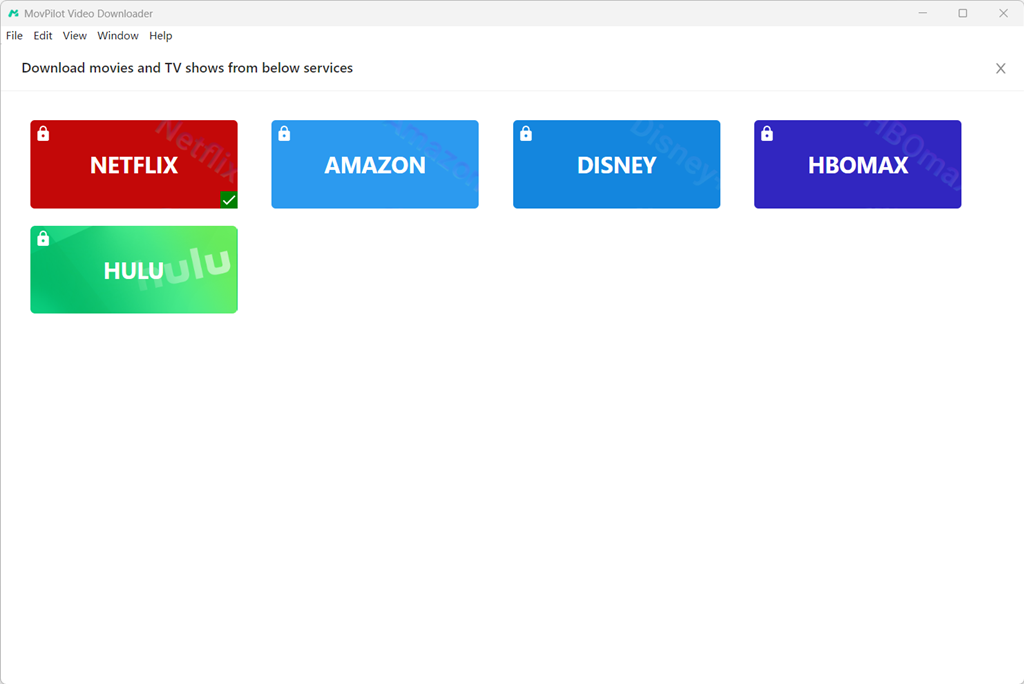
Step 1. Log in to Disney+ in MovPilot
Please run MovPilot All-in-One Video Downloader on your computer. After going to the main feed of the program, select Disney+ and complete the account login.
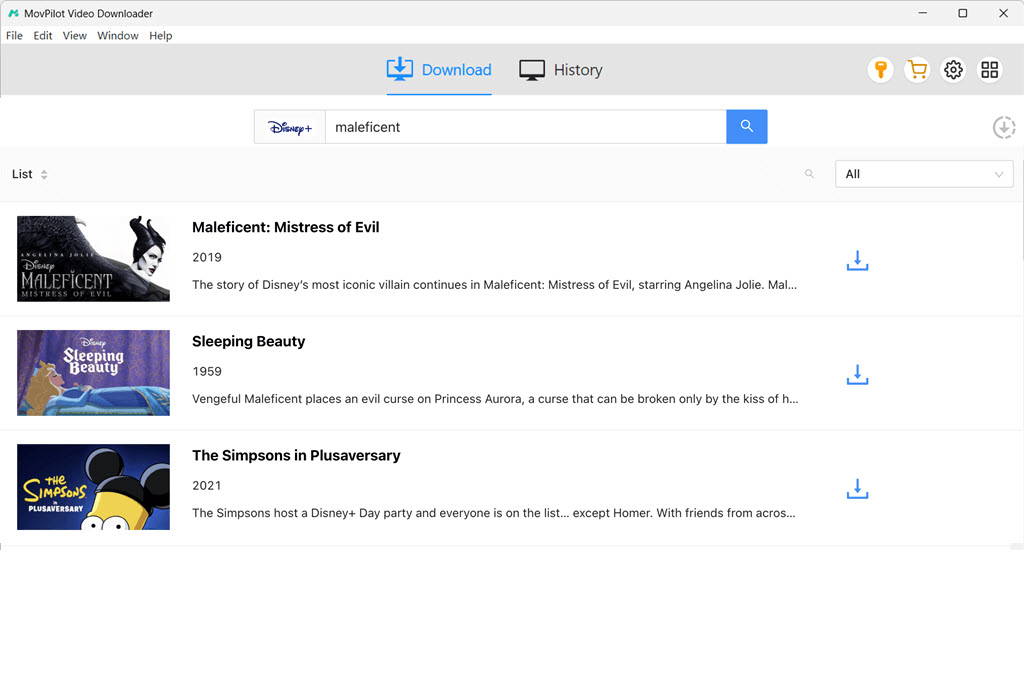
Step 2. Search for Marvel Movies
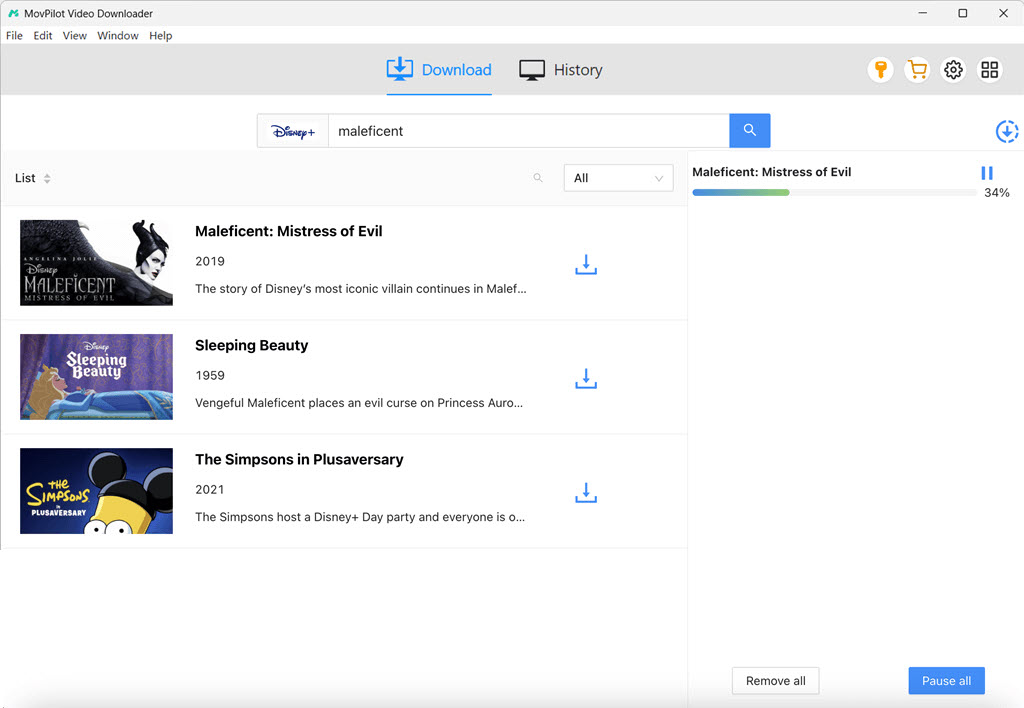
When you land on the interface of the downloader, please enter Marvel movie-related keywords to search for the results you need. They will be the same as the ones on the official platform.
Step 3. Configure Video Parameters
Before proceeding with the video download, you can click on the Setting button to further personalize output parameters in advance. Please choose the Format, Video Codec, Audio as well as Subtitle Languages in your preferences.
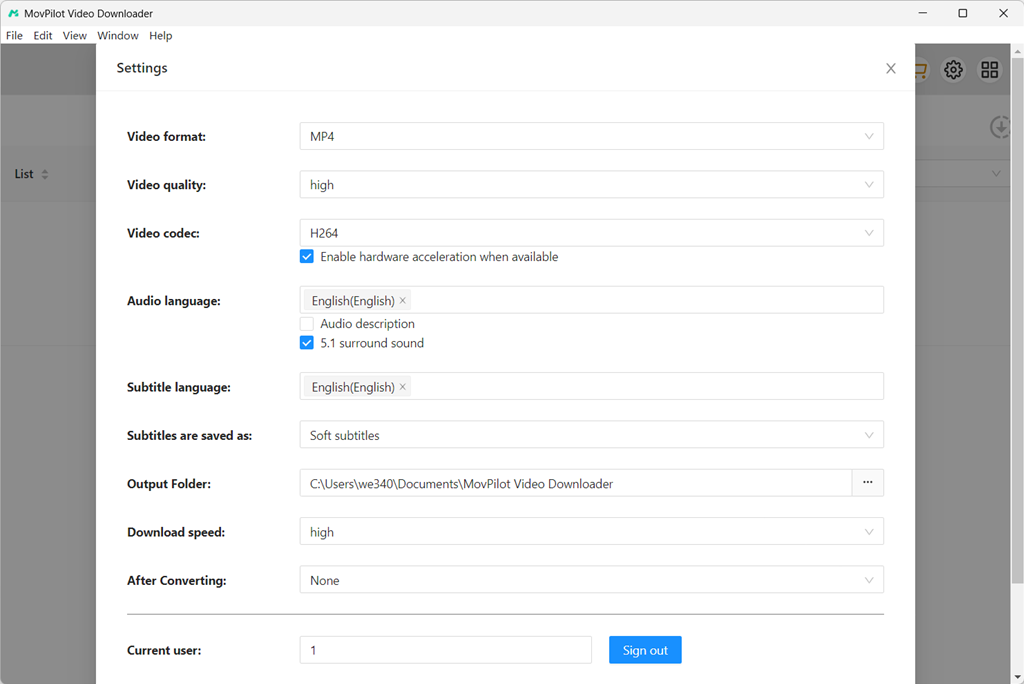
Step 4. Download Marvel Movies on Computers
Eventually, please return back to the video results and tap the Download button behind the Marvel movie you’d like to download. Once complete, you can access it offline and enjoy streaming with any installed media player on your device without restrictions!
Which Method Should You Choose?
To help you make a quick decision, here is a simple comparison between the official Disney+ download feature and MovPilot All-in-One Video Downloader:
| Feature | Official Disney+ App | MovPilot All-in-One Downloader |
|---|---|---|
| Output Format | Encrypted cache files | MP4/MKV/MOV |
| Supported Devices | iOS, Android, Fire tablet | Windows PC, Mac, Laptops |
| Video Quality | Up to 1080P (depends on device) | Up to Full HD 1080P |
| Expiration | Expires if offline for 30 days | Permanent offline playback |
| Transferable | No | Yes (Transfer to USB, TV, any player) |
FAQs About Downloading Marvel Movies
Q1: Can I download Marvel movies to MP4?
A: The official Disney+ app does not allow you to download movies as MP4 files; it only saves them as encrypted cache files within the app. To download movies to plain MP4 or MKV formats, you will need a professional tool like MovPilot All-in-One Video Downloader, which lets you play the movies on any device.
Q2: Are all Marvel movies available on Disney Plus?
A: Most of the MCU movies are available on Disney+. However, due to licensing agreements, some titles, like certain Spider-Man movies or The Incredible Hulk, might be scattered across other streaming platforms like Amazon Prime or Starz. Fortunately, an all-in-one tool like MovPilot supports multiple platforms, making it easy to grab whatever you need.
Q3: Is it legal to download Marvel movies for offline viewing?
A: It is completely legal to use the official Disney+ app to download movies for offline viewing as part of your subscription. Using third-party tools like MovPilot is generally considered acceptable as long as the downloads are strictly for personal, non-commercial use. You should not share, distribute, or profit from downloaded copyrighted materials.
Final Words
To sum up, with the help of the Disney+ official application and the third-party MovPilot All-in-One Video Downloader, you can easily download and watch Marvel movies offline by simply tapping your fingers! Now, based on the devices you are using, select the convenient method to save your favorite Marvel movies to enjoy the playback offline with your friends!
MovPilot All-in-One Video Downloader
Download videos from streaming services to be played on any device without limits.