






"Hvordan kan jeg downloade The Last of Us-serien for at se den på min pc?" Hvis du nogensinde har spurgt om dette, er du ikke alene. Med The Last of Us sæson 3 officielt bekræftet og planlagt til premiere i 2027, er mange fans ivrige efter at gense de ikoniske øjeblikke fra sæson 1 og sæson 2. Ustabilt internet under rejser eller lange pendlerture kan dog ødelægge oplevelsen.
For at nyde Joels og Ellies rejse uden buffering eller udløbsgrænser, skal du vælge en pålidelig metode til Download af The Last of Us-serien er afgørende. I denne guide vil vi guide dig gennem 4 enkle metoder for at gemme dine yndlingsepisoder til HD offline-afspilning på enhver enhed når som helst. Lad os udforske!
Metode 1. Download The Last of Us-serien til MP4 1080P med MovPilot
Den første metode, der nok falder mig ind, er at downloade The Last of Us-serien via den officielle streamingapp. Men når du først har prøvet, støder du på en mur af begrænsninger. For eksempel udløber downloads inden for 48 timer efter start, og du kan ikke overføre filer fra appen.
For at undgå disse restriktioner, MovPilot All-in-One Video Downloader er din ultimative løsning. Dette professionelle værktøj kan omgå DRM-beskyttelse og give dig mulighed for at få Download af The Last of Us-serien i MP4/MKV-formater på op til 1080p opløsning fra store OTT-tjenester som HBO Max, Hulu og flere. Uanset om du vil se offline på pc eller overføre episoder til andre enheder for permanent reklamefri afspilning, er MovPilot, en af de bedste streaming video downloadere, har du dækket!
Nøglefunktioner i MovPilot All-in-One Video Downloader:
- Permanent og DRM-fri: Gem The Last of Us-episoder for evigt på enhver enhed uden DRM-begrænsninger.
- Flere streamingplatforme og websteder: Understøtter store OTT-tjenester som Amazon Prime, Netflix, Disney+, Hulu, HBO Max og over 1000 websteder.
- Output i biografkvalitet: Sørg for videokvalitet på op til Full HD 1080P med Dolby Digital 5.1 surround sound.
- Multi-sprog support: Behold de originale flersprogede lydspor og undertekster for en medrivende oplevelse.
- Hurtig Parti Downloads: Lever en 5 gange hurtigere hastighed, så du kan gemme hele The Last of Us sæson 1/2 i batch uden at vente.
Så hvordan downloader man The Last of Us permanent? MovPilot All-in-One Video Downloader gør det nemt, selv hvis du er nybegynder. Følg nu disse enkle trin for at komme i gang (download f.eks. fra HBO Max).
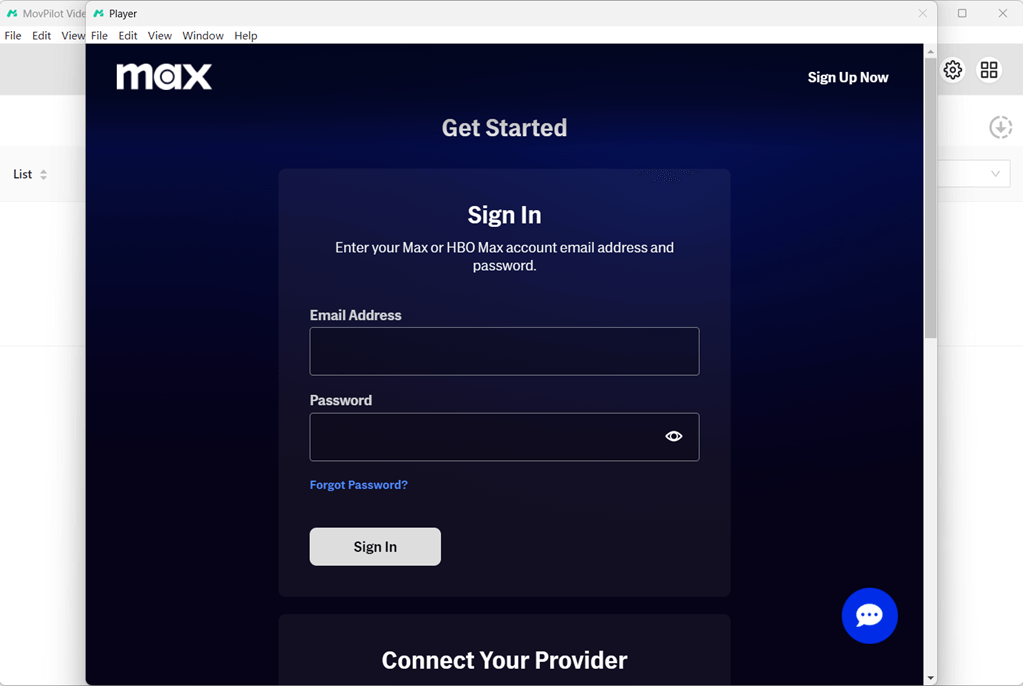
Trin 1: Åbn HBO Max på MovPilot All-in-One Video Downloader
Download og installer MovPilot All-in-One Video Downloader til din Windows- eller MacOS-computer. Start softwaren, og vælg HBO Max fra hovedgrænsefladen. Log ind på din HBO Max-konto.
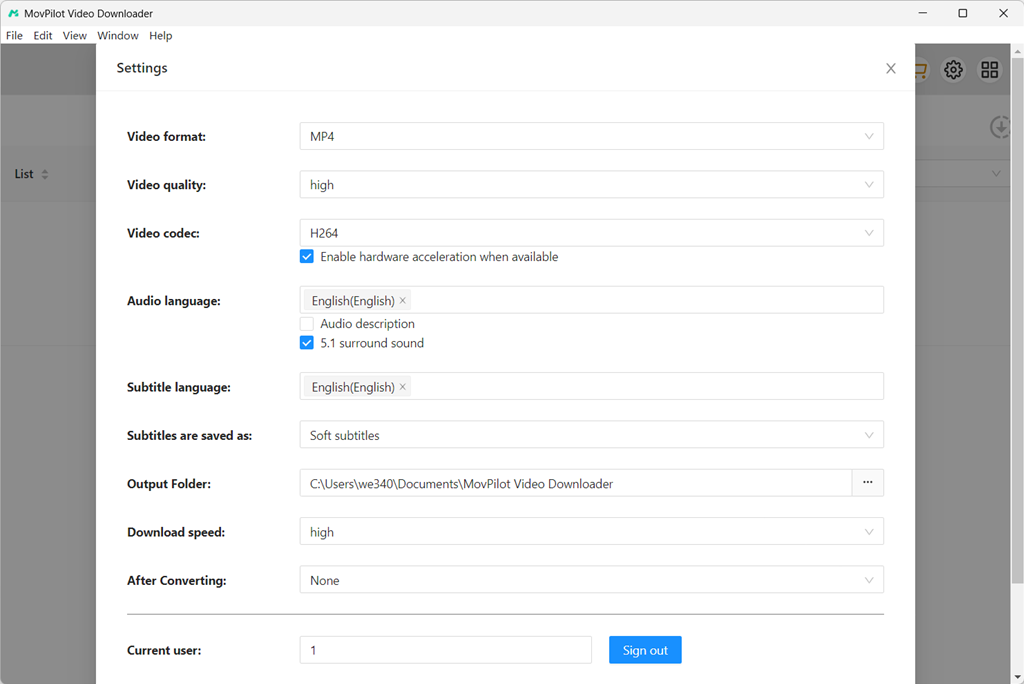
Trin 2: Juster outputindstillingerne
Klik på tandhjulsikonet øverst til højre for at åbne et indstillingsvindue. Herfra kan du justere indstillingerne efter dine behov, herunder outputmappe, outputformat, videocodec, undertekstsprog osv.
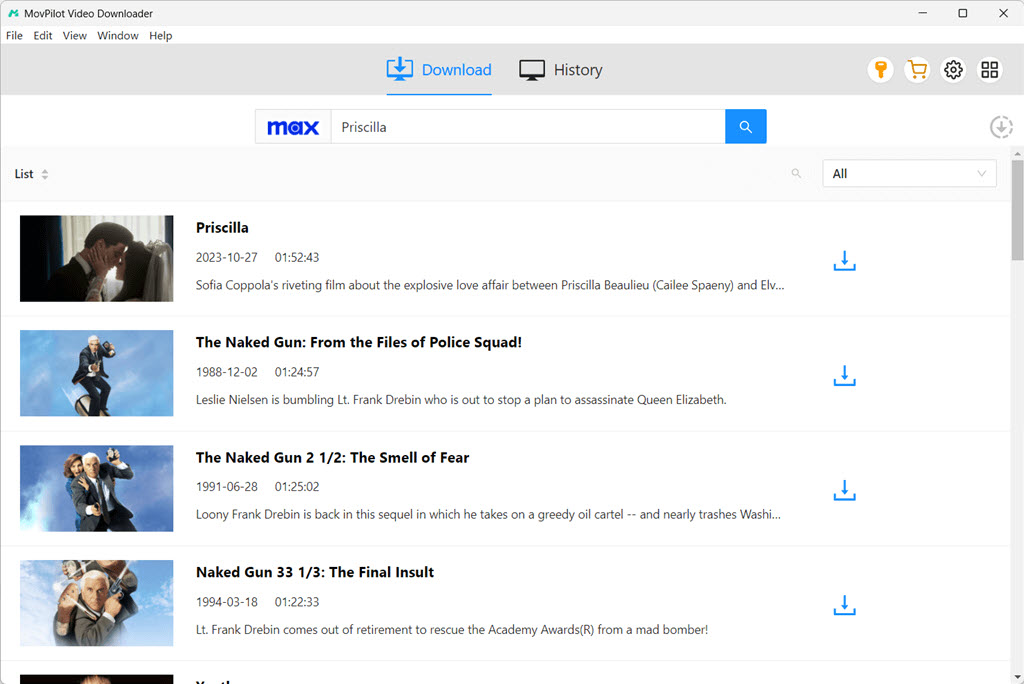
Trin 3: Tilføj videoer til download
Efter indstillingerne kan du søge efter "The Last of Us" i søgefeltet i den indbyggede browser. Den viser alle tilgængelige sæsoner.
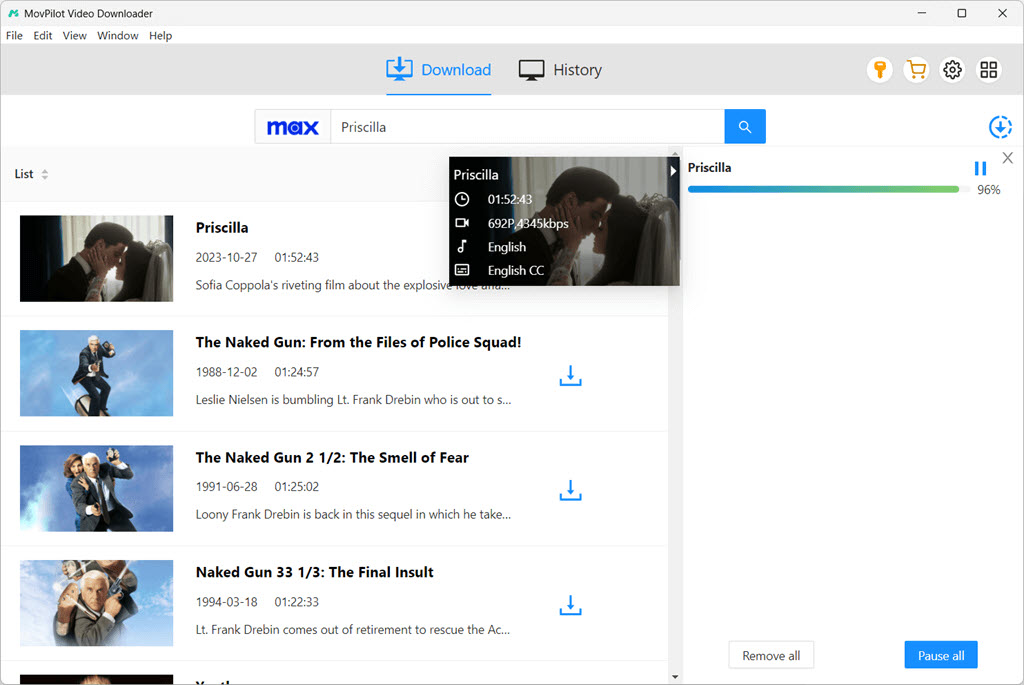
Trin 4: Klik på Download for at starte
Klik på downloadknappen ud for de titler, du vil downloade. Vælg de ønskede episoder i pop op-vinduet. Softwaren begynder automatisk at downloade videoer fra tv-serien The Last of Us. Du kan overvåge downloadingen via panelet til højre.
Trin 5: Nyd din Download The Last of Us-serien i 1080P
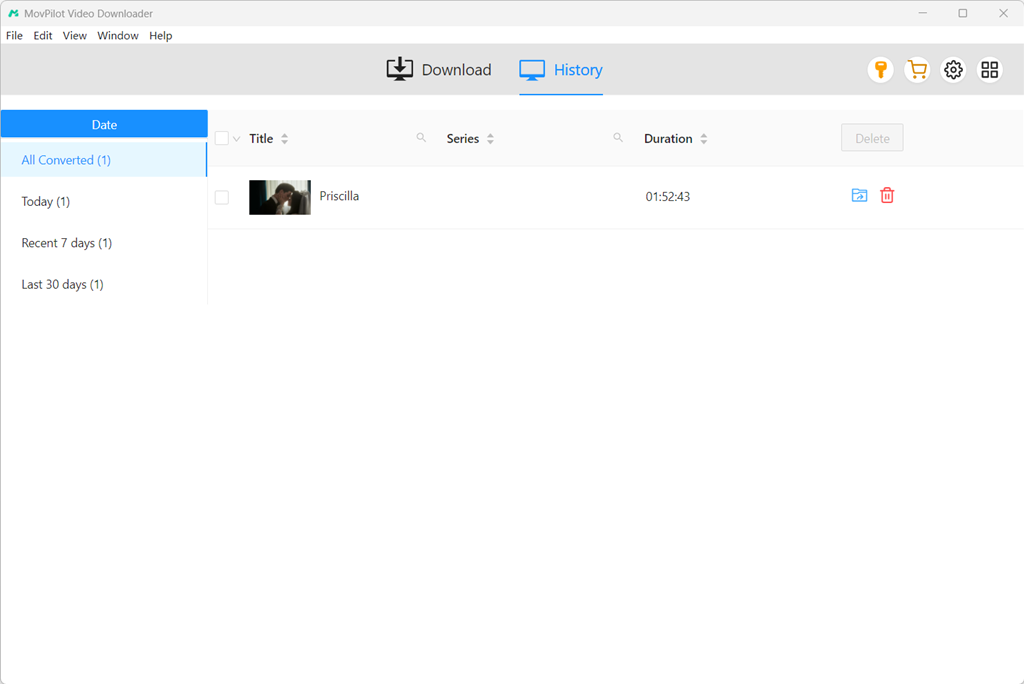
Når du er færdig, kan du tjekke den downloadede The Last of Us i afsnittet "Historik". Derefter kan du nyde disse videoer offline uden nogen begrænsninger.
Du kan også lide:
Sådan downloader du Game of Thrones sæson 1-8: Ultimativ guide
Metode 2. Optag The Last of Us-episoder med OBS Studio
Bruger OBS Studio At optage The Last of Us-episoder er en anden populær metode blandt brugerne. Dette giver dig mulighed for at optag videoer på HBO Max eller andre streamingtjenester og Gem dem som en lokal HD MP4-fil gratis på din computer.
Men da det involverer optagelse i realtid, kan det være ret tidskrævende. Derfor er denne metode mere velegnet til dem, der kun ønsker at gemme specifikke ikoniske scener eller har et par episoder af The Last of Us-serien at downloade. Her er de detaljerede trin:
Trin 1. Åbn OBS Studio på din computer.
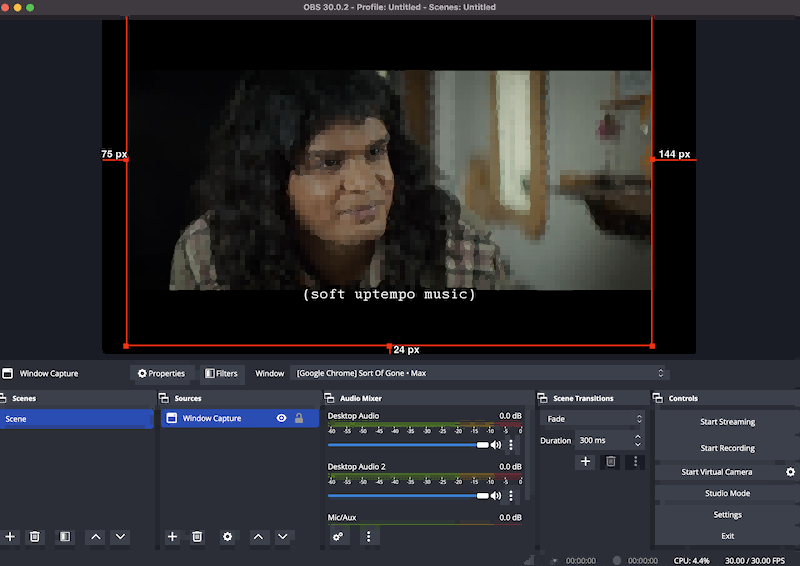
Trin 2. Klik på ikonet "+" nederst i OBS' hovedgrænseflade, og vælg "Display Capture" eller "Window Capture" for at optage browservinduet, der afspiller videoer fra tv-serien The Last of Us.
Trin 3. Gå til “Fil” > “Indstillinger” > “Output” > “Optagelse” for at tilpasse outputformatet og optagelsesindstillingerne baseret på dine behov.
Trin 4. Klik på knappen “Start optagelse”, og afspil videoen samtidig. OBS vil derefter begynde at downloade dine yndlingsepisoder af The Last of Us til din pc gratis.
Tip:
For en problemfri løsning til at gemme downloads af The Last of Us-serien i 1080P er MovPilot All-in-One Video Downloader en bedre mulighed. Den understøtter ikke kun batch-downloads, men har også 5 gange hurtigere hastigheder, hvilket sparer dig værdifuld tid.
Metode 3. Download The Last of Us TV-serien gratis via et onlineværktøj
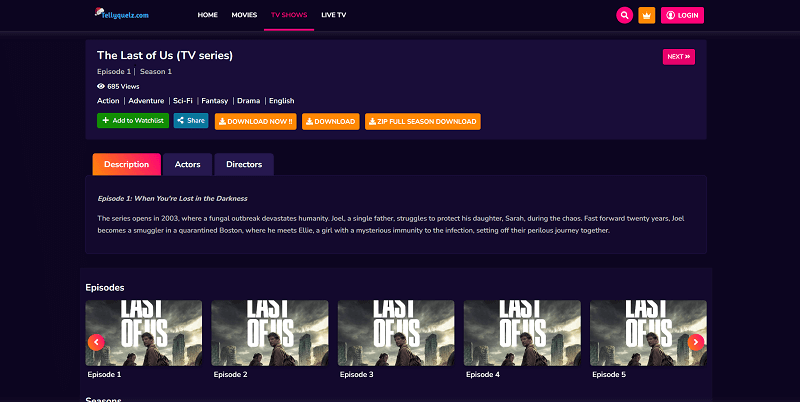
Hvis du har brug for en hurtig måde at gemme The Last of Us-episoder på til offline-visning uden software, så kan gratis online videosider være din foretrukne løsning. For eksempel, Tellyquelz.com giver direkte visning og links, der lader dig downloade The Last of Us sæson 1 og 2 online som MP4-filer. Nedenfor er de detaljerede trin:
Note:
Selvom denne metode lader dig downloade The Last of Us online gratis, er den langt fra perfekt. Dette websted har et overdreven antal pop op-reklamer, ødelagte links og dårlig opløsning. Det understøtter også kun MP4. Download videoer i MKV Med en høj kvalitet og pålidelig oplevelse anbefales det at overveje MovPilot All-in-One Video Downloader.
Trin 1. Besøg den officielle Tellyquelz.com i enhver browser.
Trin 2. Søg efter The Last of Us-serien, og åbn dens detaljeside.
Trin 3. Rul ned og vælg en sæson og den ønskede episode.
Trin 4. Klik på downloadknappen på siden for at begynde at gemme videoen fra tv-serien The Last of Us. Du kan også vælge "ZIP Full SEASON DOWNLOAD" for at få alle episoder på én gang.
Metode 4. Download The Last of Us sæson 1 og 2 offline på officielle streamingapps
Den mest ligefremme løsning er at bruge den officielle downloadfunktion, som streamingplatforme tilbyder. HBO Max er hjemsted for tv-serien The Last of Us, der dækker både sæson 1 og sæson 2. Derudover kan du også streame serien på andre større platforme som Hulu, Amazon Prime Video og YouTube.
Så længe du har et aktivt abonnement på en af disse tjenester, kan du bruge den officielle app til at downloade alle afsnit af The Last of Us og se dem offline. Nedenfor er trinnene (med Max-appen som eksempel):
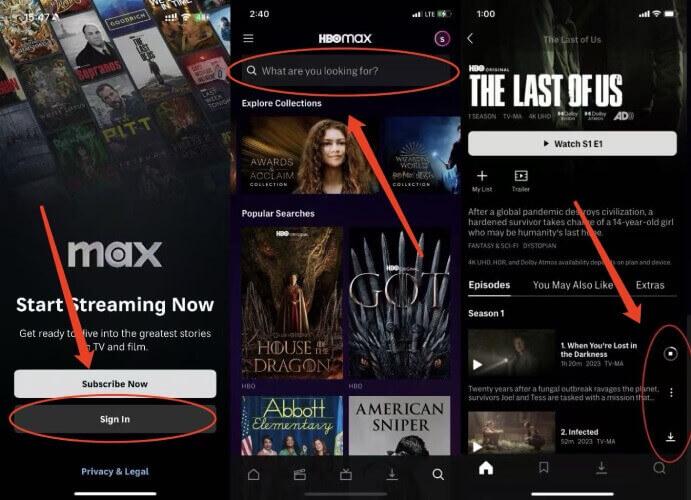
Trin 1. Åbn Max-appen på din iOS- eller Android-enhed.
Trin 2. Log ind på din abonnentkonto, og gå til siden med The Last of Us-oplysninger.
Trin 3. Tryk på ikonet ved siden af episodebeskrivelsen, og vent på, at downloadingen er færdig.
Trin 4. Når du er færdig, skal du gå til "Downloads" for at se The Last of Us offline.
NOTE:
Selvom officielle apps tilbyder offline visning, kan deres downloadbegrænsninger ikke ignoreres. Derfor leder mange brugere efter alternative måder at downloade Last of Us-serien på:
- Downloads er kan kun spilles i den officielle app og kan ikke eksporteres til MP4 eller andre almindelige formater.
- Downloads er normalt kun gyldig i 30 dage, og udløber 48 timer efter afspilningen er begyndt.
- Offline afspilning på computere understøttes normalt ikke.
- Downloadet indhold bliver automatisk ugyldigt, når dit abonnementet udløber eller annulleres.
Hvis du derfor vil gemme downloads permanent og se The Last of Us offline på en computer eller storskærm, skal du bruge et tredjepartsværktøj som MovPilot All-in-one Video Downloader.
Ofte stillede spørgsmål om tv-serien The Last of Us
1. Er det lovligt at downloade The Last of Us?
Download af The Last of Us til personlig offline-visning anses generelt for acceptabelt under "Fair Use" i mange regioner, uanset om det er via en officiel streamingplatform med et gyldigt abonnement eller et professionelt værktøj. Distribution eller deling af downloads til kommercielle formål er dog ulovligt og kan overtræde platformens servicevilkår.
2. Kan jeg beholde downloads af The Last of Us-serien permanent?
Ja, hvis du bruger værktøjer som MovPilot All-in-one Video Downloader, som kan fjerne DRM og downloade The Last of Us-serien i MP4- eller MKV-format.
3. Hvor kan man se tv-serien The Last of Us?
HBO Max er det primære streamingsted for The Last of Us sæson 1 og 2. Derudover kan du også streame serien via premium-tilføjelseskanaler på platforme som Hulu, Amazon Prime Video, YouTube, Sling TV og The Roku Channel, eller købe episoder på Apple TV og Fandango at Home.
4. Hvad kan man forvente af The Last of Us sæson 3?
The Last of Us sæson 3 vil sandsynligvis fortsætte med at tilpasse historien fra The Last of Us Part II, med fokus på Abbys perspektiv, mens hun navigerer i den samme tidslinje, som Ellie og Dina oplevede i sæson 2. Du kan forvente, at den nye sæson vil dykke dybere ned i Abbys rejse i Seattle og udforske den større konflikt, der involverer WLF og Seraphites, med en udvidelse af karakterdynamikken og uløste plottråde fra tidligere sæsoner.
Konklusion
Denne artikel guider dig gennem, hvordan du downloader The Last of Us-serien med 4 effektive metoder. Samlet set, MovPilot All-in-One Video Downloader skiller sig ud som den bedste mulighed. Det kan hjælpe dig med at downloade The Last of Us-episoder til MP4 i Full HD 1080P og gemme dem permanent. Uanset om du vil se serien igen på din computer eller overføre episoder til forskellige enheder til offline-visning, gør MovPilot processen enkel og pålidelig. Download MovPilot nu, og begynd at gemme The Last of Us offline!