






Smile 2 is finally here—the chilling sequel to the hit horror film that’ll keep you on edge! If you loved the first one, you won’t want to miss this. Want to get Smile 2 download for a long flight, a camping trip, or just to watch it offline with friends? No problem! Since it’s already streaming on platforms like Prime Video, Paramount+, and Apple TV, I’ll show you 3 easy ways to download Smile 2 full movie and enjoy it anytime, anywhere—even without Wi-Fi!
Διαβάστε επίσης:
Πώς να κατεβάσετε βίντεο Paramount Plus σε Mac χωρίς κόπο
Πώς να κατεβάσετε βίντεο Paramount Plus σε φορητό υπολογιστή [Πλήρης οδηγός]
Method 1. Download Smile 2 Movie on Paramount
Paramount+ is a top streaming platform with a huge library of movies and shows, and Smile 2 is now available on it! If you’re subscribed to Paramount+ with the SHOWTIME plan, you can easily download movies directly to your mobile devices for seamless offline access anywhere.
Here’s how to download Smile 2 full movie on your phone :
Βήμα 1. Open the Paramount+ app on your smartphone or tablet (iOS/Android) and log in to your account.
Βήμα 2. Search for Smile 2 and select the movie. Look for the download icon (a downward arrow) next to the title—this means it’s available for offline viewing.
Βήμα 3. Tap the download button to start saving Smile 2 to your device.
Βήμα 4. Wait for the download to finish—once complete, a checkmark will appear, and you can enjoy the movie anytime, even without an internet connection!
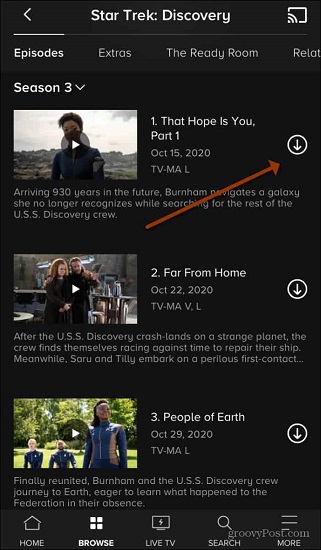
Σημείωμα: Only active Paramount+ subscribers can download content, and some downloads may expire after a certain period.
Method 2. Download Smile 2 with MovPilot All-in-One Video Downloader
If you’re looking to save Smile 2 directly to your laptop for offline viewing, you might find Paramount+’s official restrictions frustrating. Πρόγραμμα λήψης βίντεο MovPilot All-in-One is recommended to save Smile 2 offline. This powerful software bypasses platform restrictions, letting you download any Paramount+ content – including movies, shows and live sports – in high-quality MP4/MKV formats for permanent offline access.
With MovPilot, you can download Smile 2 once and watch it anywhere – on your laptop, TV, or mobile devices – without worrying about internet connections or expiration dates. The tool preserves original video quality while removing all playback restrictions, making it perfect for travel or areas with poor connectivity.
Περισσότερα εντυπωσιακά χαρακτηριστικά του MovPilot All-in-One Video Downloader:
- DRM-Free Downloads – Save videos on Netflix, Paramount+, Apple TV, Prime, Amazon and other streaming platforms as permanent MP4/MKV files without restrictions.
- Premium Quality – Download in Full HD 1080p with Dolby Digital 5.1 surround sound.
- Batch Processing – Download multiple episodes or movies with just one click.
- Multilingual Support – Choose from various audio tracks and subtitle options.
- Optimized Performance – Built-in browser and 5X faster download speeds for maximum efficiency.
Now let’s see how to use MovPilot to download Smile 2 from Paramount + on your computer step by step:
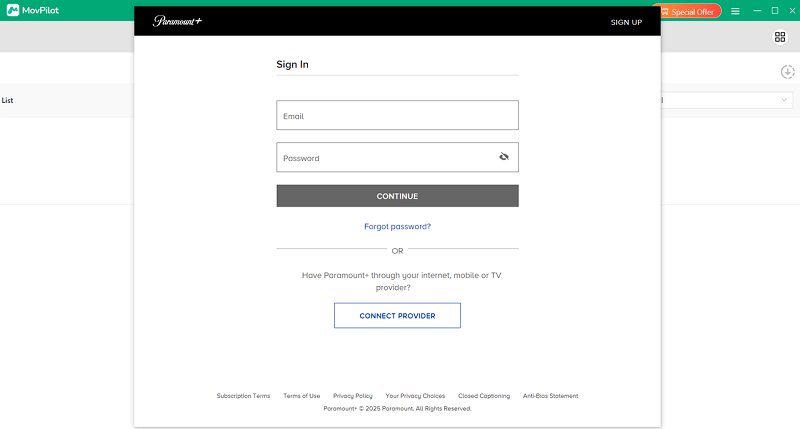
Βήμα 1. Begin by installing MovPilot on your Windows or Mac computer. Once installed, launch the application. On the main interface, you’ll see various streaming service options – select “Paramount+” to proceed. This will prompt you to log into your Paramount Plus account directly within the downloader. Make sure to use the same credentials you normally use for your Paramount+ subscription.
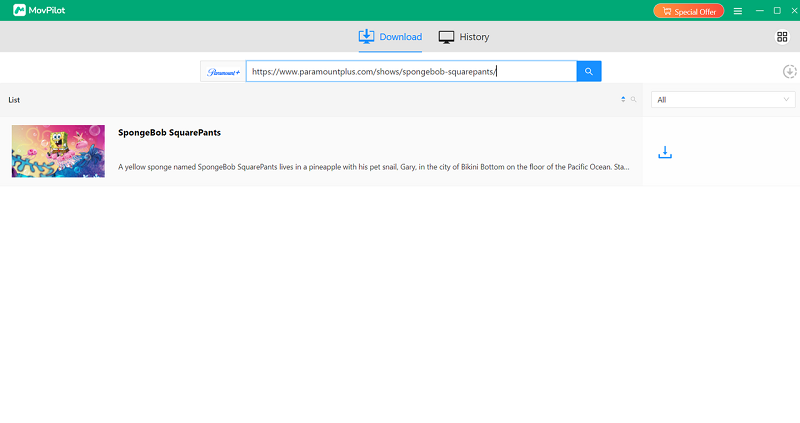
Βήμα 2. Use the built-in browser to search for Smile 2 – the downloader will display all relevant results instantly. Alternatively, if you’ve already found the movie on Paramount+’s website, you can simply copy and paste the video URL directly into MovPilot’s search bar.
Βήμα 3. Click on the gear-shaped “Settings” icon located in the upper right corner of the interface. Now you customize video format, quality, codec or audio language.
Βήμα 4. Click the prominent “Download” button to begin the process. MovPilot will work at accelerated speeds (up to 5x faster than normal) to download your movie. Once completed, navigate to the “History” tab where all your successful downloads are cataloged. Click the folder icon next to Smile 2 to instantly access the movie file on your local storage.
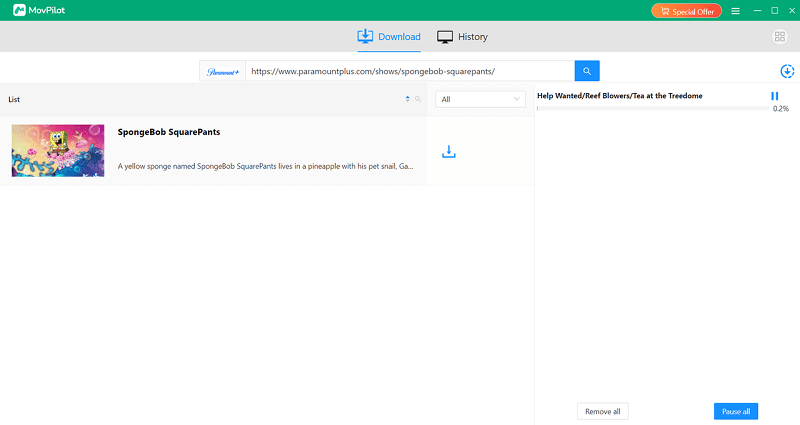
This comprehensive method ensures you get a perfect, high-quality copy of Smile 2 for all your offline viewing needs, whether you’re traveling, commuting, or simply prefer to have permanent access to your favorite movies.
Διαβάστε επίσης:
How to Get Venom: The Last Dance Download [Legal & Easy]
3 Best Ways to Download Alien: Romulus [Complete Guide]
Method 3. Download Rented Smile 2 on Amazon Prime Video Official App
If you don’t want a subscription but still want to watch Smile 2, Amazon Prime Video’s rental service is a great option. You can rent the movie at a lower cost than buying it outright and even download it for offline viewing on the official app.
Σημείωμα: Rented movies on Amazon Prime Video will expire 30 days after purchase, even if you’ve already downloaded them in the app. If you want to keep them permanently, you’ll need to use a tool like MovPilot All-in-One Video Downloader to save them as MP4 or other common video formats.
Βήμα 1. Download the Amazon Prime Video app on your smartphone, tablet, or supported streaming device and log in to your account.
Βήμα 2. Search for Smile 2 in the app and select the rental option (typically 3.99−3.99−5.99 for HD). Then complete the payment.
Βήμα 3. After renting, locate Smile 2 in your library and then click the download button.
FAQs About Smile 2 Download
Can I Keep the Rented Smile 2 on Amazon Prime Forever?
No, rented movies on Amazon Prime Video are not available permanently. When you rent Smile 2, you have 30 days to start watching it, and once you begin playback, you only have 48 hours to finish it. After the rental period expires, the movie will no longer be accessible unless you rent or purchase it again.
Additionally, while you can continue watching an already-started rental past the expiration (as long as you don’t exit playback), you cannot extend or download it for permanent offline viewing.
Where to Steam Smile 2 Free Online?
While Smile 2 is officially available on platforms like Paramount+, Prime Video, and Apple TV, some users search for free alternatives. If you’re looking to watch Smile 2 full movie online, be cautious of unauthorized sites like MP4Moviez, which may offer pirated downloads.
Σύναψη
In summary, you can download Smile 2 through three ways: the official Paramount+ app for temporary offline viewing (subscription required), downloading rented Amazon Prime Video for 48-hour access (pay-per-view), or using MovPilot Downloader for permanent DRM-free copies (recommended option).
While all are valid, Πρόγραμμα λήψης βίντεο MovPilot All-in-One stands out as the best solution since it allows unlimited offline playback in high quality without expiration dates, perfect for travelers or those wanting to build a permanent movie collection.