






Paramount Plus เป็นหนึ่งในแพลตฟอร์มสตรีมมิ่งวิดีโอที่ได้รับความนิยมมากที่สุด โดยมีภาพยนตร์และรายการทีวีที่กำลังได้รับความนิยมมากมายในความละเอียดสูงให้ผู้ใช้ได้เพลิดเพลินทางออนไลน์ อย่างไรก็ตาม เพื่อหลีกเลี่ยงข้อผิดพลาดในการสตรีมที่เกิดจากการเชื่อมต่อเครือข่ายที่ไม่เสถียร หรือเพื่อข้ามข้อจำกัดทางภูมิภาคในการเล่นวิดีโอในต่างประเทศ คุณอาจต้องการบันทึกวิดีโอ Paramount Plus เพื่อรับชมแบบออฟไลน์โดยไม่มีข้อจำกัดใดๆ ดังนั้น คู่มือนี้จะเน้นไปที่วิธีการดาวน์โหลดวิดีโอ Paramount Plus บนแล็ปท็อปเป็นหลัก หากคุณต้องการความช่วยเหลือเพิ่มเติม โปรดอ่านต่อ!
อ่านที่เกี่ยวข้อง:
ฉันสามารถดาวน์โหลดวิดีโอจาก Paramount Plus ลงพีซีได้โดยตรงหรือไม่?
น่าเสียดายที่ Paramount Plus ไม่มีฟีเจอร์ดาวน์โหลดในตัวสำหรับแล็ปท็อป สาเหตุหลักเป็นเพราะ Paramount Plus ใช้ระบบ DRM ที่เข้มงวดกว่าบนระบบ PC และ Mac ซึ่งไฟล์ที่ดาวน์โหลดมานั้นเข้าถึง คัดลอก หรือแจกจ่ายต่อได้ง่ายกว่า เพื่อลดความเสี่ยงด้านลิขสิทธิ์ การดาวน์โหลดแบบออฟไลน์จึงจำกัดเฉพาะอุปกรณ์พกพาเท่านั้น
ปัจจุบัน ฟีเจอร์การดาวน์โหลดใช้งานได้เฉพาะผู้สมัครใช้แพ็กเกจ Paramount Plus SHOWTIME ที่ใช้แอปพลิเคชันบนมือถือบนอุปกรณ์ที่รองรับเท่านั้น ได้แก่:
- iPhone และ iPad ที่ใช้ iOS 15 หรือเวอร์ชันที่ใหม่กว่า
- โทรศัพท์และแท็บเล็ต Android ที่ใช้ระบบปฏิบัติการ Android 5.0 ขึ้นไป
แม้แต่บนมือถือ การดาวน์โหลดอย่างเป็นทางการก็ยังมีข้อจำกัดที่ชัดเจน วิดีโอที่ดาวน์โหลดมาสามารถดูได้เพียงเท่านี้ เนื้อหาที่เล่นภายในแอป Paramount Plus จะมีวันหมดอายุ และไม่สามารถถ่ายโอนไปยังอุปกรณ์อื่นหรือหน่วยความจำภายนอกได้นอกจากนี้ ยังไม่มีตัวเลือกในการดาวน์โหลดวิดีโอในรูปแบบทั่วไป เช่น MP4
ดังนั้น หากคุณต้องการดาวน์โหลดวิดีโอจาก Paramount Plus ลงในแล็ปท็อปเพื่อรับชมแบบออฟไลน์ได้อย่างสะดวก คุณจำเป็นต้องใช้โปรแกรมดาวน์โหลด Paramount Plus จากผู้พัฒนาภายนอก ในส่วนต่อไป เราจะแนะนำโปรแกรมที่น่าเชื่อถือที่จะช่วยให้คุณทำเช่นนั้นได้
วิธีดาวน์โหลดวิดีโอจาก Paramount Plus ลงแล็ปท็อปเพื่อเล่นแบบออฟไลน์ได้ตลอดไป
เนื่องจาก Paramount Plus ยังใช้ DRM (Digital Rights Management) เพื่อเข้ารหัสสื่อสตรีมมิ่ง เพื่อปกป้องสื่อเหล่านี้จากการละเมิดลิขสิทธิ์และการใช้งานที่ผิดกฎหมาย หากต้องการดาวน์โหลดวิดีโอ Paramount Plus ลงในแล็ปท็อป คุณจะต้องกำจัด DRM ก่อน ดังนั้น เพื่อช่วยในเรื่องนี้ เราขอแนะนำ MovPilot Paramount Plus Video Downloader
MovPilot Paramount Plus โปรแกรมดาวน์โหลดวิดีโอ ได้ฝังฟังก์ชันการลบ DRM ที่มีประสิทธิภาพเพื่อตรวจจับและลบการป้องกันจากวิดีโอสตรีมมิ่ง Paramount Plus เพื่อช่วยให้คุณดาวน์โหลดภาพยนตร์และตอนรายการทีวีที่คุณชื่นชอบแบบออฟไลน์ได้ แม้จะไม่ต้องสมัครสมาชิกรายเดือน Paramount Plus ก็ตาม โดยฟังก์ชันนี้จะส่งออกวิดีโอที่ดาวน์โหลดมาในรูปแบบกระแสหลัก เช่น MP4 ด้วยความละเอียดที่ไม่บีบอัดและคำบรรยายต้นฉบับ รวมถึงแทร็กเสียงที่เก็บรักษาไว้
หลังจากดูวิดีโอ Paramount Plus ที่บันทึกไว้ในเครื่องแล้ว คุณก็สามารถถ่ายโอนและเก็บวิดีโอเหล่านั้นข้ามอุปกรณ์ และเพลิดเพลินกับการสตรีมแบบออฟไลน์ โดยไม่ต้องกังวลเกี่ยวกับข้อผิดพลาดในการสตรีมหรือเนื้อหาหมดอายุ!
จุดเด่นของ MovPilot Paramount Plus Video Downloader
- เว็บเบราว์เซอร์ฝังตัวเพื่อค้นหาภาพยนตร์และซีรี่ส์ทีวี Paramount Plus ที่คุณชื่นชอบเพื่อดาวน์โหลดแบบออฟไลน์โดยตรง
- รูปแบบกระแสหลักและความละเอียดวิดีโอที่กำหนดเอง (ดีที่สุดที่ HD 1080p) เพื่อส่งออกวิดีโอดาวน์โหลดตามที่คุณต้องการได้อย่างยืดหยุ่น
- รักษาเอฟเฟกต์เสียงรอบทิศทาง Dolby 5.1 ดั้งเดิมไว้เพื่อให้คุณได้สัมผัสประสบการณ์การชมภาพยนตร์เหมือนอยู่ในโรงภาพยนตร์ที่บ้าน
- การเก็บรักษาแทร็กเสียงและคำบรรยายแบบเต็มรูปแบบในหลายภาษาเพื่อให้ผู้ฟังทั่วโลกเพลิดเพลินกับประสบการณ์การสตรีมมิ่งแบบออฟไลน์
- เทคโนโลยีการเร่งความเร็วถูกนำมาใช้เพื่อแก้ไขปัญหาการดาวน์โหลดวิดีโอ Paramount Plus แบบเป็นชุดด้วยความเร็วที่เร็วขึ้น 5 เท่าเพื่อเพิ่มประสิทธิภาพให้สูงขึ้น
ด้วยการออกแบบอินเทอร์เฟซที่ใช้งานง่าย MovPilot Paramount Plus Video Downloader ยังรับประกันการทำงานที่เรียบง่ายที่สุด เพื่อช่วยดาวน์โหลดวิดีโอ Paramount Plus ลงในแล็ปท็อปได้ด้วยการแตะเท่านั้น ต่อไปนี้ ให้ทำความเข้าใจกับคำแนะนำสั้นๆ เพื่อดูว่าซอฟต์แวร์ทำงานอย่างไรเพื่อช่วย:
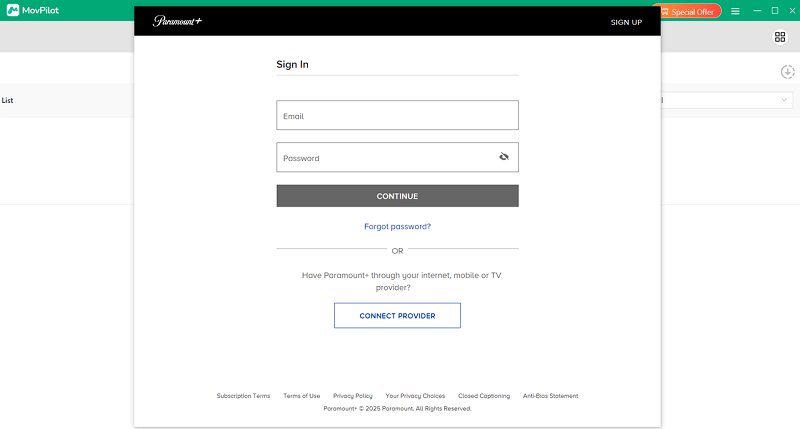
ขั้นตอนที่ 1. หลังจากติดตั้งซอฟต์แวร์แล้ว ให้เปิด MovPilot Paramount Plus Video Downloader บนแล็ปท็อปของคุณ เลือกแพลตฟอร์ม Paramount Plus จากอินเทอร์เฟซหลักและทำตามคำแนะนำเพื่อเข้าสู่ระบบแพลตฟอร์มผ่านบัญชีของคุณ
ขั้นตอนที่ 2. เมื่อเข้าถึงตัวดาวน์โหลดแล้วให้พิมพ์คำหลักโดยตรงหรือป้อน URL เพื่อเข้าถึงภาพยนตร์หรือซีรี่ส์ทีวีที่คุณต้องการดาวน์โหลด
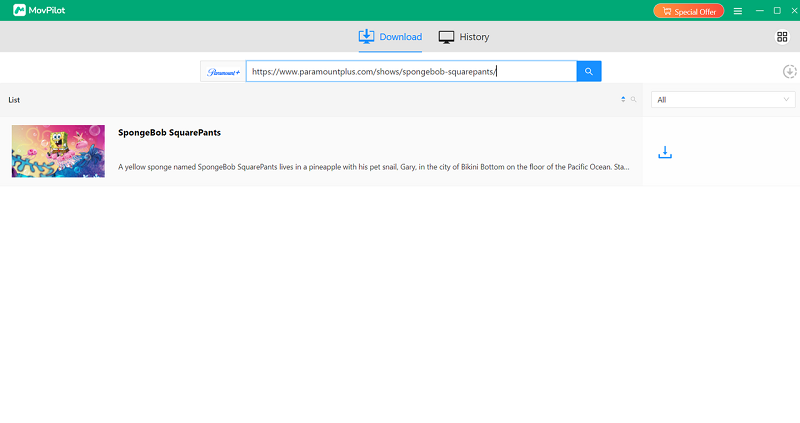
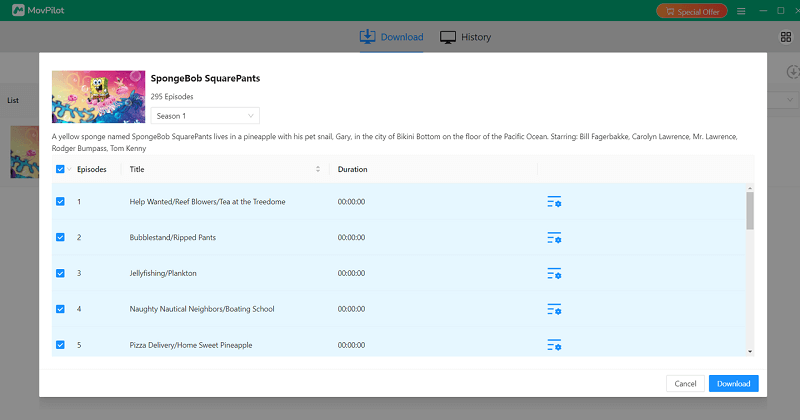
ขั้นตอนที่ 3 จากผลการค้นหาวิดีโอ ให้หาภาพยนตร์หรือซีรีส์ที่คุณต้องการบันทึกแบบออฟไลน์ หากต้องการดาวน์โหลดรายการทีวี ให้คลิกที่ไอคอนดาวน์โหลด จากนั้นหน้าต่างจะปรากฏขึ้นเพื่อให้คุณเลือกตอนที่ต้องการบันทึกตามความต้องการของคุณ
(ทางเลือก) ขั้นตอนที่ 4 หากคุณต้องการปรับแต่งการตั้งค่าการดาวน์โหลด เพียงแตะไอคอน “การตั้งค่า” ที่มุมขวาบนเพื่อเปิดหน้าต่างการตั้งค่า ที่นี่ คุณสามารถปรับเปลี่ยนรูปแบบวิดีโอ โคเดก และภาษาต่างๆ ได้ตามต้องการ
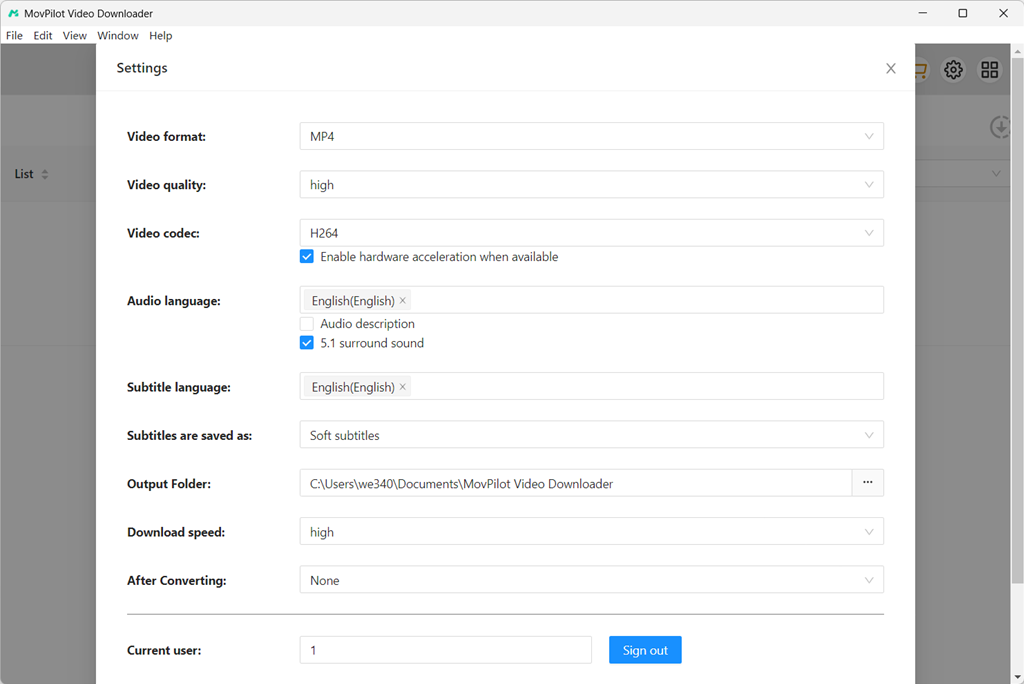
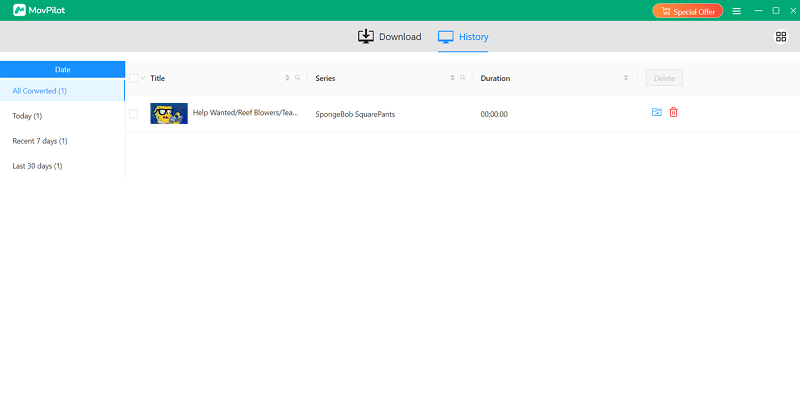
ขั้นตอนที่ 5 สุดท้าย เพียงแตะที่ไอคอน "ดาวน์โหลด" แล้ว MovPilot Paramount Plus Video Downloader จะดาวน์โหลดวิดีโอ Paramount Plus ลงในแล็ปท็อปทันที รอสักครู่แล้วคุณจะสามารถเข้าถึงวิดีโอที่ดาวน์โหลดมาได้ เพลิดเพลินกับการสตรีมมิ่งแบบออฟไลน์ ราบรื่น!
เคล็ดลับพิเศษ: บันทึกวิดีโอ Paramount Plus เพื่อบันทึกแบบออฟไลน์บนแล็ปท็อป
แม้ว่าคุณจะใช้โปรแกรมดาวน์โหลดวิดีโอเพื่อดาวน์โหลดวิดีโอ Paramount Plus ลงในแล็ปท็อป แต่คุณยังสามารถลองใช้เครื่องบันทึกเพื่อแยกส่วนที่คุณชื่นชอบจากภาพยนตร์หรือตอนรายการทีวี Paramount Plus เพื่อเก็บไว้เป็นคอลเลกชันส่วนตัวแบบออฟไลน์ได้ สำหรับจุดประสงค์ดังกล่าว FonePaw Screen Recorder สามารถให้ความช่วยเหลือที่เชื่อถือได้แก่คุณได้
เครื่องบันทึกหน้าจอ FonePaw มีฟังก์ชันการบันทึกหน้าจอที่ทรงพลังซึ่งช่วยหลีกเลี่ยงข้อผิดพลาดของหน้าจอดำและช่วยให้คุณบันทึกวิดีโอ Paramount Plus เพื่อส่งออกเป็นไฟล์ในเครื่องแบบออฟไลน์ได้สำเร็จ ซอฟต์แวร์นี้มีคุณสมบัติการบันทึกอัจฉริยะ เช่น โหมดการบันทึกหน้าจอล็อค ฟังก์ชันการบันทึกตามกำหนดเวลา และอื่นๆ เพื่อประหยัดความพยายามในการประมวลผลการบันทึกหน้าจอของคุณ หากต้องการบันทึกวิดีโอ Paramount Plus บนแล็ปท็อป คุณเพียงแค่ทำตามขั้นตอนง่ายๆ ต่อไปนี้:
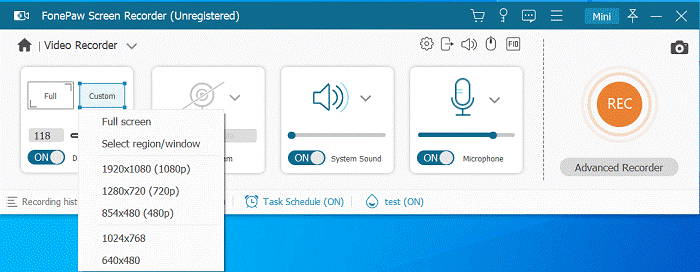
ขั้นตอนที่ 1. เปิด FonePaw Screen Recorder บนแล็ปท็อปและเลือก “Video Recorder”
ขั้นตอนที่ 2. ปรับแต่งการตั้งค่าการบันทึก เช่น พื้นที่การบันทึกและระดับเสียงของระบบ ปิดไมโครโฟนเพื่อหลีกเลี่ยงเสียงรบกวน
ขั้นตอนที่ 3 ตอนนี้เล่นวิดีโอ Paramount Plus และแตะ REC เพื่อเริ่มบันทึกทันที
ขั้นตอนที่ 4 เมื่อการบันทึกเสร็จสิ้น ให้แตะ “หยุด” แล้วคุณสามารถบันทึกวิดีโอ Paramount Plus ที่บันทึกไว้แบบออฟไลน์ได้ทันที!
บันทึก:
อย่างไรก็ตาม การบันทึกวิดีโอ Paramount Plus ที่ยาวนานอาจใช้เวลานาน และคุณภาพการบันทึกยังคงถูกบีบอัดเมื่อเทียบกับการใช้โปรแกรมดาวน์โหลด ดังนั้น หากคุณต้องการบันทึกวิดีโอ Paramount Plus แบบออฟไลน์โดยไม่สูญเสียคุณภาพและมีประสิทธิภาพมากขึ้น ขอแนะนำให้คุณลอง MovPilot Paramount Plus โปรแกรมดาวน์โหลดวิดีโอ แทน.
คำถามที่พบบ่อยเกี่ยวกับการดาวน์โหลด Paramount Plus บนพีซี
การดาวน์โหลดวิดีโอ Paramount Plus เป็นเรื่องถูกกฎหมายหรือไม่?
การดาวน์โหลดวิดีโอจาก Paramount Plus ผ่านแอปอย่างเป็นทางการนั้นถูกกฎหมาย ตราบใดที่ใช้เพื่อการรับชมส่วนตัวแบบออฟไลน์ และปฏิบัติตามข้อกำหนดการใช้งานของแพลตฟอร์ม อย่างไรก็ตาม ไฟล์ที่ดาวน์โหลดจะถูกเข้ารหัส จำกัดเฉพาะภายในแอป และไม่สามารถแชร์หรือเก็บไว้ถาวรได้
การใช้โปรแกรมดาวน์โหลดจากบุคคลที่สามจัดอยู่ในขอบเขตของกฎหมายที่ไม่ชัดเจน ในหลายภูมิภาค การดาวน์โหลดเนื้อหาที่คุณสามารถเข้าถึงได้เพื่อใช้ส่วนตัวนั้นโดยทั่วไปแล้วเป็นที่ยอมรับ แต่การแจกจ่าย ขาย หรือแบ่งปันวิดีโอ Paramount Plus ที่ดาวน์โหลดมานั้นผิดกฎหมายและละเมิดกฎหมายลิขสิทธิ์
Paramount Plus ใช้งานได้ดีที่สุดบนเบราว์เซอร์ใด?
Paramount Plus ทำงานได้ดีที่สุดบนเบราว์เซอร์รุ่นใหม่ที่รองรับการเล่น HTML5 และ DRM อย่างเต็มรูปแบบ โดยทั่วไป:
- กูเกิล โครม มอบประสิทธิภาพที่เสถียรที่สุดและความเข้ากันได้ที่กว้างที่สุดทั้งบน Windows และ macOS
- Microsoft Edge (เวอร์ชันที่ใช้ Chromium) มีประสิทธิภาพการทำงานคล้ายกับ Chrome และใช้งานได้ดีบน Windows
- ซาฟารี เป็นตัวเลือกที่ดีที่สุดสำหรับผู้ใช้ macOS เนื่องจากได้รับการปรับแต่งให้เหมาะสมกับระบบและการจัดการ DRM ของ Apple
เบราว์เซอร์ที่ล้าสมัยหรือเบราว์เซอร์ที่ปิดใช้งานส่วนประกอบ DRM อาจทำให้เกิดปัญหาในการเล่น การเข้าสู่ระบบผิดพลาด หรือฟังก์ชันบางอย่างหายไป เพื่อประสบการณ์การใช้งานที่ดีที่สุด โปรดอัปเดตเบราว์เซอร์ของคุณให้เป็นเวอร์ชันล่าสุดอยู่เสมอ
บทสรุป
แม้ว่า Paramount Plus จะไม่มีฟังก์ชันดาวน์โหลดโดยตรงสำหรับผู้ใช้คอมพิวเตอร์ตั้งโต๊ะ แต่คุณยังคงสามารถดาวน์โหลดวิดีโอจาก Paramount Plus ลงในแล็ปท็อปเพื่อรับชมการสตรีมได้อย่างราบรื่นแบบออฟไลน์ MovPilot Paramount Plus โปรแกรมดาวน์โหลดวิดีโอ นำเสนอเอาต์พุตคุณภาพสูง และประสิทธิภาพที่เสถียรและรวดเร็ว ช่วยให้คุณบันทึกวิดีโอจากแพลตฟอร์มได้ ช่วยให้คุณเพลิดเพลินกับการเล่นแบบออฟไลน์ได้ทุกที่ ตอนนี้ ติดตั้งซอฟต์แวร์และเริ่มทดลองใช้งานฟรีเพื่อดาวน์โหลดวิดีโอ Paramount Plus ลงในแล็ปท็อปได้ทันที!